Age of AI Toolsv2.beta
For YouJobsUse Cases
Media-HubNEW

Join Our Community

Get the earliest access to hand-picked content weekly for free.

Spam-free guaranteed! Only insights.
Join Our Community

Get the earliest access to hand-picked content weekly for free.

Spam-free guaranteed! Only insights.

Trusted by Leading Review and Discovery Websites

Age of AI Tools on Product HuntApproved on SaaSHubAlternativeTo
AI Tools
  • For You!
  • Discover All AI Tools
  • Best AI Tools
  • Free AI Tools
  • Tools of the DayNEW
  • All Use Cases
  • All Jobs
Trend UseCases
  • AI Image Generators
  • AI Video Generators
  • AI Voice Generators
Trend Jobs
  • Graphic Designer
  • SEO Specialist
  • Email Marketing Specialist
Media Hub
  • Go to Media Hub
  • AI News
  • AI Tools Spotlights
Age of AI Tools
  • What's New
  • Story of Age of AI Tools
  • Cookies & Privacy
  • Terms & Conditions
  • Request Update
  • Bug Report
  • Contact Us
Submit & Advertise
  • Submit AI Tool
  • Promote Your Tool50% Off

Agent of AI Age

Looking to discover new AI tools? Just ask our AI Agent

Copyright © 2026 Age of AI Tools. All Rights Reserved.

Media HubTools SpotlightTalat AI Meeting Notes Review: Local-First Privacy
25 Mar 20265 min read

Talat AI Meeting Notes Review: Local-First Privacy

Talat AI Meeting Notes Review: Local-First Privacy

🎯 Quick Impact Summary

Talat represents a significant shift in how AI meeting notes operate by prioritizing privacy through local-first architecture. Unlike cloud-dependent competitors, Talat keeps all your meeting data on your machine, eliminating cloud storage concerns while remaining completely subscription-free. This approach makes it particularly valuable for organizations handling sensitive information or those seeking maximum control over their AI productivity tools.

What's New in Talat

Talat introduces a fundamentally different approach to AI meeting notes by eliminating the cloud entirely from the equation.

  • Local-first architecture: All meeting transcription and note generation happens directly on your device, with zero data sent to external servers
  • Subscription-free model: No recurring fees or premium tiers required to access full AI meeting note capabilities
  • Privacy-by-design: Your meeting content never leaves your machine, addressing the primary concern many organizations have with cloud-based note tools
  • Granola alternative: Delivers similar AI-powered meeting intelligence without the cloud infrastructure that competitors rely on
  • Offline functionality: Works without internet connection once installed, ensuring uninterrupted access during meetings
  • Zero data collection: No tracking, no analytics collection, no third-party data sharing

Technical Specifications

Talat's technical foundation emphasizes on-device processing and minimal external dependencies.

  • Processing location: 100% local device processing with no cloud API calls for core functionality
  • Data storage: All meeting notes, transcripts, and AI-generated summaries stored locally on user's machine
  • Architecture: Lightweight on-device AI models optimized for consumer hardware without requiring GPU acceleration
  • Compatibility: Works across major operating systems with minimal system resource requirements
  • Update mechanism: Self-contained updates that maintain local-first principles without cloud synchronization

Official Benefits

  • Complete privacy: Meeting content remains entirely under your control with zero cloud exposure
  • No subscription costs: Full feature access without monthly or annual fees, reducing total cost of ownership
  • Instant processing: Local processing eliminates network latency, providing faster note generation than cloud alternatives
  • Offline reliability: Continues functioning without internet connectivity, ensuring productivity during network outages
  • Data sovereignty: Organizations maintain complete ownership and compliance control over sensitive meeting information

Real-World Translation

What Each Feature Actually Means:

  • Local-first architecture: When your legal team discusses confidential client matters, every word stays on your laptop. No data travels to Talat's servers, no cloud storage, no third-party access. A healthcare provider discussing patient cases can use Talat without HIPAA compliance concerns about cloud storage.
  • Subscription-free model: Your team gets unlimited meeting notes without budget approvals or recurring payments. A startup with 20 employees saves thousands annually compared to per-seat SaaS pricing from competitors.
  • Offline functionality: During a flight or in a location with poor connectivity, your team can still record and process meetings. The AI generates notes immediately without waiting for internet restoration.
  • Zero data collection: Unlike tools that analyze your meeting patterns for product improvements, Talat never sees your data. Your competitive strategies, financial discussions, and internal decisions remain completely private.
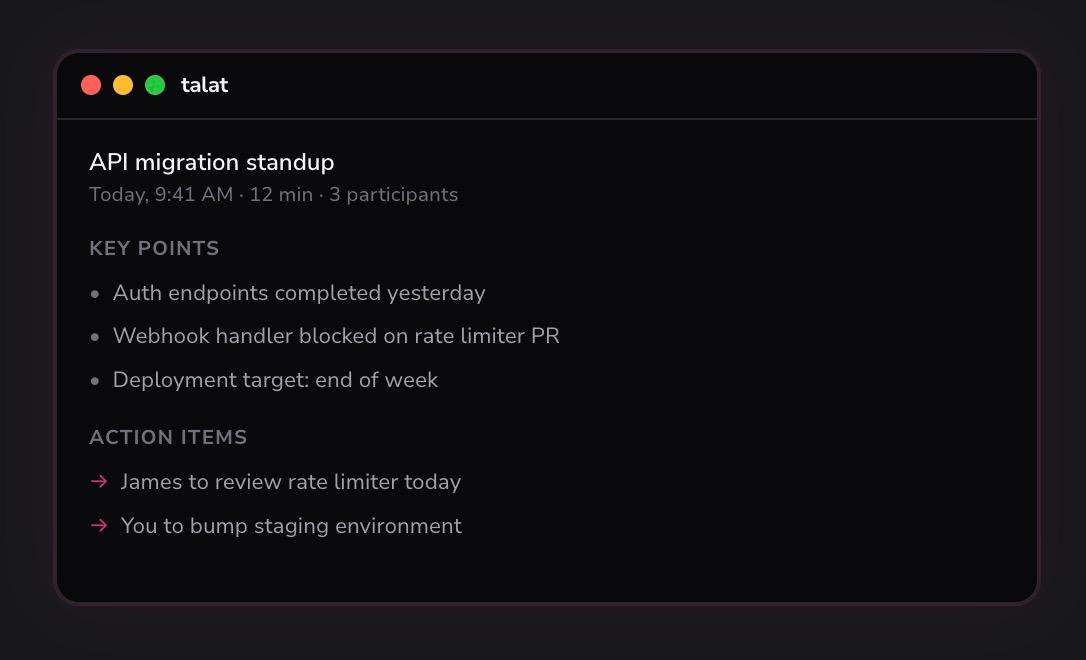
  • Granola-level intelligence: You get meeting summaries, action items, and key decision tracking without the privacy tradeoffs that cloud-based alternatives require.

Before vs After

Before

Teams using cloud-based meeting note tools like Granola face constant privacy concerns about where their meeting data lives. Organizations handling sensitive information must navigate complex data residency requirements and compliance frameworks. Every meeting transcript represents potential security exposure when stored on external servers.

After

With Talat, all meeting intelligence stays on your device with zero cloud exposure. Teams eliminate compliance complexity by maintaining complete data sovereignty. Organizations can confidently discuss sensitive topics knowing the AI processing never leaves their infrastructure.

📈 Expected Impact: Teams reduce privacy concerns by 100% while eliminating subscription costs entirely, making Talat the most cost-effective option for privacy-conscious organizations.

Job Relevance Analysis

AI Researcher

HIGH Impact
  • Use Case: AI researchers analyzing meeting discussions about experiments, methodologies, and findings can use Talat to generate structured notes without external data exposure, enabling secure collaboration on proprietary research
  • Key Benefit: Local processing means research data never touches third-party servers, maintaining research confidentiality and intellectual property protection during sensitive project discussions
  • Workflow Integration: Integrates seamlessly into research workflows where meeting notes feed directly into research documentation without cloud intermediaries
  • Skill Development: Researchers develop understanding of on-device AI processing and privacy-first architecture principles applicable to their own model development
  • Data Control: Complete ownership of meeting transcripts enables researchers to analyze their own discussion patterns and collaboration effectiveness without external surveillance
AI Researcher

Advance innovation with AI tools for academic research, data analysis, knowledge representation, decision-making, and AI-powered chatbots.

6,692 Tools
AI Researcher

Data Scientist

HIGH Impact
  • Use Case: Data scientists discussing model performance, dataset characteristics, and analysis results can document meetings securely without worrying about proprietary data exposure
  • Key Benefit: Local processing ensures sensitive data discussions (customer datasets, model architectures, performance metrics) remain completely private and under organizational control
  • Workflow Integration: Meeting notes automatically feed into project documentation and analysis workflows without requiring cloud-based intermediaries
  • Skill Development: Data scientists gain practical experience with privacy-preserving AI systems and on-device processing architectures relevant to their field
  • Compliance Advantage: Eliminates compliance documentation burden when discussing regulated datasets or sensitive analysis results
Data Scientist

Understand business insights via AI for analyzing, predicting, data mining, data visualization, and data warehousing.

4,480 Tools
Data Scientist

Language Translator

MEDIUM Impact
  • Use Case: Language translators working on confidential translation projects, client discussions, and multilingual meetings can generate notes without exposing client content to cloud services
  • Key Benefit: Client confidentiality remains protected when discussing translation projects, terminology decisions, and sensitive source materials during team meetings
  • Workflow Integration: Meeting notes support translation project management by documenting decisions about terminology, style guides, and client requirements locally
  • Skill Development: Translators develop awareness of privacy-first tools and local processing capabilities applicable to language technology and AI translation systems
  • Client Trust: Demonstrates commitment to data privacy when working with clients handling sensitive or proprietary content requiring translation
Language Translator

Discover curated AI tools with practical use cases for Language Translator. Evaluate capabilities & cost; to boost productivity. Choose smarter—see the tools.

2,809 Tools
Language Translator

Getting Started

How to Access

  • Download Talat: Visit the official Talat website and download the application for your operating system (Windows, macOS, or Linux)
  • Install locally: Run the installer and follow standard installation prompts to set up Talat on your machine
  • Launch the application: Open Talat and grant necessary microphone permissions for meeting recording
  • Start recording: Begin your next meeting and let Talat automatically transcribe and generate notes in real-time

Quick Start Guide

For Beginners:

  1. Open Talat and click "New Meeting" to start a recording session
  2. Allow microphone access when prompted and position your device to capture all participants
  3. Let Talat run during your entire meeting without any manual intervention
  4. After the meeting ends, review the automatically generated summary and action items

For Power Users:

  1. Configure custom note templates and formatting preferences in Talat's settings to match your organization's documentation standards
  2. Set up automatic categorization rules to organize notes by project, client, or meeting type for easier retrieval
  3. Export notes in multiple formats (Markdown, PDF, plain text) and integrate with your existing documentation systems
  4. Customize AI summarization parameters to emphasize specific discussion topics or decision types relevant to your workflow
  5. Create meeting templates with pre-defined sections for recurring meeting types to standardize documentation

Pro Tips

  • Optimize audio quality: Position microphones strategically to capture all participants clearly, improving transcription accuracy and note quality
  • Review immediately: Check generated notes within 24 hours while context is fresh to add missing details or clarify ambiguous points
  • Use consistent naming: Establish a naming convention for meetings (date, project, participants) to make notes easily searchable and organized
  • Export regularly: Back up important meeting notes to your preferred storage system to prevent accidental loss and maintain archival records

Getting Started

FAQ

Related Topics

Talat AI meeting noteslocal-first AI notesGranola alternativeAI meeting assistantprivacy-first note taking

Table of contents

What's New in TalatTechnical SpecificationsOfficial BenefitsReal-World TranslationJob Relevance AnalysisGetting StartedGetting StartedFAQ
Impact LevelMEDIUM
Update ReleasedMarch 24, 2026

Best for

Data ScientistAI ResearcherLanguage Translator

Related Use Cases

AI Travel ToolsAI Productivity ToolsAI Automation Tools

Related Articles

Claude Computer Control: AI Agent Review
Claude Code Auto Mode: AI Coding Without Disasters
AI2's Computer Use Agent: Open Source Automation
All AI Spotlights

Editor's Pick Articles

Google TV Gemini Features: AI Sports Updates & Visual Responses
GitAgent Review: Docker for AI Agents
Google Launches Stitch: AI-Native UI Design Platform
All Articles
Special offer for AI Owners – 50% OFF Promotional Plans

Join Our Community

Get the earliest access to hand-picked content weekly for free.

Spam-free guaranteed! Only insights.

Follow Us on Socials

Don't Miss AI Topics

ai art generatorai voice generatorai text generatorai avatar generatorai designai writing assistantai audio generatorai content generatorai dubbingai graphic designai banner generatorai in dropshipping

AI Spotlights

Unleashing Today's trailblazer, this week's game-changers, and this month's legends in AI. Dive in and discover tools that matter.

All AI Spotlights
Claude Computer Control: AI Agent Review

Claude Computer Control: AI Agent Review

Claude Code Auto Mode: AI Coding Without Disasters

Claude Code Auto Mode: AI Coding Without Disasters

AI2's Computer Use Agent: Open Source Automation

AI2's Computer Use Agent: Open Source Automation

Google TV Gemini Features: AI Sports Updates & Visual Responses

Google TV Gemini Features: AI Sports Updates & Visual Responses

OpenAI Teen Safety Tools: Developer Guide

OpenAI Teen Safety Tools: Developer Guide

GitAgent Review: Docker for AI Agents

GitAgent Review: Docker for AI Agents

Nvidia OpenClaw Strategy: Enterprise AI Framework

Nvidia OpenClaw Strategy: Enterprise AI Framework

Nemotron-Cascade 2: NVIDIA's 30B MoE Model

Nemotron-Cascade 2: NVIDIA's 30B MoE Model

Google Colab MCP Server: AI Agents Meet Cloud GPUs

Google Colab MCP Server: AI Agents Meet Cloud GPUs

Qianfan-OCR Review: Unified Document AI Model

Qianfan-OCR Review: Unified Document AI Model

Nvidia Data Factory: Physical AI Revolution

Nvidia Data Factory: Physical AI Revolution

OpenClaw Security Framework: Protecting AI Agents

OpenClaw Security Framework: Protecting AI Agents

NVIDIA DSX Air: AI Factory Simulation at Scale

NVIDIA DSX Air: AI Factory Simulation at Scale

NemoClaw Review: Nvidia's Secure AI Privacy Layer

NemoClaw Review: Nvidia's Secure AI Privacy Layer

Nvidia DLSS 5: AI-Powered Photorealism in Gaming

Nvidia DLSS 5: AI-Powered Photorealism in Gaming

OpenViking: Filesystem-Based Memory for AI Agents

OpenViking: Filesystem-Based Memory for AI Agents

Nyne AI Review: Human Context for Intelligent Agents

Nyne AI Review: Human Context for Intelligent Agents

Xbox Gaming Copilot AI Review: Voice Control Gaming

Xbox Gaming Copilot AI Review: Voice Control Gaming

Aletheia AI Agent Review: Research Breakthrough

Aletheia AI Agent Review: Research Breakthrough

You Might Like These Latest News

All AI News

Stay informed with the latest AI news, breakthroughs, trends, and updates shaping the future of artificial intelligence.

TinyLoRA: 13-Parameter Fine-Tuning Reaches 91.8% on Qwen2.5

Mar 25, 2026
TinyLoRA: 13-Parameter Fine-Tuning Reaches 91.8% on Qwen2.5

Databricks Acquires AI Security Startups

Mar 25, 2026
Databricks Acquires AI Security Startups

Judge Questions Pentagon's Move Against Anthropic

Mar 25, 2026
Judge Questions Pentagon's Move Against Anthropic

Air Street Capital Raises $232M Fund III

Mar 24, 2026
Air Street Capital Raises $232M Fund III

Apple WWDC 2026: AI Siri Upgrades Coming

Mar 24, 2026
Apple WWDC 2026: AI Siri Upgrades Coming

Nvidia CEO Claims AI Has Achieved AGI

Mar 24, 2026
Nvidia CEO Claims AI Has Achieved AGI

Cursor Reveals Coding Model Built on Moonshot AI's Kimi

Mar 23, 2026
Cursor Reveals Coding Model Built on Moonshot AI's Kimi

Microsoft Rolls Back Copilot AI Bloat on Windows

Mar 21, 2026
Microsoft Rolls Back Copilot AI Bloat on Windows

Trump Administration Targets State AI Laws

Mar 21, 2026
Trump Administration Targets State AI Laws
Tools of The Day

Tools of The Day

Discover the top AI tools handpicked daily by our editors to help you stay ahead with the latest and most innovative solutions.


10MAR
Adobe Illustrator
Adobe Illustrator
9MAR
Adobe Firefly
Adobe Firefly
8MAR
Adobe Sensei
Adobe Sensei
7MAR
Adobe Photoshop
Adobe Photoshop
6MAR
Adobe Firefly
Adobe Firefly
5MAR
Shap-E
Shap-E
4MAR
Point-E
Point-E

Explore AI Tools of The Day