Age of AI Toolsv2.beta
For YouJobsUse Cases
Media-HubNEW

Join Our Community

Get the earliest access to hand-picked content weekly for free.

Spam-free guaranteed! Only insights.
Join Our Community

Get the earliest access to hand-picked content weekly for free.

Spam-free guaranteed! Only insights.

Trusted by Leading Review and Discovery Websites

Age of AI Tools on Product HuntApproved on SaaSHubAlternativeTo
AI Tools
  • For You!
  • Discover All AI Tools
  • Best AI Tools
  • Free AI Tools
  • Tools of the DayNEW
  • All Use Cases
  • All Jobs
Trend UseCases
  • AI Image Generators
  • AI Video Generators
  • AI Voice Generators
Trend Jobs
  • Graphic Designer
  • SEO Specialist
  • Email Marketing Specialist
Media Hub
  • Go to Media Hub
  • AI News
  • AI Tools Spotlights
Age of AI Tools
  • What's New
  • Story of Age of AI Tools
  • Cookies & Privacy
  • Terms & Conditions
  • Request Update
  • Bug Report
  • Contact Us
Submit & Advertise
  • Submit AI Tool
  • Promote Your Tool50% Off

Agent of AI Age

Looking to discover new AI tools? Just ask our AI Agent

Copyright © 2026 Age of AI Tools. All Rights Reserved.

Media HubTools SpotlightMicrosoft Scout Review: OpenClaw-Powered AI Assistant
3 Jun 20265 min read

Microsoft Scout Review: OpenClaw-Powered AI Assistant

Microsoft Scout Review: OpenClaw-Powered AI Assistant

🎯 Quick Impact Summary

Microsoft Scout represents a significant shift in how AI assistants operate within enterprise environments. Built on OpenClaw technology and launched at Microsoft Build, Scout goes beyond traditional Copilot by functioning as a true personal assistant that can see, access, and act across your entire Microsoft 365 ecosystem. This always-on assistant handles everything from calendar management to expense reporting, marking Microsoft's most ambitious attempt yet at delivering autonomous AI capabilities to business users.

What's New in Microsoft Scout

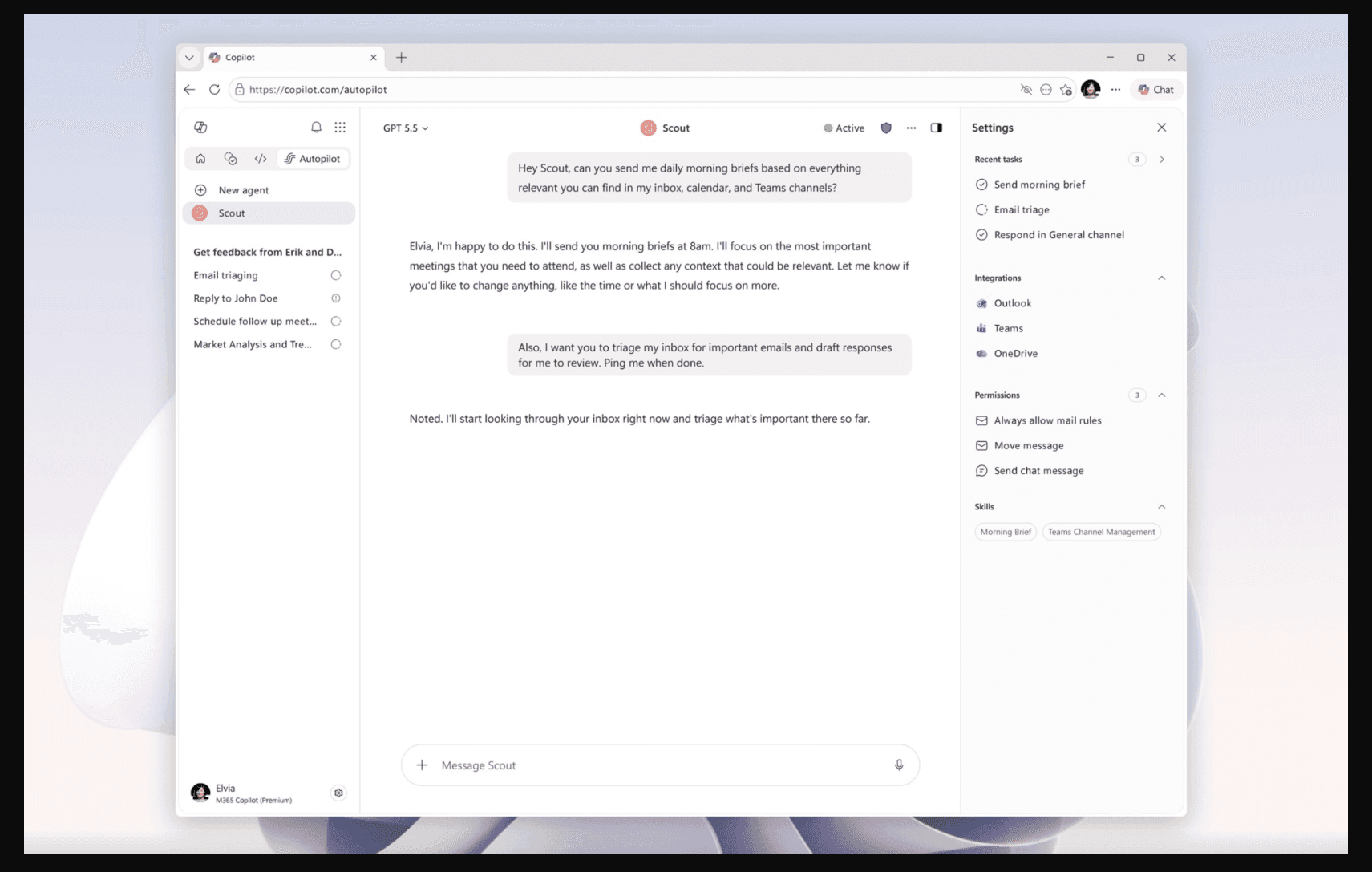
Microsoft Scout introduces a fundamentally different approach to AI assistance compared to existing Copilot offerings. Rather than being confined to individual applications, Scout operates as an integrated personal assistant across your entire Microsoft 365 environment.

  • Always-On Personal Assistant: Scout runs continuously in the background, proactively managing tasks across Outlook, OneDrive, Teams, and other Microsoft 365 apps without requiring manual activation for each action.
  • OpenClaw Foundation: Built on OpenClaw technology, Scout brings enterprise-grade AI reasoning capabilities that enable complex multi-step workflows and autonomous decision-making beyond simple chat interactions.
  • Cross-Application Integration: Unlike Copilot that lives within individual apps, Scout can see and act across your entire Microsoft 365 ecosystem, understanding context from emails, calendars, files, and team communications simultaneously.
  • Autonomous Task Execution: Scout can independently handle calendar organization, draft emails, process expense reports, and manage administrative workflows without constant user intervention.
  • Contextual Intelligence: The assistant learns from your work patterns, communication style, and preferences to provide increasingly personalized assistance over time.
  • Enterprise-Grade Security: Designed with business requirements in mind, Scout respects organizational policies, data governance, and compliance requirements while operating across sensitive business systems.

Technical Specifications

Scout's architecture reflects Microsoft's commitment to building a next-generation AI assistant capable of handling enterprise complexity.

  • Foundation Model: Built on OpenClaw technology, providing advanced reasoning capabilities and multi-step task execution beyond traditional language models.
  • Integration Architecture: Deeply integrated with Microsoft 365 APIs, enabling real-time access to Outlook, Teams, OneDrive, and other enterprise applications with full context awareness.
  • Processing Capability: Handles complex workflows involving multiple applications, data sources, and decision points simultaneously, with the ability to maintain context across extended interactions.
  • Deployment Model: Operates as a cloud-based service within Microsoft's infrastructure, ensuring scalability and consistency across enterprise deployments.
  • Supported Platforms: Available across Microsoft 365 web applications, desktop clients, and mobile platforms with synchronized state management.

Official Benefits

  • Increased Productivity: Automates routine administrative tasks like calendar management, email drafting, and expense processing, freeing employees to focus on high-value work.
  • Reduced Context Switching: Scout consolidates information from multiple Microsoft 365 apps, eliminating the need to manually switch between applications to complete complex tasks.
  • Improved Decision-Making: Provides contextual insights by analyzing patterns across emails, meetings, and documents, helping users make better-informed decisions faster.
  • Enhanced Work-Life Balance: By handling administrative overhead autonomously, Scout reduces after-hours work and email management burden on employees.
  • Scalable AI Assistance: Brings enterprise-grade AI capabilities to all employees without requiring specialized training or technical expertise.

Real-World Translation

What Each Feature Actually Means:

  • Always-On Personal Assistant: Instead of opening Copilot and asking it to help, Scout watches your calendar and automatically suggests meeting prep materials, suggests optimal meeting times based on attendee availability, and even drafts meeting agendas before you start your day. You wake up to a prepared briefing without lifting a finger.
  • Cross-Application Integration: When a client emails you about a project deadline, Scout can simultaneously check your calendar for conflicts, review related files in OneDrive, pull context from previous Teams conversations about that client, and suggest a realistic timeline for completion. No manual information gathering required.
  • Autonomous Task Execution: Scout can process your expense reports by reading emails with receipts, matching them to calendar events, categorizing expenses according to company policy, and submitting them for approval. You review and approve rather than manually entering data.
  • Contextual Intelligence: After learning your communication style, Scout drafts emails that sound like you, suggests meeting attendees based on project context, and flags calendar conflicts before they become problems. The assistant becomes more effective the longer you use it.
  • Enterprise Security: Scout respects your organization's data classification rules, ensuring it doesn't share confidential information across unauthorized departments and maintains audit trails for compliance purposes.

Before vs After

Before

Employees manually managed calendars, drafted emails, processed expenses, and toggled between multiple Microsoft 365 applications to complete routine tasks. Copilot provided helpful suggestions within individual apps but couldn't autonomously execute workflows or maintain context across applications. Administrative overhead consumed significant time that could be spent on strategic work.

After

Scout operates as a true personal assistant, proactively managing administrative tasks across the entire Microsoft 365 ecosystem. The assistant can autonomously handle calendar management, email drafting, expense reporting, and complex multi-step workflows while maintaining full context and respecting enterprise security policies. Employees reclaim hours weekly previously spent on administrative work.

📈 Expected Impact: Organizations can expect 15-25% reduction in time spent on administrative tasks, with employees redirecting that time toward higher-value strategic work and collaboration.

Job Relevance Analysis

AI Researcher

HIGH Impact
  • Use Case: AI researchers can study Scout's OpenClaw implementation to understand how enterprise-grade AI assistants handle complex reasoning, multi-step task execution, and context management across distributed systems. This provides real-world insights into production AI systems beyond academic environments.
  • Key Benefit: Direct access to a production-grade AI system built on cutting-edge technology enables researchers to analyze how OpenClaw performs in enterprise settings, informing future research directions and benchmarking methodologies.
  • Workflow Integration: Researchers can use Scout as both a case study subject and a productivity tool, analyzing its decision-making patterns while simultaneously benefiting from its automation capabilities for administrative work.
  • Skill Development: Working with Scout helps researchers understand the gap between theoretical AI capabilities and practical enterprise requirements, including security, compliance, and user trust considerations.
  • Research Opportunities: Scout's architecture provides opportunities to study how AI systems maintain context across multiple data sources, handle conflicting priorities, and make autonomous decisions within organizational constraints.
AI Researcher

Advance innovation with AI tools for academic research, data analysis, knowledge representation, decision-making, and AI-powered chatbots.

6,692 Tools
AI Researcher

Automation Engineer

HIGH Impact
  • Use Case: Automation engineers can leverage Scout as a platform for building and testing enterprise automation workflows. Scout's ability to execute complex multi-step tasks across Microsoft 365 applications directly aligns with automation engineering goals.
  • Key Benefit: Scout eliminates the need to build custom integrations for common Microsoft 365 automation scenarios. Engineers can focus on complex, organization-specific workflows while Scout handles routine automation patterns.
  • Workflow Integration: Automation engineers can use Scout to prototype workflows, test integration patterns, and validate business process improvements before implementing custom solutions. Scout becomes a rapid prototyping platform.
  • Skill Development: Working with Scout helps automation engineers understand how AI-driven automation differs from rule-based automation, including handling ambiguity, learning from patterns, and adapting to changing business requirements.
  • Efficiency Gains: Scout reduces the time spent building and maintaining custom automation scripts for routine tasks, allowing automation engineers to tackle more complex challenges and strategic initiatives.
Automation Engineer

Increase your productivity with these AI solutions for automation, quality assurance, integration, collaboration, and code creation.

5,288 Tools
Automation Engineer

Software Developer

MEDIUM Impact
  • Use Case: Software developers can integrate Scout capabilities into their applications through Microsoft 365 APIs and potentially future Scout APIs. Developers building on the Microsoft 365 platform can leverage Scout's automation capabilities to enhance their solutions.
  • Key Benefit: Scout provides a reference implementation for building AI-powered assistants that operate across multiple applications. Developers can study Scout's architecture to inform their own multi-application AI solutions.
  • Workflow Integration: Developers can use Scout to automate routine development tasks like meeting scheduling, email management, and documentation, freeing time for actual coding and problem-solving.
  • Skill Development: Building integrations with Scout helps developers understand how to work with enterprise AI systems, handle context across applications, and design user experiences around autonomous AI capabilities.
  • Platform Opportunities: As Scout matures, developers may gain access to APIs enabling custom extensions and integrations, creating new opportunities for building specialized AI-powered solutions on top of Scout's foundation.
Software Developer

Browse vetted AI tools and real‑world use cases for Software Developer. Compare pricing, features & tips; to automate busywork. Find the right AI tools.

5,965 Tools
Software Developer

Getting Started

How to Access

  • Microsoft 365 Subscription: Scout is available to Microsoft 365 subscribers as part of their enterprise subscription, with rollout beginning following the Build announcement.
  • Admin Enablement: Organization administrators enable Scout through the Microsoft 365 admin center, configuring policies and permissions for employee access.
  • Automatic Integration: Once enabled, Scout appears across Microsoft 365 applications including Outlook, Teams, OneDrive, and other supported apps without requiring individual installation.
  • User Activation: Employees access Scout through their existing Microsoft 365 interface, with the assistant becoming available immediately upon organizational enablement.

Quick Start Guide

For Beginners:

  1. Access Scout through your Microsoft 365 app (Outlook, Teams, or OneDrive) where you'll see the Scout interface in the sidebar or command palette.
  2. Start with simple requests like "organize my calendar for tomorrow" or "draft a response to this email" to understand how Scout interprets your needs.
  3. Review Scout's suggestions before approving actions, building familiarity with how the assistant understands your preferences and work style.
  4. Gradually expand to more complex tasks as you become comfortable with Scout's capabilities and decision-making patterns.

For Power Users:

  1. Configure Scout's preferences through settings to define your communication style, preferred meeting formats, and organizational policies you want Scout to follow.
  2. Create custom workflows by chaining multiple Scout actions together, such as "when I receive an expense email, extract the receipt, categorize it, and prepare it for approval."
  3. Set up Scout's learning parameters to accelerate how quickly the assistant adapts to your specific work patterns, communication preferences, and organizational context.
  4. Integrate Scout with custom Microsoft 365 workflows and Power Automate to extend its capabilities beyond built-in functions.
  5. Monitor Scout's activity logs and decision patterns to identify optimization opportunities and ensure the assistant aligns with your evolving needs.

Pro Tips

  • Start with Observation: Let Scout run for a week without making changes, observing how it interprets your work patterns and preferences before customizing its behavior.
  • Provide Feedback Consistently: When Scout makes decisions you disagree with, provide clear feedback so the assistant learns your preferences faster and becomes more accurate over time.
  • Use for Routine Tasks First: Begin with repetitive administrative tasks where Scout's learning curve is less critical, then expand to more complex workflows once you trust the assistant's decision-making.
  • Review Organizational Policies: Work with your IT and compliance teams to ensure Scout's automation aligns with organizational policies, data governance requirements, and security standards.

FAQ

Related Topics

Microsoft Scout AI assistantOpenClaw technologyMicrosoft 365 automationAI personal assistant review

Table of contents

What's New in Microsoft ScoutTechnical SpecificationsOfficial BenefitsReal-World TranslationJob Relevance AnalysisGetting StartedFAQ
Impact LevelHIGH
Update ReleasedJune 2, 2026

Best for

Software DeveloperAI ResearcherAutomation Engineer

Related Use Cases

AI Chatbot ToolsAI Automation ToolsSocial Networking AI Tools

Related Articles

Gemini Omni and 3.5: Google's Latest AI Models
Step 3.7 Flash Review: 198B MoE Vision-Language Model
Gemini Spark Review: Google's AI Agent Goes Personal
All AI Spotlights

Editor's Pick Articles

Google Gemini App Update 2026: AI Chatbot Powerhouse
Notion AI Agents: Turn Your Workspace Into an AI Hub
Perplexity Personal Computer: AI Agents for Mac
All Articles
Special offer for AI Owners – 50% OFF Promotional Plans

Join Our Community

Get the earliest access to hand-picked content weekly for free.

Spam-free guaranteed! Only insights.

Follow Us on Socials

Don't Miss AI Topics

ai art generatorai voice generatorai text generatorai avatar generatorai designai writing assistantai audio generatorai content generatorai dubbingai graphic designai banner generatorai in dropshipping

AI Spotlights

Unleashing Today's trailblazer, this week's game-changers, and this month's legends in AI. Dive in and discover tools that matter.

All AI Spotlights
Gemini Omni and 3.5: Google's Latest AI Models

Gemini Omni and 3.5: Google's Latest AI Models

Step 3.7 Flash Review: 198B MoE Vision-Language Model

Step 3.7 Flash Review: 198B MoE Vision-Language Model

Gemini Spark Review: Google's AI Agent Goes Personal

Gemini Spark Review: Google's AI Agent Goes Personal

Microsoft Agent Governance Toolkit Review

Microsoft Agent Governance Toolkit Review

Gemini Spark AI Agent Review: Always-On Automation

Gemini Spark AI Agent Review: Always-On Automation

MAI-Thinking-1 Review: Microsoft's Advanced Reasoning AI

MAI-Thinking-1 Review: Microsoft's Advanced Reasoning AI

Microsoft MDASH Review: 100+ AI Agents for Threat Hunting

Microsoft MDASH Review: 100+ AI Agents for Threat Hunting

Google Phone App Fake Call Detection Review

Google Phone App Fake Call Detection Review

Stable Audio 3 Review: Fast AI Audio Generation

Stable Audio 3 Review: Fast AI Audio Generation

Claude Opus 4.8: Dynamic Workflows & Faster AI

Claude Opus 4.8: Dynamic Workflows & Faster AI

Microsoft 365 Copilot Redesign: 2x Speed Boost

Microsoft 365 Copilot Redesign: 2x Speed Boost

Perplexity Bumblebee: AI Supply Chain Security Scanner

Perplexity Bumblebee: AI Supply Chain Security Scanner

AWS OpenSearch Serverless Review: Enterprise Search Reimagined

AWS OpenSearch Serverless Review: Enterprise Search Reimagined

OSCAR: 2-Bit KV Cache Quantization for LLMs

OSCAR: 2-Bit KV Cache Quantization for LLMs

StepAudio 2.5 Realtime: AI Voice Model Review

StepAudio 2.5 Realtime: AI Voice Model Review

Google I/O 2026: Gemini Omni & AI Breakthroughs

Google I/O 2026: Gemini Omni & AI Breakthroughs

IrisGo Review: AI Desktop Buddy Learns Your Tasks

IrisGo Review: AI Desktop Buddy Learns Your Tasks

Clouted Review: AI Video Clipping for Viral Shorts

Clouted Review: AI Video Clipping for Viral Shorts

Qwen3.7-Max Review: 1M-Token Reasoning Agent

Qwen3.7-Max Review: 1M-Token Reasoning Agent

You Might Like These Latest News

All AI News

Stay informed with the latest AI news, breakthroughs, trends, and updates shaping the future of artificial intelligence.

Anthropic's IPO Filing Balances Growth With Responsible AI

Jun 3, 2026

Anthropic's IPO Filing Balances Growth With Responsible AI

Meta's AI Chatbot Exploited to Hijack Instagram Accounts

Jun 3, 2026

Meta's AI Chatbot Exploited to Hijack Instagram Accounts

Anthropic IPO Filing: AI Enters Enterprise Utility Phase

Jun 3, 2026
Anthropic IPO Filing: AI Enters Enterprise Utility Phase

Groq Raises $650M as AI Chip Startup Pivots to Inference

Jun 3, 2026
Groq Raises $650M as AI Chip Startup Pivots to Inference

Coders Ditching AI Tools Risk Quality Issues

Jun 3, 2026
Coders Ditching AI Tools Risk Quality Issues

Nvidia Targets $200B CPU Market With AI Agent PCs

Jun 3, 2026
Nvidia Targets $200B CPU Market With AI Agent PCs

Microsoft Build 2026: AI Dev Tools and Personal Assistant

Jun 3, 2026
Microsoft Build 2026: AI Dev Tools and Personal Assistant

Trump Orders AI Model Review Before Release

Jun 3, 2026
Trump Orders AI Model Review Before Release

DuckDuckGo Installs Surge 30% as Users Reject Google AI Search

May 29, 2026
DuckDuckGo Installs Surge 30% as Users Reject Google AI Search
Tools of The Day

Tools of The Day

Discover the top AI tools handpicked daily by our editors to help you stay ahead with the latest and most innovative solutions.


10MAR
Adobe Illustrator
Adobe Illustrator
9MAR
Adobe Firefly
Adobe Firefly
8MAR
Adobe Sensei
Adobe Sensei
7MAR
Adobe Photoshop
Adobe Photoshop
6MAR
Adobe Firefly
Adobe Firefly
5MAR
Shap-E
Shap-E
4MAR
Point-E
Point-E

Explore AI Tools of The Day