Age of AI Toolsv2.beta
For YouJobsUse Cases
Media-HubNEW

Join Our Community

Get the earliest access to hand-picked content weekly for free.

Spam-free guaranteed! Only insights.
Join Our Community

Get the earliest access to hand-picked content weekly for free.

Spam-free guaranteed! Only insights.

Trusted by Leading Review and Discovery Websites

Age of AI Tools on Product HuntApproved on SaaSHubAlternativeTo
AI Tools
  • For You!
  • Discover All AI Tools
  • Best AI Tools
  • Free AI Tools
  • Tools of the DayNEW
  • All Use Cases
  • All Jobs
Trend UseCases
  • AI Image Generators
  • AI Video Generators
  • AI Voice Generators
Trend Jobs
  • Graphic Designer
  • SEO Specialist
  • Email Marketing Specialist
Media Hub
  • Go to Media Hub
  • AI News
  • AI Tools Spotlights
Age of AI Tools
  • What's New
  • Story of Age of AI Tools
  • Cookies & Privacy
  • Terms & Conditions
  • Request Update
  • Bug Report
  • Contact Us
Submit & Advertise
  • Submit AI Tool
  • Promote Your Tool50% Off

Agent of AI Age

Looking to discover new AI tools? Just ask our AI Agent

Copyright © 2026 Age of AI Tools. All Rights Reserved.

Media HubTools SpotlightNotion AI Agents: Turn Your Workspace Into an AI Hub
16 May 20265 min read

Notion AI Agents: Turn Your Workspace Into an AI Hub

Notion AI Agents: Turn Your Workspace Into an AI Hub

🎯 Quick Impact Summary

Notion's new developer platform fundamentally reshapes how teams work by turning workspaces into hubs for AI agents, external data integration, and custom code execution. This move positions Notion as a central orchestration layer for agentic AI workflows rather than just a note-taking tool. Teams can now deploy autonomous agents directly within their workspace to automate complex tasks, connect to external systems, and execute custom logic without leaving Notion.

What's New in Notion AI Agents

Notion has introduced a comprehensive developer platform that enables teams to build, deploy, and manage AI agents within their workspace ecosystem. This represents a major evolution from Notion as a static workspace to a dynamic hub for autonomous intelligence.
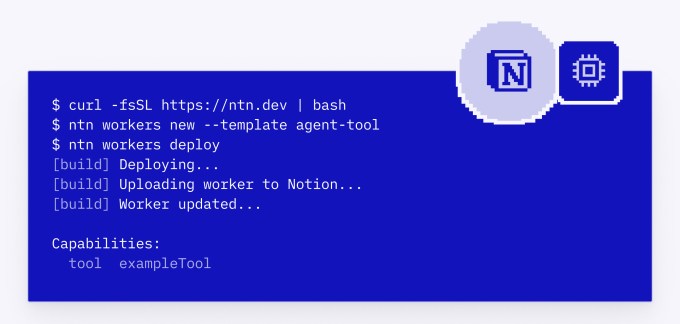
  • AI Agent Integration: Deploy autonomous agents directly into Notion workspaces that can perform tasks, make decisions, and execute workflows without manual intervention
  • External Data Connection: Connect AI agents to external data sources, APIs, and third-party systems so agents can access real-time information and trigger actions across your tech stack
  • Custom Code Execution: Write and execute custom code alongside AI agents, enabling complex logic, data transformations, and specialized workflows tailored to your team's needs
  • Developer Platform: Access comprehensive APIs, SDKs, and documentation that allow developers to build custom integrations and extend Notion's capabilities beyond native features
  • Workspace Orchestration: Manage all agents, data connections, and automations from a single unified dashboard within your Notion workspace
  • Real-Time Collaboration: Enable teams to collaborate on agent-driven workflows while maintaining visibility into agent actions and outcomes

Notion AI agents workspace integration hub

Technical Specifications

The Notion developer platform is built on modern cloud architecture designed to support scalable agent deployment and real-time data synchronization across enterprise environments.
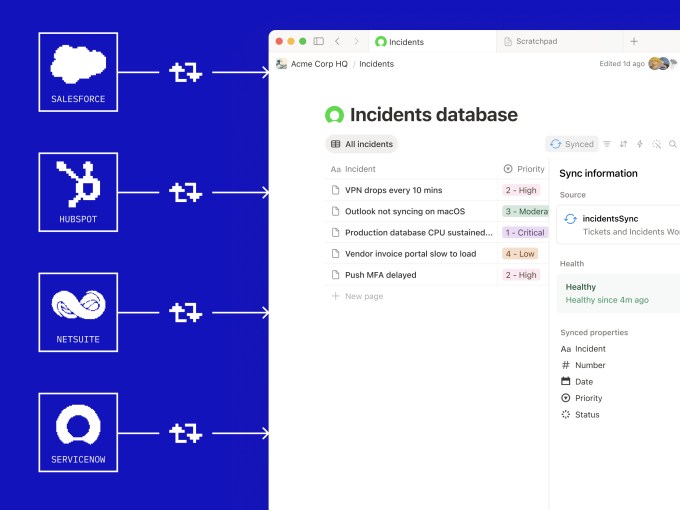
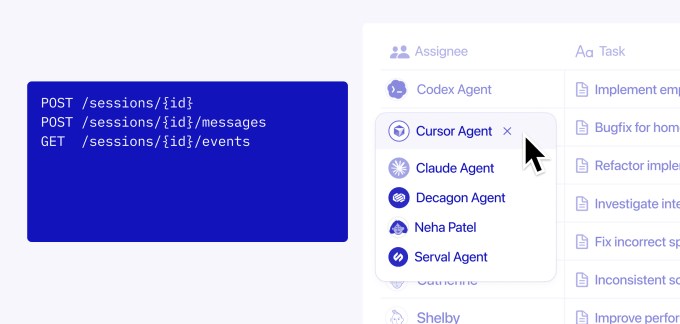
  • API-First Architecture: RESTful APIs and webhooks enable seamless integration with external systems, allowing agents to read from and write to any connected data source
  • Agent Runtime Environment: Supports multiple AI model backends and custom code execution in containerized environments with automatic scaling based on workload demand
  • Data Sync Protocol: Real-time bidirectional synchronization between Notion databases and external sources, with support for batch operations and incremental updates
  • Authentication & Security: OAuth 2.0 support, API key management, and role-based access controls ensure secure agent operations and data protection
  • Monitoring & Logging: Built-in observability tools track agent execution, performance metrics, and error logs for debugging and optimization

Notion developer platform architecture

Official Benefits

  • Eliminate manual data entry and repetitive tasks by deploying agents that work 24/7 without human intervention
  • Reduce time spent switching between tools by centralizing agent management, data connections, and automation workflows in one workspace
  • Accelerate decision-making with real-time data aggregation from multiple sources, enabling agents to provide insights and recommendations instantly
  • Lower development costs by using no-code and low-code agent builders that don't require extensive software engineering expertise
  • Scale automation across teams without infrastructure overhead, as Notion handles agent hosting, scaling, and maintenance

Notion AI automation workflow

Real-World Translation

What Each Feature Actually Means:

  • AI Agent Integration: Instead of manually checking email, Slack, and project management tools for updates, deploy an agent that monitors all three simultaneously, summarizes key information, and updates your Notion dashboard every hour. The agent works while you sleep.
  • External Data Connection: Connect your CRM, accounting software, and customer support platform to Notion so agents can automatically pull customer data, identify at-risk accounts, and flag them for your sales team without manual data entry.
  • Custom Code Execution: Write Python or JavaScript code that runs alongside agents to perform specialized calculations, data cleaning, or business logic that generic AI agents can't handle on their own.
  • Developer Platform: Your engineering team can build custom integrations specific to your company's workflow, such as an agent that automatically generates reports from raw data and posts them to Slack every Monday morning.
  • Workspace Orchestration: View all active agents, their current tasks, success rates, and any errors from a single dashboard, giving you complete visibility into your automation infrastructure.

Before vs After

Before

Teams relied on disconnected tools and manual workflows to manage data across multiple systems. Automation required expensive custom development or multiple third-party services. Switching between platforms wasted time and created data silos where information couldn't flow seamlessly between systems.

After

Notion becomes a unified hub where AI agents automatically orchestrate work across all connected systems. Teams deploy agents with minimal coding, and data flows bidirectionally between Notion and external tools in real time. Automation scales without additional infrastructure costs or complex integrations.

📈 Expected Impact: Teams can reduce manual task time by 40-60% while centralizing all automation logic in a single, collaborative workspace.

Job Relevance Analysis

AI Researcher

HIGH Impact
  • Use Case: Design and test new agent architectures, experiment with different AI models, and evaluate agent performance across various tasks and datasets within a production environment
  • Key Benefit: Access to real-world agent deployment infrastructure allows researchers to move beyond theoretical models and test agents against actual business workflows and data
  • Workflow Integration: Use Notion's developer platform to prototype new agent behaviors, collect performance metrics, and iterate rapidly without building infrastructure from scratch
  • Skill Development: Gain hands-on experience with production-grade agent systems, learning how agents behave in real environments with constraints, errors, and edge cases
  • Research Opportunities: Contribute to Notion's agent ecosystem by publishing custom agent templates, optimization techniques, or novel approaches that other researchers and developers can use
AI Researcher

Advance innovation with AI tools for academic research, data analysis, knowledge representation, decision-making, and AI-powered chatbots.

6,692 Tools
AI Researcher

Data Scientist

HIGH Impact
  • Use Case: Build agents that automatically process raw data, perform feature engineering, generate insights, and deliver predictive models directly into team workflows without manual handoffs
  • Key Benefit: Eliminate the gap between data science work and business application by deploying models as agents that continuously run, update predictions, and surface insights to stakeholders
  • Workflow Integration: Connect data pipelines to Notion, create agents that monitor data quality, flag anomalies, and automatically retrain models when performance degrades
  • Skill Development: Learn to operationalize machine learning models as autonomous agents, understanding how to handle real-time data, error handling, and continuous improvement
  • Collaboration: Share agent-driven insights with non-technical team members through Notion's collaborative interface, making data science work more accessible and actionable
Data Scientist

Understand business insights via AI for analyzing, predicting, data mining, data visualization, and data warehousing.

4,480 Tools
Data Scientist

Software Developer

HIGH Impact
  • Use Case: Build custom integrations, extend agent capabilities with specialized code, and create complex workflows that combine AI agents with business logic specific to your organization
  • Key Benefit: Reduce development time by leveraging Notion's agent framework and APIs instead of building automation infrastructure from scratch, allowing focus on business logic
  • Workflow Integration: Use the developer platform to create agents that orchestrate microservices, manage data synchronization, and automate deployment pipelines
  • Skill Development: Master agent-oriented architecture patterns, learn to design systems where autonomous agents coordinate work, and understand how to build reliable, scalable automation
  • Ecosystem Contribution: Publish reusable agent templates, custom integrations, and code libraries to Notion's developer marketplace, creating new revenue or portfolio opportunities
Software Developer

Browse vetted AI tools and real‑world use cases for Software Developer. Compare pricing, features & tips; to automate busywork. Find the right AI tools.

5,965 Tools
Software Developer

Getting Started

How to Access

  • Visit the Notion developer portal and sign in with your Notion account
  • Navigate to the "Create Agent" section and select your workspace
  • Choose a pre-built agent template or start with a blank agent configuration
  • Connect your external data sources and configure authentication credentials
  • Deploy your agent and monitor its activity from the Notion dashboard

Quick Start Guide

For Beginners:

  1. Start with a pre-built agent template (such as data sync, email monitoring, or task automation) to understand how agents work without writing code
  2. Connect one external data source (like a Google Sheet or API) and configure the agent to pull data into your Notion database
  3. Set up a simple trigger (like "when new data arrives") and define an action (like "create a Notion page") to see automation in action
  4. Test the agent with sample data and review the logs to understand how it processes information

For Power Users:

  1. Write custom code in Python or JavaScript to extend agent behavior beyond template capabilities, handling specialized business logic
  2. Set up bidirectional data synchronization between Notion and multiple external systems, configuring conflict resolution and data transformation rules
  3. Implement error handling, retry logic, and monitoring to ensure agents run reliably in production environments
  4. Create custom webhooks and API endpoints that allow external systems to trigger agent actions or retrieve data from Notion
  5. Build a dashboard that aggregates agent performance metrics, execution logs, and business outcomes for team visibility

Pro Tips

  • Start Small: Deploy your first agent on a non-critical workflow to learn the platform before automating mission-critical processes
  • Monitor Agent Behavior: Check agent logs regularly to catch issues early and understand how agents interact with your data and external systems
  • Use Version Control: Keep track of agent configurations and custom code in Git so you can roll back changes if something breaks
  • Test Thoroughly: Create a staging workspace to test agent behavior before deploying to production, especially when connecting to external systems

FAQ

Related Topics

Notion AI agentsAI automation toolsno-code AIagentic AIworkflow automation

Table of contents

What's New in Notion AI AgentsTechnical SpecificationsOfficial BenefitsReal-World TranslationJob Relevance AnalysisGetting StartedFAQ
Impact LevelHIGH
Update ReleasedMay 13, 2026

Best for

Data ScientistSoftware DeveloperAI Researcher

Related Use Cases

AI Automation ToolsAI Business ToolsSocial Networking AI Tools

Related Articles

Edge Copilot Update: AI Now Reads All Your Tabs
GLiGuard Review: 300M Safety Model Beats Larger Competitors
Cline SDK Review: Open-Source Agent Runtime
All AI Spotlights

Editor's Pick Articles

Perplexity Personal Computer: AI Agents for Mac
Claude Personal App Connectors Review
ChatGPT Images 2.0 Review: Better Text & Details
All Articles
Special offer for AI Owners – 50% OFF Promotional Plans

Join Our Community

Get the earliest access to hand-picked content weekly for free.

Spam-free guaranteed! Only insights.

Follow Us on Socials

Don't Miss AI Topics

ai art generatorai voice generatorai text generatorai avatar generatorai designai writing assistantai audio generatorai content generatorai dubbingai graphic designai banner generatorai in dropshipping

AI Spotlights

Unleashing Today's trailblazer, this week's game-changers, and this month's legends in AI. Dive in and discover tools that matter.

All AI Spotlights
Edge Copilot Update: AI Now Reads All Your Tabs

Edge Copilot Update: AI Now Reads All Your Tabs

GLiGuard Review: 300M Safety Model Beats Larger Competitors

GLiGuard Review: 300M Safety Model Beats Larger Competitors

Cline SDK Review: Open-Source Agent Runtime

Cline SDK Review: Open-Source Agent Runtime

OpenAI Codex Now on ChatGPT Mobile App

OpenAI Codex Now on ChatGPT Mobile App

Clawdmeter: Claude Code Usage Dashboard

Clawdmeter: Claude Code Usage Dashboard

ZAYA1-8B-Diffusion: 7.7x Faster MoE Model

ZAYA1-8B-Diffusion: 7.7x Faster MoE Model

Claude for Small Business Contract Review Tool

Claude for Small Business Contract Review Tool

Gemini Intelligence Review: AI Phone Control

Gemini Intelligence Review: AI Phone Control

Google Gboard Gemini Dictation: AI Voice Recognition

Google Gboard Gemini Dictation: AI Voice Recognition

Google Create My Widget: AI-Powered Custom Widgets

Google Create My Widget: AI-Powered Custom Widgets

Wispr Flow Review: Hinglish Voice AI for India

Wispr Flow Review: Hinglish Voice AI for India

OpenAI Codex Chrome Extension Review

OpenAI Codex Chrome Extension Review

Perplexity Personal Computer: AI Agents for Mac

Perplexity Personal Computer: AI Agents for Mac

OpenAI Voice Intelligence API: New Features Review

OpenAI Voice Intelligence API: New Features Review

ChatGPT Trusted Contact: New Self-Harm Safeguard

ChatGPT Trusted Contact: New Self-Harm Safeguard

CopilotKit Intelligence: Enterprise AI Memory Platform

CopilotKit Intelligence: Enterprise AI Memory Platform

OpenAI Training Spec: GPU Performance Breakthrough

OpenAI Training Spec: GPU Performance Breakthrough

AWS Managed Agents Review: OpenAI Partnership

AWS Managed Agents Review: OpenAI Partnership

Glean AI Search Review: Enterprise Search Redefined

Glean AI Search Review: Enterprise Search Redefined

You Might Like These Latest News

All AI News

Stay informed with the latest AI news, breakthroughs, trends, and updates shaping the future of artificial intelligence.

63% of Orgs Lack AI Governance Policies

May 16, 2026
63% of Orgs Lack AI Governance Policies

AI Chatbots Leak Personal Phone Numbers

May 16, 2026
AI Chatbots Leak Personal Phone Numbers

Making AI Sustainable: What's Missing

May 16, 2026
Making AI Sustainable: What's Missing

OpenAI Explores Legal Action Against Apple

May 16, 2026
OpenAI Explores Legal Action Against Apple

Microsoft Cancels Claude Code Licenses

May 16, 2026
Microsoft Cancels Claude Code Licenses

YouTube Expands AI Deepfake Detection to All Adults

May 16, 2026
YouTube Expands AI Deepfake Detection to All Adults

Anthropic and PwC Embed Claude in Enterprise

May 16, 2026
Anthropic and PwC Embed Claude in Enterprise

ArXiv Bans Researchers for AI Slop in Papers

May 16, 2026
ArXiv Bans Researchers for AI Slop in Papers

Anthropic Launches AI Legal Services Tools

May 13, 2026
Anthropic Launches AI Legal Services Tools
Tools of The Day

Tools of The Day

Discover the top AI tools handpicked daily by our editors to help you stay ahead with the latest and most innovative solutions.


10MAR
Adobe Illustrator
Adobe Illustrator
9MAR
Adobe Firefly
Adobe Firefly
8MAR
Adobe Sensei
Adobe Sensei
7MAR
Adobe Photoshop
Adobe Photoshop
6MAR
Adobe Firefly
Adobe Firefly
5MAR
Shap-E
Shap-E
4MAR
Point-E
Point-E

Explore AI Tools of The Day