









Age of AI Toolsv2.beta
For YouJobsUse Cases
Media-HubNEW

Join Our Community

Get the earliest access to hand-picked content weekly for free.

Spam-free guaranteed! Only insights.
Join Our Community

Get the earliest access to hand-picked content weekly for free.

Spam-free guaranteed! Only insights.

Trusted by Leading Review and Discovery Websites

Age of AI Tools on Product HuntApproved on SaaSHubAlternativeTo
AI Tools
  • For You!
  • Discover All AI Tools
  • Best AI Tools
  • Free AI Tools
  • Tools of the DayNEW
  • All Use Cases
  • All Jobs
Trend UseCases
  • AI Image Generators
  • AI Video Generators
  • AI Voice Generators
Trend Jobs
  • Graphic Designer
  • SEO Specialist
  • Email Marketing Specialist
Media Hub
  • Go to Media Hub
  • AI News
  • AI Tools Spotlights
Age of AI Tools
  • What's New
  • Story of Age of AI Tools
  • Cookies & Privacy
  • Terms & Conditions
  • Request Update
  • Bug Report
  • Contact Us
Submit & Advertise
  • Submit AI Tool
  • Promote Your Tool50% Off

Agent of AI Age

Looking to discover new AI tools? Just ask our AI Agent

Copyright © 2026 Age of AI Tools. All Rights Reserved.

Media HubTools SpotlightMicrosoft 365 Copilot Redesign: 2x Speed Boost
29 May 20265 min read

Microsoft 365 Copilot Redesign: 2x Speed Boost

Microsoft 365 Copilot Redesign: 2x Speed Boost

🎯 Quick Impact Summary

Microsoft 365 Copilot just received a significant redesign that fundamentally improves how users interact with AI assistance across the Microsoft 365 suite. The update delivers a 2x speed improvement, cleaner interface, and smarter response formatting that makes information easier to scan and act on. This is a meaningful refresh that addresses real workflow friction points for enterprise users relying on AI productivity tools daily.

What's New in Microsoft 365 Copilot

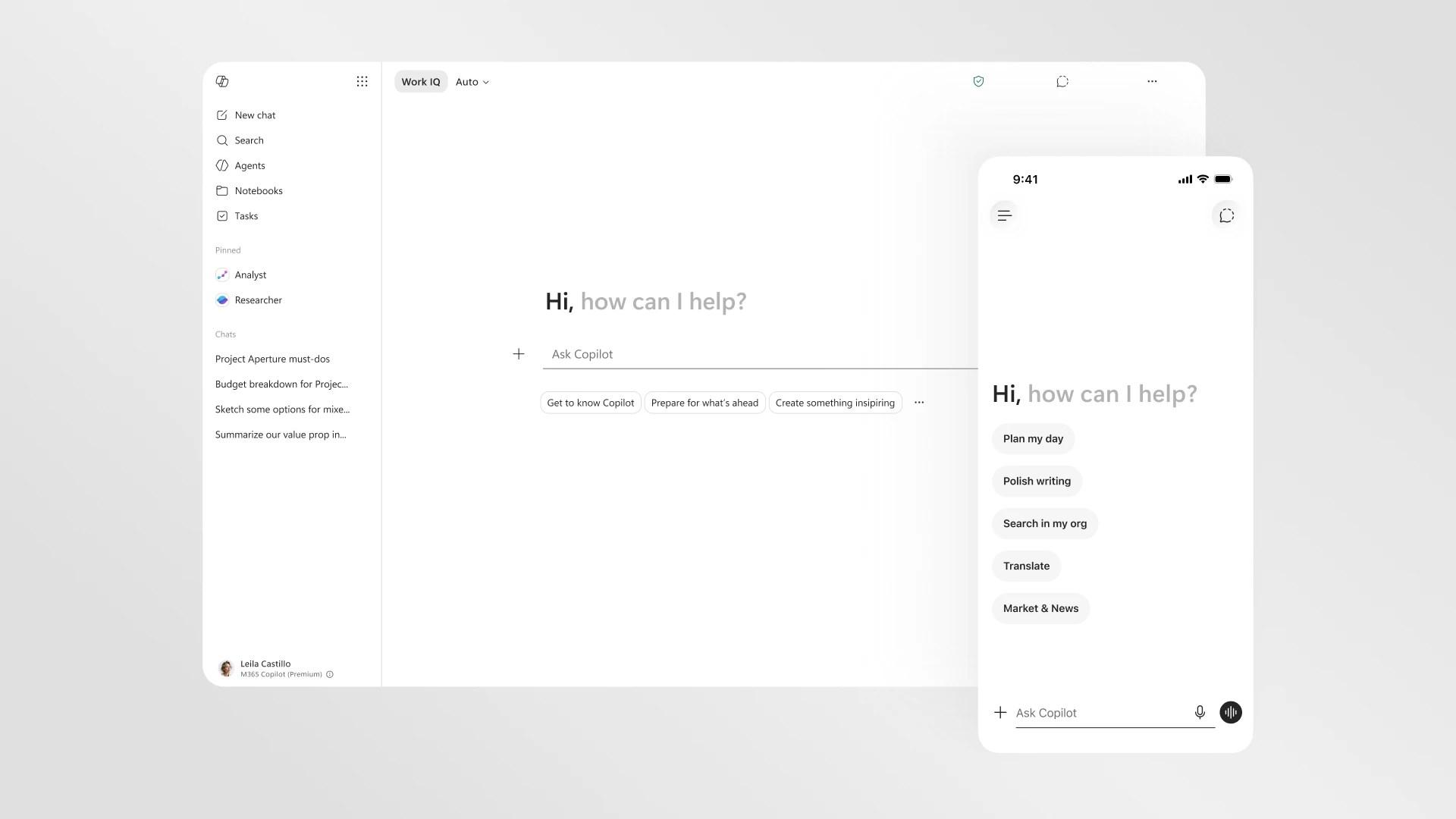
Microsoft's latest redesign transforms the Copilot experience with performance gains and thoughtful interface improvements. The update rolls out across desktop and mobile devices, bringing consistency to how users interact with AI assistance.

  • 2x Faster Load Times: The revamped interface loads twice as fast as the previous version, reducing wait times when launching Copilot or switching between tasks.
  • Progressive Disclosure: Copilot now shows tools and controls based on your specific prompt instead of overwhelming you with all options at once, making the interface feel less cluttered.
  • Structured Response Formatting: Responses are now more reliable and easier to scan, with better visual hierarchy that helps users quickly find the information they need.
  • Enhanced Prompt Box: The upgraded prompt box now supports direct text formatting, expands dynamically to fit longer inputs, and provides a more natural writing experience.
  • Mobile Optimization: The redesign prioritizes mobile usability, ensuring the cleaner interface works seamlessly on phones and tablets alongside desktop versions.
  • Consistent Cross-Platform Experience: Desktop and mobile versions now share the same design language and functionality, eliminating friction when switching devices.

Technical Specifications

The redesign includes technical improvements that enhance both performance and usability across the Microsoft 365 ecosystem.

  • Performance Optimization: 2x faster load times achieved through interface rendering improvements and optimized data delivery.
  • Progressive Disclosure Architecture: Dynamic UI rendering that adapts tool visibility based on prompt context and user intent, reducing initial cognitive load.
  • Cross-Platform Compatibility: Unified codebase supporting Windows, macOS, iOS, and Android with native performance on each platform.
  • Enhanced Text Processing: Improved prompt parsing that handles formatted text, inline styling, and multi-line inputs within the expanded prompt box.
  • Response Structuring Engine: Backend improvements that organize AI responses with better formatting, hierarchical information display, and scannable content blocks.

Official Benefits

  • 2x Faster Performance: Load times cut in half, enabling quicker access to AI assistance without waiting for interface rendering.
  • Improved Information Scannability: Structured responses with better visual hierarchy make it easier to locate and act on key information within seconds.
  • Reduced Cognitive Overload: Progressive disclosure shows only relevant tools and options for your specific task, eliminating unnecessary interface clutter.
  • Better Mobile Experience: Optimized design ensures the same powerful functionality works smoothly on phones and tablets, not just desktop.
  • Streamlined Text Input: Direct formatting support and expandable prompt box reduce friction when composing complex requests or multi-line instructions.

Real-World Translation

What Each Feature Actually Means:

  • 2x Faster Load Times: When you open Copilot to draft an email or analyze a spreadsheet, it appears instantly instead of making you wait several seconds. This matters when you're juggling multiple tasks and need quick answers without interrupting your flow.
  • Progressive Disclosure: Instead of seeing 15 different options when you ask Copilot a question, it shows only the 3-4 tools most relevant to your request. For a marketing manager analyzing campaign data, this means fewer clicks to find the right analysis option.
  • Structured Response Formatting: When Copilot provides meeting notes or project summaries, information now appears in clear sections with bold headers and bullet points instead of dense paragraphs. You can scan the entire response in 10 seconds instead of reading through walls of text.
  • Enhanced Prompt Box: You can now paste formatted content, add line breaks, and even apply bold or italics directly in your prompt before sending. A financial analyst preparing a complex query can format their request exactly as needed without switching to another tool.
  • Mobile Optimization: Your team can use Copilot with full functionality on their phones during meetings or while traveling, with the same clean interface they see on their desktop.

Before vs After

Before

Previous versions of Microsoft 365 Copilot loaded slowly, displayed all available options at once regardless of context, and returned responses in dense formats that required significant scanning time. Users on mobile devices experienced inconsistent functionality and had to switch back to desktop for complex tasks. The prompt box had limited formatting capabilities, forcing users to compose requests in plain text without visual structure.

After

The redesigned Copilot loads twice as fast, intelligently shows only relevant tools based on your specific prompt, and formats responses with clear hierarchy and scannable sections. Mobile and desktop experiences are now unified with full feature parity, and the enhanced prompt box supports direct text formatting. Users can accomplish tasks faster with less interface friction and cognitive load.

📈 Expected Impact: Enterprise users will save 20-30% of time spent interacting with Copilot through faster load times, smarter tool discovery, and quicker information scanning. *

Job Relevance Analysis

Automation Engineer

HIGH Impact
  • Use Case: Automation engineers use Copilot to generate workflow logic, debug automation scripts, and design process flows across Microsoft 365 applications. The faster interface and structured responses help them quickly validate automation logic without context switching.
  • Key Benefit: Progressive disclosure shows automation-specific tools and templates based on your prompt, reducing time spent navigating menus to find the right automation building blocks.
  • Workflow Integration: The enhanced prompt box lets engineers paste complex workflow requirements with formatting intact, making it easier to communicate multi-step automation needs to Copilot.
  • Skill Development: Working with Copilot's improved response formatting helps engineers better understand how to structure automation logic and identify optimization opportunities in their processes.
  • Daily Impact: When designing a new workflow automation, engineers can now ask Copilot for suggestions, receive clearly formatted step-by-step logic, and implement changes 2x faster than before.
Automation Engineer

Increase your productivity with these AI solutions for automation, quality assurance, integration, collaboration, and code creation.

5,288 Tools
Automation Engineer

Cybersecurity & Detection

MEDIUM Impact
  • Use Case: Security professionals leverage Copilot to analyze threat patterns, generate detection rules, and document security incidents within Microsoft 365. The cleaner interface helps them focus on critical security information without distraction.
  • Key Benefit: Structured response formatting makes security alerts and threat analysis easier to scan quickly, which is critical when responding to potential breaches or anomalies.
  • Workflow Integration: The progressive disclosure feature shows security-relevant tools and analysis options based on your query, helping security teams find threat detection capabilities faster.
  • Skill Development: Clear, scannable responses help security professionals better understand threat patterns and detection logic, improving their ability to identify and respond to emerging threats.
  • Daily Impact: When investigating a suspicious login pattern, security teams get formatted threat analysis with clear indicators and recommended actions instead of dense paragraphs requiring careful parsing.

UI/UX Designer

HIGH Impact
  • Use Case: UX designers use Copilot to brainstorm interface improvements, generate design specifications, and analyze user feedback across Microsoft 365 products. The redesigned interface itself serves as a reference for modern AI-assisted design patterns.
  • Key Benefit: The progressive disclosure approach and enhanced formatting directly inform how designers should structure complex interfaces, providing a real-world example of effective UX principles in action.
  • Workflow Integration: Designers can now format design briefs and user research directly in the prompt box, maintaining visual hierarchy and structure that Copilot can better understand and respond to.
  • Skill Development: Observing how Copilot's redesign handles information hierarchy, progressive disclosure, and mobile optimization provides valuable insights designers can apply to their own projects.
  • Daily Impact: When requesting design suggestions for a new feature, designers receive formatted mockup recommendations and usability insights that are immediately actionable without requiring additional interpretation.
UI/UX Designer

Increase user interaction via AI for wireframes, intelligent layouts, web development, photo editing, and interactive UIs.

4,954 Tools
UI/UX Designer

Getting Started

How to Access

  • Existing Users: The redesigned Copilot rolls out automatically to all Microsoft 365 subscribers. No action required; you'll see the new interface when you next launch Copilot.
  • New Users: Access Copilot through any Microsoft 365 application (Word, Excel, Teams, Outlook) by clicking the Copilot icon or using the keyboard shortcut.
  • Mobile Access: Download the latest version of Microsoft 365 apps from your device's app store to get the optimized mobile interface.
  • Enterprise Deployment: IT administrators can verify the rollout status in the Microsoft 365 admin center and ensure all devices are updated to the latest version.

Quick Start Guide

For Beginners:

  1. Open any Microsoft 365 application (Word, Excel, Teams, or Outlook) and locate the Copilot icon in the ribbon or sidebar.
  2. Click the Copilot icon to open the redesigned interface, which now loads in half the time of previous versions.
  3. Type your request in the enhanced prompt box, using formatting if needed, and press Enter to see structured responses.
  4. Review the scannable response format and click on suggested tools or actions that appear based on your specific prompt.

For Power Users:

  1. Leverage progressive disclosure by crafting specific prompts that trigger advanced tools relevant to your task (e.g., "Analyze this sales data and create a forecast model").
  2. Use the enhanced prompt box to paste formatted content, multi-line instructions, or structured data that Copilot can parse more effectively.
  3. Combine Copilot with Microsoft 365 automation features to create workflows that use AI-generated logic and recommendations.
  4. Experiment with different prompt structures to see how Copilot adapts its tool suggestions and response formatting based on your intent.
  5. Monitor response quality and use the feedback mechanisms to help Microsoft improve Copilot's accuracy for your specific use cases.

Pro Tips

  • Be Specific in Prompts: The more context you provide, the better progressive disclosure works to show you exactly the tools you need. Instead of "analyze data," try "analyze Q2 sales by region and create a forecast."
  • Use Formatting in Prompts: Take advantage of the enhanced prompt box by pasting formatted content or using line breaks to structure complex requests, which helps Copilot understand multi-part tasks.
  • Scan Responses Strategically: The new structured formatting means you can quickly identify key sections. Look for bold headers and bullet points to find the information most relevant to your task.
  • Combine with Other Microsoft 365 Features: Use Copilot's suggestions alongside Power Automate, Power BI, or Teams to create end-to-end workflows that leverage AI insights.

Getting Started

FAQ

Related Topics

Microsoft 365 Copilot reviewCopilot redesign 2026AI productivity toolsMicrosoft Copilot speed boost

Table of contents

What's New in Microsoft 365 CopilotTechnical SpecificationsOfficial BenefitsReal-World TranslationJob Relevance AnalysisGetting StartedGetting StartedFAQ
Impact LevelMEDIUM
Update ReleasedMay 28, 2026

Best for

UI/UX DesignerAutomation EngineerCybersecurity & Detection

Related Use Cases

AI Travel ToolsAI Productivity ToolsAI Automation Tools

Related Articles

Stable Audio 3 Review: Fast AI Audio Generation
Claude Opus 4.8: Dynamic Workflows & Faster AI
Perplexity Bumblebee: AI Supply Chain Security Scanner
All AI Spotlights

Editor's Pick Articles

Google Gemini App Update 2026: AI Chatbot Powerhouse
Notion AI Agents: Turn Your Workspace Into an AI Hub
Perplexity Personal Computer: AI Agents for Mac
All Articles
Special offer for AI Owners – 50% OFF Promotional Plans

Join Our Community

Get the earliest access to hand-picked content weekly for free.

Spam-free guaranteed! Only insights.

Follow Us on Socials

Don't Miss AI Topics

ai art generatorai voice generatorai text generatorai avatar generatorai designai writing assistantai audio generatorai content generatorai dubbingai graphic designai banner generatorai in dropshipping

AI Spotlights

Unleashing Today's trailblazer, this week's game-changers, and this month's legends in AI. Dive in and discover tools that matter.

All AI Spotlights
Stable Audio 3 Review: Fast AI Audio Generation
Stable Audio 3 Review: Fast AI Audio Generation

Claude Opus 4.8: Dynamic Workflows & Faster AI

Claude Opus 4.8: Dynamic Workflows & Faster AI

Perplexity Bumblebee: AI Supply Chain Security Scanner

Perplexity Bumblebee: AI Supply Chain Security Scanner

AWS OpenSearch Serverless Review: Enterprise Search Reimagined
AWS OpenSearch Serverless Review: Enterprise Search Reimagined

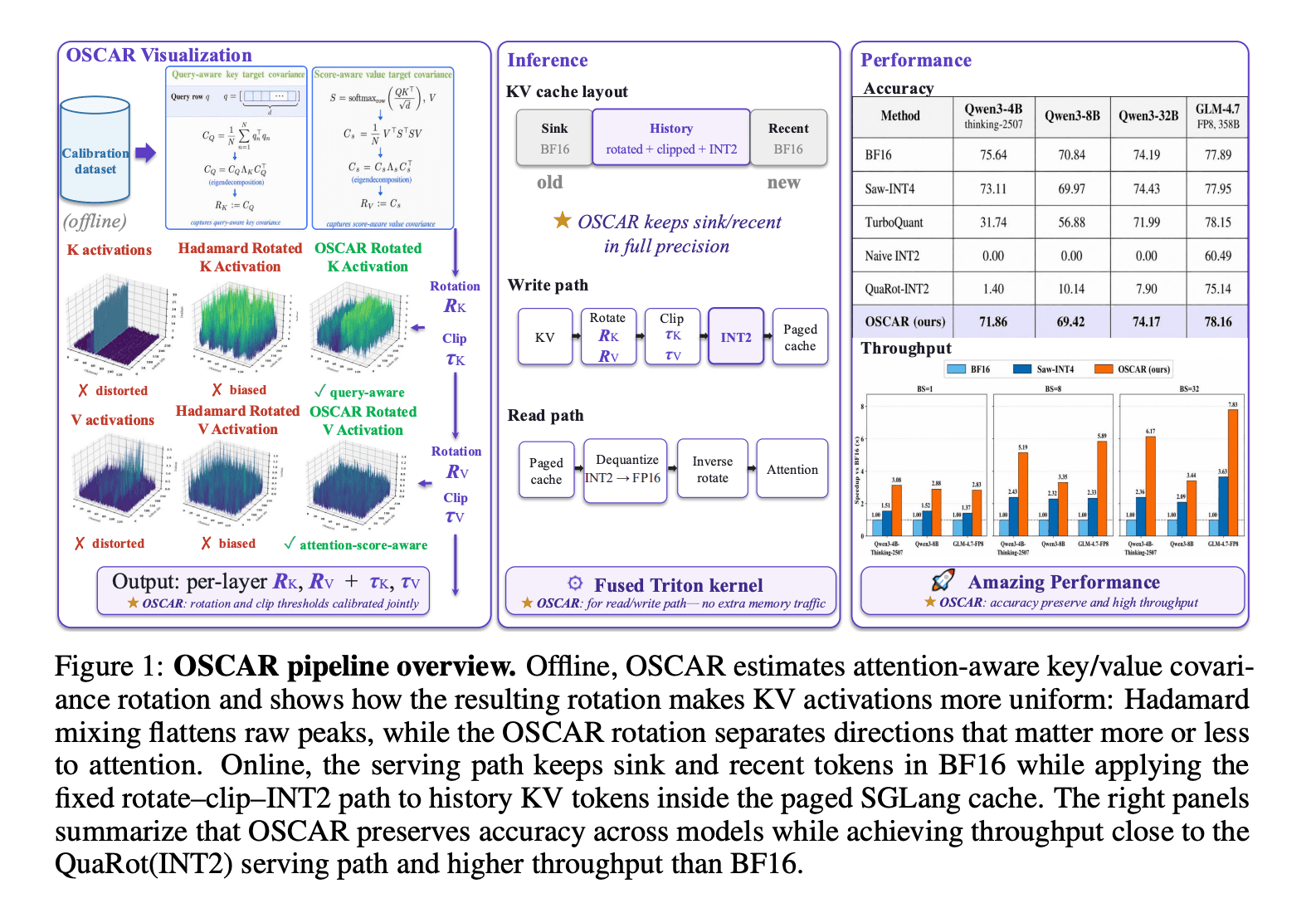
OSCAR: 2-Bit KV Cache Quantization for LLMs

OSCAR: 2-Bit KV Cache Quantization for LLMs

StepAudio 2.5 Realtime: AI Voice Model Review

StepAudio 2.5 Realtime: AI Voice Model Review

Google I/O 2026: Gemini Omni & AI Breakthroughs

Google I/O 2026: Gemini Omni & AI Breakthroughs

IrisGo Review: AI Desktop Buddy Learns Your Tasks

IrisGo Review: AI Desktop Buddy Learns Your Tasks

Clouted Review: AI Video Clipping for Viral Shorts

Clouted Review: AI Video Clipping for Viral Shorts

Qwen3.7-Max Review: 1M-Token Reasoning Agent

Qwen3.7-Max Review: 1M-Token Reasoning Agent

Cohere Command A+: 218B MoE Model Review

Cohere Command A+: 218B MoE Model Review

Gmail AI Inbox: Talk to Your Email with Gemini

Gmail AI Inbox: Talk to Your Email with Gemini

Google Antigravity 2.0: Agent-First AI Platform

Google Antigravity 2.0: Agent-First AI Platform

Gemini Spark Review: 24/7 AI Assistant with Gmail

Gemini Spark Review: 24/7 AI Assistant with Gmail

Google Gemini App Update 2026: AI Chatbot Powerhouse

Google Gemini App Update 2026: AI Chatbot Powerhouse

SandboxAQ's Claude Integration: Drug Discovery for Everyone

SandboxAQ's Claude Integration: Drug Discovery for Everyone

Notion AI Agents: Turn Your Workspace Into an AI Hub

Notion AI Agents: Turn Your Workspace Into an AI Hub

Edge Copilot Update: AI Now Reads All Your Tabs

Edge Copilot Update: AI Now Reads All Your Tabs

GLiGuard Review: 300M Safety Model Beats Larger Competitors

GLiGuard Review: 300M Safety Model Beats Larger Competitors

You Might Like These Latest News

All AI News

Stay informed with the latest AI news, breakthroughs, trends, and updates shaping the future of artificial intelligence.

DuckDuckGo Installs Surge 30% as Users Reject Google AI Search

May 29, 2026
DuckDuckGo Installs Surge 30% as Users Reject Google AI Search

OpenRouter Doubles Valuation to $1.3B

May 29, 2026
OpenRouter Doubles Valuation to $1.3B

Critical Starlette Vulnerability Threatens Millions of AI Agents

May 29, 2026
Critical Starlette Vulnerability Threatens Millions of AI Agents

Meta Launches Paid Subscriptions Across Instagram, Facebook, WhatsApp

May 29, 2026
Meta Launches Paid Subscriptions Across Instagram, Facebook, WhatsApp

Anthropic Raises $65B, Approaches $1T Valuation

May 29, 2026
Anthropic Raises $65B, Approaches $1T Valuation

AI Coding Startup Reaches $26B Valuation

May 29, 2026
AI Coding Startup Reaches $26B Valuation

Asana Acquires StackAI to Expand No-Code AI Automation

May 29, 2026
Asana Acquires StackAI to Expand No-Code AI Automation

IBM and Red Hat Launch $5B Open Source Security Initiative

May 29, 2026
IBM and Red Hat Launch $5B Open Source Security Initiative

ClickUp Replaces Hundreds with AI Agents

May 26, 2026
ClickUp Replaces Hundreds with AI Agents
Tools of The Day

Tools of The Day

Discover the top AI tools handpicked daily by our editors to help you stay ahead with the latest and most innovative solutions.


10MAR
Adobe Illustrator
Adobe Illustrator
9MAR
Adobe Firefly
Adobe Firefly
8MAR
Adobe Sensei
Adobe Sensei
7MAR
Adobe Photoshop
Adobe Photoshop
6MAR
Adobe Firefly
Adobe Firefly
5MAR
Shap-E
Shap-E
4MAR
Point-E
Point-E

Explore AI Tools of The Day