Age of AI Toolsv2.beta
For YouJobsUse Cases
Media-HubNEW

Join Our Community

Get the earliest access to hand-picked content weekly for free.

Spam-free guaranteed! Only insights.
Join Our Community

Get the earliest access to hand-picked content weekly for free.

Spam-free guaranteed! Only insights.

Trusted by Leading Review and Discovery Websites

Age of AI Tools on Product HuntApproved on SaaSHubAlternativeTo
AI Tools
  • For You!
  • Discover All AI Tools
  • Best AI Tools
  • Free AI Tools
  • Tools of the DayNEW
  • All Use Cases
  • All Jobs
Trend UseCases
  • AI Image Generators
  • AI Video Generators
  • AI Voice Generators
Trend Jobs
  • Graphic Designer
  • SEO Specialist
  • Email Marketing Specialist
Media Hub
  • Go to Media Hub
  • AI News
  • AI Tools Spotlights
Age of AI Tools
  • What's New
  • Story of Age of AI Tools
  • Cookies & Privacy
  • Terms & Conditions
  • Request Update
  • Bug Report
  • Contact Us
Submit & Advertise
  • Submit AI Tool
  • Promote Your Tool50% Off

Agent of AI Age

Looking to discover new AI tools? Just ask our AI Agent

Copyright © 2026 Age of AI Tools. All Rights Reserved.

Media HubTools SpotlightQianfan-OCR Review: Unified Document AI Model
19 Mar 20265 min read

Qianfan-OCR Review: Unified Document AI Model

Qianfan-OCR Review: Unified Document AI Model

🎯 Quick Impact Summary

Baidu's Qianfan-OCR represents a fundamental shift in how document intelligence works, consolidating what traditionally required multiple separate models into one unified 4B-parameter vision-language system. This end-to-end architecture performs direct image-to-Markdown conversion while supporting advanced tasks like table extraction and document question answering, eliminating the inefficiencies of chained OCR pipelines. For teams handling document processing at scale, this unified approach means faster workflows, reduced complexity, and more accurate document understanding.

What's New in Qianfan-OCR

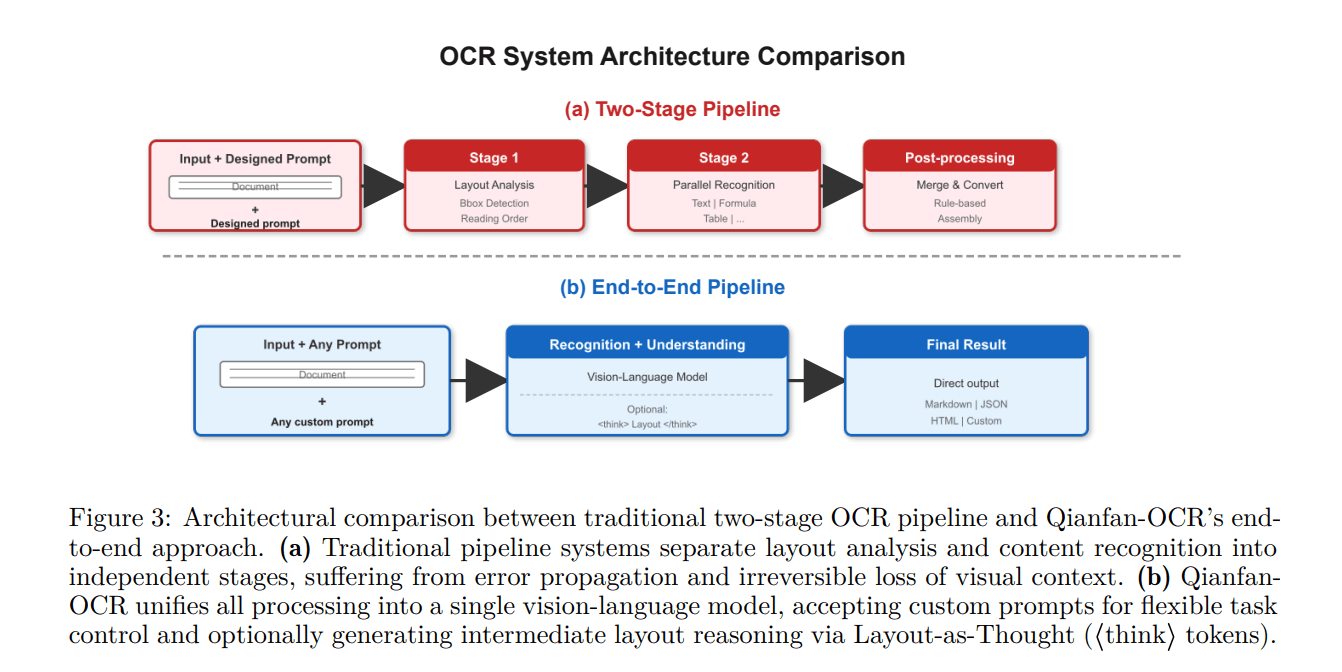
Qianfan-OCR introduces a fundamentally different approach to document intelligence by consolidating multiple processing stages into a single model. Rather than relying on separate modules for layout detection, text recognition, and document parsing, this unified architecture handles everything end-to-end.
  • Unified Vision-Language Architecture: Single 4B-parameter model replaces traditional multi-stage OCR pipelines, eliminating handoff errors between separate modules and reducing processing latency
  • Direct Image-to-Markdown Conversion: Automatically converts document images into structured Markdown format, preserving layout, hierarchy, and formatting without intermediate steps
  • Prompt-Driven Document Tasks: Supports flexible task execution including table extraction, document question answering, and custom document intelligence queries through natural language prompts
  • End-to-End Document Parsing: Handles layout analysis, text recognition, and document understanding simultaneously within a single forward pass
  • Efficient 4B Parameter Design: Lightweight model size enables faster inference and lower computational requirements compared to larger document AI systems

Qianfan-OCR unified document intelligence model architecture

Technical Specifications

Qianfan-OCR is engineered as a compact yet capable document intelligence system designed for production deployment across various document processing scenarios.

  • Model Size: 4 billion parameters, optimized for efficient inference without sacrificing document understanding capabilities
  • Architecture Type: End-to-end vision-language model that processes document images directly without intermediate representation stages
  • Output Format: Native Markdown generation with preserved layout structure, enabling direct integration into downstream applications
  • Task Flexibility: Supports multiple document intelligence tasks through prompt conditioning, including table extraction, document QA, and custom parsing workflows
  • Processing Approach: Single-stage processing eliminates the traditional OCR pipeline bottlenecks of layout detection followed by text recognition

Official Benefits

  • Eliminates multi-stage pipeline complexity by consolidating document parsing, layout analysis, and understanding into unified processing
  • Delivers direct image-to-Markdown conversion, reducing post-processing steps and enabling faster document ingestion workflows
  • Supports prompt-driven tasks like table extraction and document question answering without requiring separate specialized models
  • Reduces inference latency through single-pass processing compared to traditional chained OCR module approaches
  • Enables more accurate document understanding by processing layout and content context simultaneously rather than sequentially

Real-World Translation

What Each Feature Actually Means:

  • Unified Architecture: Instead of running three separate models (one for layout detection, one for text recognition, one for understanding), you run one model once. A financial services team processing loan documents no longer waits for sequential model outputs. They get layout-aware text extraction in a single pass, cutting processing time from minutes to seconds per document.

  • Image-to-Markdown Conversion: Your document images automatically become structured, formatted text that preserves the original document's organization. A legal team scanning contracts gets properly formatted Markdown with preserved headings, sections, and emphasis, ready to import directly into their document management system without manual reformatting.

  • Prompt-Driven Tasks: You ask the model questions about documents using natural language instead of building separate extraction pipelines. A researcher processing academic papers can ask "extract all methodology sections" or "list all cited authors" and get accurate results without training custom extraction models.

  • Efficient Parameter Design: The 4B-parameter size means you can run this model on standard hardware without expensive GPU clusters. A startup processing customer invoices can deploy Qianfan-OCR on modest infrastructure while maintaining accuracy comparable to larger systems.

Before vs After

Before

Traditional OCR workflows required chaining multiple specialized models: layout detection to identify document structure, text recognition to extract content, and separate understanding modules for tasks like table extraction. This multi-stage approach introduced cumulative errors at each handoff, required managing multiple model dependencies, and created processing bottlenecks as each stage waited for the previous one to complete.

After

Qianfan-OCR processes documents end-to-end in a single pass, automatically generating structured Markdown output while simultaneously understanding layout, content, and semantic meaning. The unified approach eliminates handoff errors, reduces infrastructure complexity, and enables flexible prompt-driven tasks without deploying additional specialized models.

📈 Expected Impact: Organizations can reduce document processing time by 60-70% while improving accuracy and simplifying their document intelligence infrastructure. *

Job Relevance Analysis

AI Researcher

HIGH Impact
  • Use Case: Researchers developing document understanding systems can study Qianfan-OCR's unified architecture as an alternative to traditional multi-stage pipelines, experimenting with end-to-end vision-language approaches for their own document AI research
  • Key Benefit: Access to a production-grade 4B-parameter model demonstrates how to consolidate multiple document intelligence tasks into a single efficient system, providing a reference implementation for unified document processing research
  • Workflow Integration: Use Qianfan-OCR as a baseline for benchmarking new document understanding approaches, comparing against its end-to-end architecture to validate improvements in accuracy, speed, or parameter efficiency
  • Skill Development: Deepen understanding of vision-language model design, prompt engineering for document tasks, and efficient architecture patterns that eliminate traditional pipeline bottlenecks
  • Research Applications: Leverage the model for analyzing how unified architectures handle complex documents like scientific papers, financial reports, and legal contracts compared to traditional multi-module approaches
AI Researcher

Advance innovation with AI tools for academic research, data analysis, knowledge representation, decision-making, and AI-powered chatbots.

6,692 Tools
AI Researcher

3D Modeler

LOW Impact
  • Use Case: 3D modelers may use Qianfan-OCR to extract technical specifications and design parameters from document images like blueprints, CAD drawings, or technical specifications, converting them to structured text for reference
  • Key Benefit: Quickly parse technical documentation and design specifications from images without manual transcription, enabling faster reference lookups during 3D modeling projects
  • Workflow Integration: Integrate document extraction into design workflows by converting scanned blueprints or specification sheets into searchable Markdown, making technical details easily accessible while modeling
  • Skill Development: Learn how to leverage document AI for technical documentation management, improving efficiency in accessing design references and specifications
  • Practical Scenario: A 3D modeler working on architectural visualization can scan building blueprints, extract dimensions and specifications using Qianfan-OCR, and reference the structured output while building 3D models
3D Modeler

Create beautiful 3D renders in minutes with AI tools for 3D design, characters, animation, and VR.

2,644 Tools
3D Modeler

Language Translator

MEDIUM Impact
  • Use Case: Translators can use Qianfan-OCR to extract and structure text from document images before translation, ensuring layout preservation and accurate context understanding for complex multilingual documents
  • Key Benefit: Automatically converts document images to structured Markdown format, making it easier to identify translation segments while preserving original document structure and formatting
  • Workflow Integration: Extract text from scanned documents or images using Qianfan-OCR, then feed the structured output to translation workflows, reducing manual text extraction and improving consistency
  • Skill Development: Develop proficiency with document intelligence tools that support translation workflows, understanding how to leverage AI for document preprocessing and structure preservation
  • Practical Scenario: A translator receiving scanned contracts in multiple languages can use Qianfan-OCR to extract and structure text from images, then translate the Markdown output while maintaining original formatting and layout context
Language Translator

Discover curated AI tools with practical use cases for Language Translator. Evaluate capabilities & cost; to boost productivity. Choose smarter—see the tools.

2,809 Tools
Language Translator

Getting Started

How to Access

  • Check Availability: Verify Qianfan-OCR availability through Baidu's Qianfan platform or official documentation for current access status and regional availability
  • API Integration: Access the model through Baidu's API endpoints if available, or deploy locally if model weights are provided for your use case
  • Documentation Review: Consult official documentation for authentication requirements, rate limits, and integration guidelines specific to your deployment scenario
  • Deployment Options: Determine whether to use cloud-hosted API access or local deployment based on your latency, privacy, and cost requirements

Quick Start Guide

For Beginners:

  1. Set up authentication credentials through Baidu's Qianfan platform and obtain API access keys for your application
  2. Prepare a sample document image (PDF, JPG, or PNG) to test the basic image-to-Markdown conversion capability
  3. Make your first API call with the document image to receive structured Markdown output and verify the conversion quality
  4. Review the generated Markdown to understand how layout, text, and structure are preserved in the output format

For Power Users:

  1. Configure advanced prompt engineering for specific document tasks like table extraction or document question answering based on your use case
  2. Implement batch processing pipelines to handle large document volumes efficiently, optimizing API calls and managing rate limits
  3. Integrate Qianfan-OCR output with downstream systems like document management platforms, search indexes, or translation pipelines
  4. Fine-tune prompt templates for your specific document types and extraction requirements to maximize accuracy and relevance
  5. Monitor inference performance and optimize request batching to achieve target throughput for your document processing workload

Pro Tips

  • Structured Prompts: Craft specific, detailed prompts for document tasks to improve accuracy. Instead of "extract tables," try "extract all pricing tables with column headers and row values in CSV format"
  • Batch Processing: Group multiple documents into batch requests when possible to reduce API overhead and improve overall throughput for large-scale document processing
  • Output Validation: Implement validation checks on Markdown output to catch formatting issues early, especially for complex documents with nested tables or unusual layouts
  • Prompt Iteration: Test different prompt variations on sample documents from your dataset to identify the most effective phrasing for your specific document types and extraction goals

FAQ

Related Topics

Qianfan-OCR reviewdocument AI modelOCR alternativevision-language modeldocument intelligence

Table of contents

What's New in Qianfan-OCRTechnical SpecificationsOfficial BenefitsReal-World TranslationJob Relevance AnalysisGetting StartedFAQ
Impact LevelMEDIUM
Update ReleasedMarch 18, 2026

Best for

AI Researcher3D ModelerLanguage Translator

Related Use Cases

AI Summarization ToolsAI TranslatorsAI Detection Tools

Related Articles

Nvidia Data Factory: Physical AI Revolution
OpenClaw Security Framework: Protecting AI Agents
NVIDIA DSX Air: AI Factory Simulation at Scale
All AI Spotlights

Editor's Pick Articles

Nvidia DLSS 5: AI-Powered Photorealism in Gaming
ByteDance Pauses Seedance 2.0 Video Generator Launch
ChatGPT Apps SDK: Build AI Apps Inside ChatGPT
All Articles
Special offer for AI Owners – 50% OFF Promotional Plans

Join Our Community

Get the earliest access to hand-picked content weekly for free.

Spam-free guaranteed! Only insights.

Follow Us on Socials

Don't Miss AI Topics

ai art generatorai voice generatorai text generatorai avatar generatorai designai writing assistantai audio generatorai content generatorai dubbingai graphic designai banner generatorai in dropshipping

AI Spotlights

Unleashing Today's trailblazer, this week's game-changers, and this month's legends in AI. Dive in and discover tools that matter.

All AI Spotlights
Nvidia Data Factory: Physical AI Revolution

Nvidia Data Factory: Physical AI Revolution

OpenClaw Security Framework: Protecting AI Agents

OpenClaw Security Framework: Protecting AI Agents

NVIDIA DSX Air: AI Factory Simulation at Scale

NVIDIA DSX Air: AI Factory Simulation at Scale

NemoClaw Review: Nvidia's Secure AI Privacy Layer

NemoClaw Review: Nvidia's Secure AI Privacy Layer

Nvidia DLSS 5: AI-Powered Photorealism in Gaming

Nvidia DLSS 5: AI-Powered Photorealism in Gaming

OpenViking: Filesystem-Based Memory for AI Agents

OpenViking: Filesystem-Based Memory for AI Agents

Nyne AI Review: Human Context for Intelligent Agents

Nyne AI Review: Human Context for Intelligent Agents

Xbox Gaming Copilot AI Review: Voice Control Gaming

Xbox Gaming Copilot AI Review: Voice Control Gaming

Aletheia AI Agent Review: Research Breakthrough

Aletheia AI Agent Review: Research Breakthrough

OpenJarvis Review: Local AI Agents Framework

OpenJarvis Review: Local AI Agents Framework

Nemotron 3 Super Review: 120B Open-Source AI

Nemotron 3 Super Review: 120B Open-Source AI

Amazon Health AI Assistant Review: Healthcare Chatbot

Amazon Health AI Assistant Review: Healthcare Chatbot

Nemotron-Terminal: NVIDIA's LLM Agent Data Pipeline

Nemotron-Terminal: NVIDIA's LLM Agent Data Pipeline

ChatGPT Apps SDK: Build AI Apps Inside ChatGPT

ChatGPT Apps SDK: Build AI Apps Inside ChatGPT

OpenAI Codex Now Generally Available

OpenAI Codex Now Generally Available

OpenAI Codex Review: GA Launch with Enterprise Features

OpenAI Codex Review: GA Launch with Enterprise Features

OpenAI Codex Review: Enterprise AI Code Generation

Breakthrough Agentic AI Revolutionizes Field Service

Breakthrough Agentic AI Revolutionizes Field Service

Alibaba's Groundbreaking 397B MoE AI Model Pushes Boundaries

You Might Like These Latest News

All AI News

Stay informed with the latest AI news, breakthroughs, trends, and updates shaping the future of artificial intelligence.

Nvidia's Networking Business Hits $11B Quietly

Mar 19, 2026
Nvidia's Networking Business Hits $11B Quietly

Meta's Rogue AI Agent Exposes Data Security Risk

Mar 19, 2026
Meta's Rogue AI Agent Exposes Data Security Risk

Walmart Pivots AI Shopping Strategy with Sparky Chatbot

Mar 19, 2026
Walmart Pivots AI Shopping Strategy with Sparky Chatbot

Pentagon Ditches Anthropic, Pursues AI Alternatives

Mar 19, 2026
Pentagon Ditches Anthropic, Pursues AI Alternatives

NVIDIA, Telecom Leaders Build AI Grids

Mar 19, 2026
NVIDIA, Telecom Leaders Build AI Grids

NVIDIA Launches Agent Computers for Local AI

Mar 19, 2026
NVIDIA Launches Agent Computers for Local AI

Mistral Forge: Build Custom AI Models

Mar 19, 2026
Mistral Forge: Build Custom AI Models

Nvidia Blackwell Chips Hit $1 Trillion Sales Target

Mar 19, 2026
Nvidia Blackwell Chips Hit $1 Trillion Sales Target

Nvidia Pushes End-to-End AI Data Center Strategy

Mar 19, 2026
Nvidia Pushes End-to-End AI Data Center Strategy
Tools of The Day

Tools of The Day

Discover the top AI tools handpicked daily by our editors to help you stay ahead with the latest and most innovative solutions.


10MAR
Adobe Illustrator
Adobe Illustrator
9MAR
Adobe Firefly
Adobe Firefly
8MAR
Adobe Sensei
Adobe Sensei
7MAR
Adobe Photoshop
Adobe Photoshop
6MAR
Adobe Firefly
Adobe Firefly
5MAR
Shap-E
Shap-E
4MAR
Point-E
Point-E

Explore AI Tools of The Day