Age of AI Toolsv2.beta
For YouJobsUse Cases
Media-HubNEW

Join Our Community

Get the earliest access to hand-picked content weekly for free.

Spam-free guaranteed! Only insights.
Join Our Community

Get the earliest access to hand-picked content weekly for free.

Spam-free guaranteed! Only insights.

Trusted by Leading Review and Discovery Websites

Age of AI Tools on Product HuntApproved on SaaSHubAlternativeTo
AI Tools
  • For You!
  • Discover All AI Tools
  • Best AI Tools
  • Free AI Tools
  • Tools of the DayNEW
  • All Use Cases
  • All Jobs
Trend UseCases
  • AI Image Generators
  • AI Video Generators
  • AI Voice Generators
Trend Jobs
  • Graphic Designer
  • SEO Specialist
  • Email Marketing Specialist
Media Hub
  • Go to Media Hub
  • AI News
  • AI Tools Spotlights
Age of AI Tools
  • What's New
  • Story of Age of AI Tools
  • Cookies & Privacy
  • Terms & Conditions
  • Request Update
  • Bug Report
  • Contact Us
Submit & Advertise
  • Submit AI Tool
  • Promote Your Tool50% Off

Agent of AI Age

Looking to discover new AI tools? Just ask our AI Agent

Copyright © 2026 Age of AI Tools. All Rights Reserved.

Media HubTools SpotlightOpenAI Codex Now on ChatGPT Mobile App
16 May 20265 min read

OpenAI Codex Now on ChatGPT Mobile App

OpenAI Codex Now on ChatGPT Mobile App

🎯 Quick Impact Summary

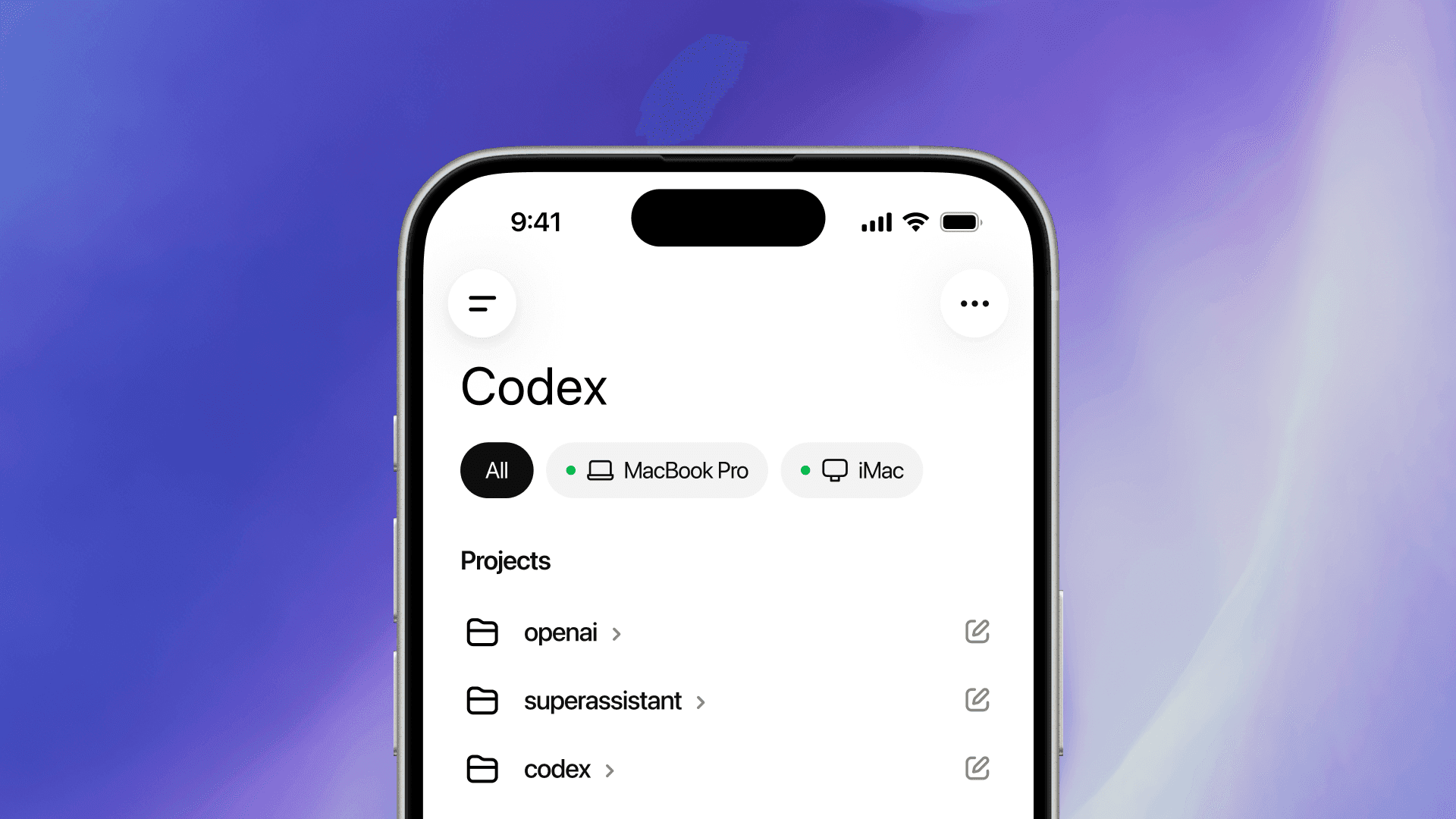
OpenAI is expanding access to Codex by integrating it into the ChatGPT mobile app, allowing users to write code and interact with applications from their phones. This mobile expansion follows the company's recent macOS update and represents a direct response to competitive pressure from tools like Claude Code. The move signals OpenAI's commitment to building a comprehensive AI platform that works seamlessly across devices.

What's New in OpenAI Codex

OpenAI has made Codex available directly within the ChatGPT mobile app, extending the capabilities of its desktop tool to iOS and Android users. This integration marks a significant step in making advanced AI coding assistance portable and accessible anywhere.

  • Mobile Codex Access: Users can now access Codex functionality from the ChatGPT app on both iOS and Android devices, eliminating the need to switch between applications
  • Cross-Platform Continuity: Seamlessly move between desktop and mobile workflows, maintaining context and code snippets across devices
  • App Control on Mobile: Extended functionality allows Codex to interact with mobile applications, similar to its macOS capabilities
  • Competitive Response: Follows recent updates enabling macOS app operation, positioning Codex against Claude Code and other AI coding tools
  • Superapp Strategy: Part of OpenAI's broader vision to create a unified desktop and mobile AI platform that handles coding, content creation, and app automation

Technical Specifications

Codex on mobile maintains the core technical architecture of its desktop counterpart while optimizing for mobile constraints and touch interfaces.

  • Platform Support: Available on iOS and Android through the native ChatGPT application
  • Model Architecture: Leverages OpenAI's advanced language models trained on code repositories and programming documentation
  • Integration Method: Built directly into ChatGPT app infrastructure, no separate installation required
  • Synchronization: Cloud-based sync allows code and projects to persist across desktop and mobile devices
  • Performance Optimization: Mobile version optimized for smaller screens and touch-based interaction patterns

Official Benefits

  • Increased Accessibility: Code generation and app automation available anywhere, not limited to desktop environments
  • Workflow Flexibility: Developers can start projects on desktop and continue editing on mobile, or vice versa
  • Competitive Positioning: Directly addresses the surge in popularity of Claude Code by offering similar capabilities in an established platform
  • Enterprise Value: Extends Codex capabilities to mobile-first workflows, supporting OpenAI's enterprise business growth strategy
  • Unified Experience: Consolidates multiple tools into a single app, reducing context switching and improving productivity

Real-World Translation

What Each Feature Actually Means:

  • Mobile Codex Access: Instead of being tethered to your desktop to use Codex, you can now generate code, debug scripts, or automate tasks while commuting, in meetings, or working from anywhere. A developer can quickly fix a bug reported during a client call by accessing Codex directly from their phone
  • Cross-Platform Continuity: Start writing a complex script on your laptop during the morning, then refine and test it on your tablet during lunch without losing your work or context. Your entire coding session flows naturally across devices
  • App Control on Mobile: Automate repetitive tasks on your phone itself, like organizing files, filling out forms, or managing notifications. Previously, this required desktop access; now it's possible from your mobile device
  • Competitive Response: You get the same AI-powered coding capabilities that made Claude Code popular, but integrated into the ChatGPT ecosystem you already use daily
  • Superapp Strategy: Instead of juggling separate tools for coding, writing, research, and automation, everything lives in one app. Your entire AI workflow becomes more streamlined and efficient

Before vs After

Before

Codex was primarily a desktop tool, requiring users to be at their computers to access code generation and app automation features. Mobile users had to rely on basic ChatGPT capabilities without the advanced coding functionality. Developers working on-the-go couldn't efficiently leverage AI-powered code assistance.

After

Codex is now accessible from the ChatGPT mobile app on iOS and Android, enabling code generation and app interaction from any device. Developers maintain seamless workflows across desktop and mobile, with cloud synchronization preserving their work. Mobile-first developers and remote workers gain access to enterprise-grade AI coding tools.

📈 Expected Impact: Developers gain 24/7 access to AI-powered coding assistance across all devices, potentially increasing productivity for remote and mobile-first teams by enabling continuous workflow integration.

Job Relevance Analysis

AI Researcher

HIGH Impact
  • Use Case: AI researchers can use Codex on mobile to rapidly prototype algorithms, test hypotheses, and generate experimental code during research sessions away from the lab or office
  • Key Benefit: Accelerates the research-to-implementation cycle by enabling code generation and testing anywhere, reducing time spent on boilerplate code and syntax errors
  • Workflow Integration: Seamlessly integrates with existing research workflows by allowing researchers to move between literature review on mobile and code implementation on desktop
  • Skill Development: Helps researchers develop stronger software engineering practices by providing real-time coding assistance and best-practice suggestions
  • Competitive Advantage: Access to mobile Codex means researchers can stay productive during travel, conferences, or field research without sacrificing coding capability
AI Researcher

Advance innovation with AI tools for academic research, data analysis, knowledge representation, decision-making, and AI-powered chatbots.

6,692 Tools
AI Researcher

Game Developer

MEDIUM Impact
  • Use Case: Game developers can use Codex to generate game logic, debug scripts, and create utility tools while working on-site at studios or during remote development sessions
  • Key Benefit: Speeds up iteration cycles by providing instant code suggestions for common game development patterns, physics calculations, and AI behaviors
  • Workflow Integration: Fits into mobile-first game development workflows where developers prototype ideas on tablets or phones before implementing on desktop engines
  • Skill Development: Helps developers learn new game frameworks and programming patterns by studying Codex-generated code examples
  • Practical Scenario: A game developer can quickly generate enemy AI behavior code during a design meeting on their phone, then refine it in the full engine later
Game Developer

Use AI to simplify your game development from 3D rendering to character building, story development, debugging, and even AR!

4,918 Tools
Game Developer

Data Scientist

MEDIUM Impact
  • Use Case: Data scientists can generate data processing scripts, statistical analysis code, and visualization templates from mobile devices while working with datasets or presenting findings
  • Key Benefit: Reduces time spent writing repetitive data manipulation code, allowing data scientists to focus on analysis and insights rather than syntax
  • Workflow Integration: Complements existing data science workflows by providing mobile access to code generation during data exploration, model testing, and documentation phases
  • Skill Development: Strengthens Python, R, and SQL proficiency by providing real-time examples of best practices and efficient data handling patterns
  • Practical Scenario: A data scientist reviewing preliminary analysis results on a tablet can immediately generate code to test a new hypothesis or create additional visualizations
Data Scientist

Understand business insights via AI for analyzing, predicting, data mining, data visualization, and data warehousing.

4,480 Tools
Data Scientist

Getting Started

How to Access

  1. Open the ChatGPT app on your iOS or Android device
  2. Ensure you have the latest version of ChatGPT installed from your device's app store
  3. Log in with your OpenAI account or create one if you don't have an account
  4. Access Codex features directly from the chat interface without additional setup

Quick Start Guide

For Beginners:

  1. Open ChatGPT mobile app and start a new conversation
  2. Type a natural language description of what code you need (e.g., "Write a Python function that sorts a list of dictionaries by a specific key")
  3. Review the generated code and ask follow-up questions to refine or modify it
  4. Copy the code to your clipboard and paste it into your development environment

For Power Users:

  1. Sync your existing Codex projects from desktop by accessing your cloud-saved files in the mobile app
  2. Use multi-turn conversations to iteratively build complex code, referencing previous outputs and building on them
  3. Leverage Codex's app control features to automate mobile workflows by describing the tasks you want to automate
  4. Integrate mobile Codex sessions with your CI/CD pipeline by exporting generated code directly to your repositories
  5. Create custom prompts and save them as templates for frequently-used code generation tasks

Pro Tips

  • Combine with Voice Input: Use your phone's voice-to-text feature to describe code requirements hands-free while working on other tasks
  • Leverage Context: Paste existing code snippets into conversations so Codex can understand your codebase style and generate consistent code
  • Test Incrementally: Generate small, testable code blocks rather than entire applications, then build complexity gradually
  • Save Useful Outputs: Bookmark or screenshot particularly useful Codex outputs for future reference and to build your own code library

FAQ

Related Topics

OpenAI Codex mobileChatGPT mobile app code generationAI code assistant iOS AndroidCodex vs Claude Code

Table of contents

What's New in OpenAI CodexTechnical SpecificationsOfficial BenefitsReal-World TranslationJob Relevance AnalysisGetting StartedFAQ
Impact LevelMEDIUM
Update ReleasedMay 14, 2026

Best for

Data ScientistAI ResearcherGame Developer

Related Use Cases

AI Chatbot ToolsAI TranslatorsAI Social Media Chatbots

Related Articles

Notion AI Agents: Turn Your Workspace Into an AI Hub
Edge Copilot Update: AI Now Reads All Your Tabs
GLiGuard Review: 300M Safety Model Beats Larger Competitors
All AI Spotlights

Editor's Pick Articles

Notion AI Agents: Turn Your Workspace Into an AI Hub
Perplexity Personal Computer: AI Agents for Mac
Claude Personal App Connectors Review
All Articles
Special offer for AI Owners – 50% OFF Promotional Plans

Join Our Community

Get the earliest access to hand-picked content weekly for free.

Spam-free guaranteed! Only insights.

Follow Us on Socials

Don't Miss AI Topics

ai art generatorai voice generatorai text generatorai avatar generatorai designai writing assistantai audio generatorai content generatorai dubbingai graphic designai banner generatorai in dropshipping

AI Spotlights

Unleashing Today's trailblazer, this week's game-changers, and this month's legends in AI. Dive in and discover tools that matter.

All AI Spotlights
Notion AI Agents: Turn Your Workspace Into an AI Hub

Notion AI Agents: Turn Your Workspace Into an AI Hub

Edge Copilot Update: AI Now Reads All Your Tabs

Edge Copilot Update: AI Now Reads All Your Tabs

GLiGuard Review: 300M Safety Model Beats Larger Competitors

GLiGuard Review: 300M Safety Model Beats Larger Competitors

Cline SDK Review: Open-Source Agent Runtime

Cline SDK Review: Open-Source Agent Runtime

Clawdmeter: Claude Code Usage Dashboard

Clawdmeter: Claude Code Usage Dashboard

ZAYA1-8B-Diffusion: 7.7x Faster MoE Model

ZAYA1-8B-Diffusion: 7.7x Faster MoE Model

Claude for Small Business Contract Review Tool

Claude for Small Business Contract Review Tool

Gemini Intelligence Review: AI Phone Control

Gemini Intelligence Review: AI Phone Control

Google Gboard Gemini Dictation: AI Voice Recognition

Google Gboard Gemini Dictation: AI Voice Recognition

Google Create My Widget: AI-Powered Custom Widgets

Google Create My Widget: AI-Powered Custom Widgets

Wispr Flow Review: Hinglish Voice AI for India

Wispr Flow Review: Hinglish Voice AI for India

OpenAI Codex Chrome Extension Review

OpenAI Codex Chrome Extension Review

Perplexity Personal Computer: AI Agents for Mac

Perplexity Personal Computer: AI Agents for Mac

OpenAI Voice Intelligence API: New Features Review

OpenAI Voice Intelligence API: New Features Review

ChatGPT Trusted Contact: New Self-Harm Safeguard

ChatGPT Trusted Contact: New Self-Harm Safeguard

CopilotKit Intelligence: Enterprise AI Memory Platform

CopilotKit Intelligence: Enterprise AI Memory Platform

OpenAI Training Spec: GPU Performance Breakthrough

OpenAI Training Spec: GPU Performance Breakthrough

AWS Managed Agents Review: OpenAI Partnership

AWS Managed Agents Review: OpenAI Partnership

Glean AI Search Review: Enterprise Search Redefined

Glean AI Search Review: Enterprise Search Redefined

You Might Like These Latest News

All AI News

Stay informed with the latest AI news, breakthroughs, trends, and updates shaping the future of artificial intelligence.

63% of Orgs Lack AI Governance Policies

May 16, 2026
63% of Orgs Lack AI Governance Policies

AI Chatbots Leak Personal Phone Numbers

May 16, 2026
AI Chatbots Leak Personal Phone Numbers

Making AI Sustainable: What's Missing

May 16, 2026
Making AI Sustainable: What's Missing

OpenAI Explores Legal Action Against Apple

May 16, 2026
OpenAI Explores Legal Action Against Apple

Microsoft Cancels Claude Code Licenses

May 16, 2026
Microsoft Cancels Claude Code Licenses

YouTube Expands AI Deepfake Detection to All Adults

May 16, 2026
YouTube Expands AI Deepfake Detection to All Adults

Anthropic and PwC Embed Claude in Enterprise

May 16, 2026
Anthropic and PwC Embed Claude in Enterprise

ArXiv Bans Researchers for AI Slop in Papers

May 16, 2026
ArXiv Bans Researchers for AI Slop in Papers

Anthropic Launches AI Legal Services Tools

May 13, 2026
Anthropic Launches AI Legal Services Tools
Tools of The Day

Tools of The Day

Discover the top AI tools handpicked daily by our editors to help you stay ahead with the latest and most innovative solutions.


10MAR
Adobe Illustrator
Adobe Illustrator
9MAR
Adobe Firefly
Adobe Firefly
8MAR
Adobe Sensei
Adobe Sensei
7MAR
Adobe Photoshop
Adobe Photoshop
6MAR
Adobe Firefly
Adobe Firefly
5MAR
Shap-E
Shap-E
4MAR
Point-E
Point-E

Explore AI Tools of The Day