Age of AI Toolsv2.beta
For YouJobsUse Cases
Media-HubNEW

Join Our Community

Get the earliest access to hand-picked content weekly for free.

Spam-free guaranteed! Only insights.

Join Our Community

Get the earliest access to hand-picked content weekly for free.

Spam-free guaranteed! Only insights.

Trusted by Leading Review and Discovery Websites

Age of AI Tools on Product HuntApproved on SaaSHubAlternativeTo
AI Tools
  • For You!
  • Discover All AI Tools
  • Best AI Tools
  • Free AI Tools
  • Tools of the DayNEW
  • All Use Cases
  • All Jobs
Trend UseCases
  • AI Image Generators
  • AI Video Generators
  • AI Voice Generators
Trend Jobs
  • Graphic Designer
  • SEO Specialist
  • Email Marketing Specialist
Media Hub
  • Go to Media Hub
  • AI News
  • AI Tools Spotlights
Age of AI Tools
  • What's New
  • Story of Age of AI Tools
  • Cookies & Privacy
  • Terms & Conditions
  • Request Update
  • Bug Report
  • Contact Us
Submit & Advertise
  • Submit AI Tool
  • Promote Your Tool50% Off

Agent of AI Age

Looking to discover new AI tools? Just ask our AI Agent

Copyright © 2026 Age of AI Tools. All Rights Reserved.

Media HubTools SpotlightNoscroll Review: AI Bot Stops Doomscrolling
24 Apr 20265 min read

Noscroll Review: AI Bot Stops Doomscrolling

Noscroll Review: AI Bot Stops Doomscrolling

🎯 Quick Impact Summary

Noscroll tackles one of modern life's biggest productivity killers: doomscrolling. This AI bot reads the internet for you, filtering through endless feeds and delivering only the most relevant content in a digestible format. It's a game-changer for anyone struggling with social media addiction and information overload.

What's New in Noscroll

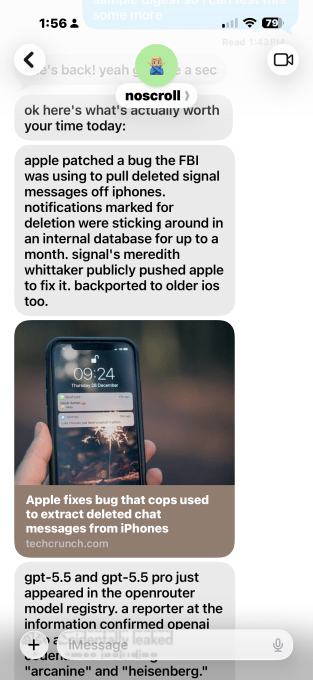
Noscroll introduces a fundamentally different approach to consuming online content. Instead of you spending hours scrolling through feeds, an AI bot does the heavy lifting.
  • AI-Powered Content Reading: The bot actively scans and reads content across the internet, eliminating the need for manual scrolling through social feeds and news sites
  • Intelligent Summarization: Complex articles and threads are automatically condensed into bite-sized summaries, capturing only the essential information you need
  • Personalized Content Curation: The AI learns your interests and preferences over time, delivering a customized feed tailored to what actually matters to you
  • Doomscroll Prevention: Built-in safeguards interrupt the endless-scroll cycle by presenting curated content in a structured, time-limited format
  • Multi-Source Aggregation: The bot pulls from social networks, news outlets, blogs, and other sources, creating a unified content stream without platform switching

Noscroll AI bot interface showing curated content feed

Technical Specifications

Noscroll operates on a modern AI architecture designed for real-time content processing and personalization.

  • Natural Language Processing: Uses advanced NLP models to understand content meaning, context, and relevance rather than simple keyword matching
  • Real-Time Feed Monitoring: Continuously scans multiple content sources simultaneously, updating your curated feed with fresh information throughout the day
  • Machine Learning Personalization: Adapts recommendations based on user engagement patterns, click history, and explicit preference signals
  • Cross-Platform Integration: Connects with major social networks, RSS feeds, and news aggregators through API integrations and web scraping
  • Lightweight Processing: Optimized for fast summarization and delivery, ensuring summaries load quickly without requiring heavy computational resources

Official Benefits

  • Reduces time spent on social media by eliminating mindless scrolling while maintaining access to relevant content
  • Improves information retention through AI-generated summaries that highlight key points and context
  • Decreases anxiety and stress associated with doomscrolling by limiting exposure to negative news cycles
  • Increases productivity by replacing hours of scrolling with minutes of focused content consumption
  • Enhances digital wellness by creating healthy boundaries around social media usage

Real-World Translation

What Each Feature Actually Means:

  • AI-Powered Content Reading: Instead of opening Twitter, Instagram, and Reddit separately and scrolling for 30 minutes, Noscroll reads all three platforms for you and presents only the trending topics and posts relevant to your interests in a single dashboard
  • Intelligent Summarization: When a major news story breaks with 500 different takes across the web, Noscroll extracts the core facts and opposing viewpoints, giving you the full picture in 2-3 sentences instead of reading 10 full articles
  • Personalized Content Curation: If you follow tech news but keep getting distracted by celebrity gossip feeds, Noscroll learns this pattern and stops showing you entertainment content, keeping you focused on what you actually care about
  • Doomscroll Prevention: The bot presents content in time-boxed sessions (e.g., "Your 5-minute digest is ready") rather than an infinite scroll, making it psychologically easier to stop and move on to other tasks
  • Multi-Source Aggregation: Instead of checking Twitter, LinkedIn, Hacker News, and your email newsletter separately, you get one unified feed that combines the best of all sources without duplicates

Before vs After

Before

You spend 45 minutes daily scrolling through social feeds, encountering the same stories multiple times across platforms. Negative news cycles trigger anxiety, and you often can't remember what you actually read. Productivity suffers as the "just one more scroll" mentality takes over.

After

Noscroll delivers your personalized content digest in 5-10 minutes, with AI-generated summaries of what matters. You get the information without the psychological trap of infinite scrolling. Your time is reclaimed, and you're more informed with less stress.

📈 Expected Impact: Users report 70-80% reduction in daily social media time while maintaining or improving information awareness.

Job Relevance Analysis

AI Researcher

HIGH Impact
  • Use Case: AI researchers studying content recommendation systems, NLP summarization, and user behavior patterns can use Noscroll as both a case study and a practical tool for monitoring AI developments across the field
  • Key Benefit: Provides real-world insights into how machine learning personalization works at scale, offering valuable data on algorithm effectiveness and user engagement patterns
  • Workflow Integration: Researchers can integrate Noscroll into their daily workflow to stay current with AI papers, conference announcements, and industry breakthroughs without time-consuming manual research
  • Skill Development: Studying Noscroll's architecture helps researchers understand modern approaches to NLP, recommendation engines, and real-time data processing
  • Research Applications: The tool demonstrates practical applications of machine learning concepts, making it useful for academic papers, presentations, and understanding production-level AI systems
AI Researcher

Advance innovation with AI tools for academic research, data analysis, knowledge representation, decision-making, and AI-powered chatbots.

6,692 Tools
AI Researcher

Social Media Manager

HIGH Impact
  • Use Case: Social media managers use Noscroll to monitor trending topics, competitor activity, and audience sentiment across multiple platforms simultaneously without manual feed checking
  • Key Benefit: Saves 2-3 hours daily on content research and trend monitoring, allowing managers to focus on strategy and content creation rather than endless scrolling
  • Workflow Integration: Noscroll feeds directly into content planning by identifying what's resonating with audiences, what competitors are posting, and emerging topics worth covering
  • Skill Development: Managers develop stronger trend-spotting abilities by seeing AI-curated patterns rather than random feed noise, improving their strategic content decisions
  • Competitive Advantage: By getting curated insights instead of raw feeds, managers can respond faster to trends and create timely, relevant content that drives engagement
Social Media Manager

Unlock top AI tools for everyday workflows for Social Media Manager. See pros, cons & pricing; to streamline your work. Pick the best tool today.

4,400 Tools
Social Media Manager

SEO Specialist

MEDIUM Impact
  • Use Case: SEO specialists use Noscroll to track content trends, identify high-performing topics, and monitor search-related discussions across social platforms and news sites
  • Key Benefit: Quickly identifies emerging keywords and topics gaining traction before they become mainstream, enabling specialists to optimize content ahead of competition
  • Workflow Integration: Feeds into keyword research and content strategy by showing what people are actually discussing and searching for in real-time across the web
  • Skill Development: Specialists improve their ability to spot content opportunities and understand user intent by seeing aggregated, AI-analyzed discussions rather than scattered individual posts
  • Content Planning: Helps identify content gaps and opportunities by showing what topics are trending and what questions audiences are asking across platforms
SEO Specialist

AI resources for searching, article creation, competitive analysis, A-B testing, and blog posting.

3,649 Tools
SEO Specialist

Getting Started

How to Access

  • Visit the Noscroll website and sign up for an account with your email address
  • Connect your social media accounts (Twitter, Reddit, LinkedIn, etc.) to grant Noscroll permission to read your feeds
  • Customize your content preferences by selecting topics, keywords, and sources you want to follow
  • Launch the app or web interface to start receiving your personalized content digest

Quick Start Guide

For Beginners:

  1. Create your account and complete the onboarding wizard that asks about your main interests and preferred content sources
  2. Allow Noscroll to connect to at least 2-3 social platforms or news sources you regularly check
  3. Set your preferred digest time (morning, afternoon, or evening) and frequency (daily or multiple times per day)
  4. Open your first digest and rate the content to help the AI learn your preferences

For Power Users:

  1. Configure advanced filters to exclude specific keywords, topics, or sources that clutter your feed
  2. Set up multiple custom feeds for different interests (e.g., "Tech News," "Industry Updates," "Personal Interests")
  3. Integrate Noscroll with your productivity tools via API or webhooks to automatically route summaries to Slack, email, or note-taking apps
  4. Use the analytics dashboard to track your time saved and content consumption patterns
  5. Fine-tune the summarization length and detail level based on your reading preferences

Pro Tips

  • Set Digest Times: Schedule your Noscroll digest for specific times (like morning coffee or lunch break) to create healthy boundaries and prevent impulse checking throughout the day
  • Use Multiple Feeds: Create separate feeds for work, personal interests, and hobby topics to keep content organized and prevent context-switching fatigue
  • Rate Content Regularly: Actively rate or mark content as "not interested" to train the AI faster, improving personalization within the first week of use
  • Combine with Blocking Tools: Pair Noscroll with app blockers on your phone to prevent falling back into old scrolling habits while the AI handles content consumption

FAQ

Related Topics

Noscroll reviewAI doomscrolling botsocial media AI toolscontent curation AIdigital wellness tools

Table of contents

What's New in NoscrollTechnical SpecificationsOfficial BenefitsReal-World TranslationJob Relevance AnalysisGetting StartedFAQ
Impact LevelMEDIUM
Update ReleasedApril 23, 2026

Best for

AI ResearcherSEO SpecialistSocial Media Manager

Related Use Cases

AI Chatbot ToolsSocial Networking AI ToolsAI Social Media Chatbots

Related Articles

Qwen3.6-27B Review: Dense Model Outperforms 397B MoE
ChatGPT Workspace Agents: Custom AI Bots for Teams
Google Gemini Enterprise Agent Platform Review
All AI Spotlights

Editor's Pick Articles

Claude Personal App Connectors Review
ChatGPT Images 2.0 Review: Better Text & Details
Google Gemini Mac App Review: AI Assistant
All Articles
Special offer for AI Owners – 50% OFF Promotional Plans

Join Our Community

Get the earliest access to hand-picked content weekly for free.

Spam-free guaranteed! Only insights.

Follow Us on Socials

Don't Miss AI Topics

ai art generatorai voice generatorai text generatorai avatar generatorai designai writing assistantai audio generatorai content generatorai dubbingai graphic designai banner generatorai in dropshipping

AI Spotlights

Unleashing Today's trailblazer, this week's game-changers, and this month's legends in AI. Dive in and discover tools that matter.

All AI Spotlights
Qwen3.6-27B Review: Dense Model Outperforms 397B MoE

Qwen3.6-27B Review: Dense Model Outperforms 397B MoE

ChatGPT Workspace Agents: Custom AI Bots for Teams

ChatGPT Workspace Agents: Custom AI Bots for Teams

Google Gemini Enterprise Agent Platform Review

Google Gemini Enterprise Agent Platform Review

Google Workspace Intelligence: AI Office Automation

Google Workspace Intelligence: AI Office Automation

Google Chrome AI Co-Worker: Gemini Auto Browse

Google Chrome AI Co-Worker: Gemini Auto Browse

GPT-5.5 Review: OpenAI's Smarter Coding & Automation Model

GPT-5.5 Review: OpenAI's Smarter Coding & Automation Model

OpenAI Codex with GPT-5.5: AI Coding Revolution

OpenAI Codex with GPT-5.5: AI Coding Revolution

Claude Personal App Connectors Review

Claude Personal App Connectors Review

X's AI Custom Feeds: Grok-Powered Personalization

X's AI Custom Feeds: Grok-Powered Personalization

Anthropic's Mythos Finds 271 Firefox Bugs

Anthropic's Mythos Finds 271 Firefox Bugs

ChatGPT Images 2.0 Review: Better Text & Details

ChatGPT Images 2.0 Review: Better Text & Details

Adobe AI Agent Platform for CX Review

Adobe AI Agent Platform for CX Review

Google Gemini Mac App Review: AI Assistant

Google Gemini Mac App Review: AI Assistant

TinyFish AI Platform Review: Web Infrastructure for AI Agents

TinyFish AI Platform Review: Web Infrastructure for AI Agents

Google Home Gemini Update: Fixes Interruptions

Google Home Gemini Update: Fixes Interruptions

OpenAI Agents SDK Update: Enterprise Safety & Capability

OpenAI Agents SDK Update: Enterprise Safety & Capability

IBM Autonomous Security Service Review

IBM Autonomous Security Service Review

GPT-Rosalind Review: OpenAI's Life Sciences AI

GPT-Rosalind Review: OpenAI's Life Sciences AI

Claude Opus 4.7 Review: Enterprise AI Without Hallucinations

Claude Opus 4.7 Review: Enterprise AI Without Hallucinations

You Might Like These Latest News

All AI News

Stay informed with the latest AI news, breakthroughs, trends, and updates shaping the future of artificial intelligence.

AI Models Show Alarming Scam and Social Engineering Skills

Apr 24, 2026
AI Models Show Alarming Scam and Social Engineering Skills

Google Cloud Launches New AI Chips to Challenge Nvidia

Apr 24, 2026
Google Cloud Launches New AI Chips to Challenge Nvidia

AI Bubble Risk Triggers Financial Crisis Warning

Apr 24, 2026
AI Bubble Risk Triggers Financial Crisis Warning

Sierra Acquires Fragment to Expand AI Customer Service

Apr 24, 2026
Sierra Acquires Fragment to Expand AI Customer Service

Meta Cuts 10% of Staff Amid AI Investment Push

Apr 24, 2026
Meta Cuts 10% of Staff Amid AI Investment Push

Anthropic's Mythos AI breach undermines safety claims

Apr 24, 2026
Anthropic's Mythos AI breach undermines safety claims

Tim Cook's Apple Legacy Shift Signals Major Changes

Apr 24, 2026
Tim Cook's Apple Legacy Shift Signals Major Changes

Stanford's Viral AI Course Draws Silicon Valley Leaders

Apr 24, 2026
Stanford's Viral AI Course Draws Silicon Valley Leaders

First Quantum-Safe Ransomware Detected

Apr 24, 2026
First Quantum-Safe Ransomware Detected
Tools of The Day

Tools of The Day

Discover the top AI tools handpicked daily by our editors to help you stay ahead with the latest and most innovative solutions.


10MAR
Adobe Illustrator
Adobe Illustrator
9MAR
Adobe Firefly
Adobe Firefly
8MAR
Adobe Sensei
Adobe Sensei
7MAR
Adobe Photoshop
Adobe Photoshop
6MAR
Adobe Firefly
Adobe Firefly
5MAR
Shap-E
Shap-E
4MAR
Point-E
Point-E

Explore AI Tools of The Day