










Age of AI Toolsv2.beta
For YouJobsUse Cases
Media-HubNEW

Join Our Community

Get the earliest access to hand-picked content weekly for free.

Spam-free guaranteed! Only insights.
Join Our Community

Get the earliest access to hand-picked content weekly for free.

Spam-free guaranteed! Only insights.

Trusted by Leading Review and Discovery Websites

Age of AI Tools on Product HuntApproved on SaaSHubAlternativeTo
AI Tools
  • For You!
  • Discover All AI Tools
  • Best AI Tools
  • Free AI Tools
  • Tools of the DayNEW
  • All Use Cases
  • All Jobs
Trend UseCases
  • AI Image Generators
  • AI Video Generators
  • AI Voice Generators
Trend Jobs
  • Graphic Designer
  • SEO Specialist
  • Email Marketing Specialist
Media Hub
  • Go to Media Hub
  • AI News
  • AI Tools Spotlights
Age of AI Tools
  • What's New
  • Story of Age of AI Tools
  • Cookies & Privacy
  • Terms & Conditions
  • Request Update
  • Bug Report
  • Contact Us
Submit & Advertise
  • Submit AI Tool
  • Promote Your Tool50% Off

Agent of AI Age

Looking to discover new AI tools? Just ask our AI Agent

Copyright © 2026 Age of AI Tools. All Rights Reserved.

Media HubTools SpotlightGoogle Photos AI Enhance: Smart Photo Editing Review
9 Apr 20265 min read

Google Photos AI Enhance: Smart Photo Editing Review

Google Photos AI Enhance: Smart Photo Editing Review

🎯 Quick Impact Summary

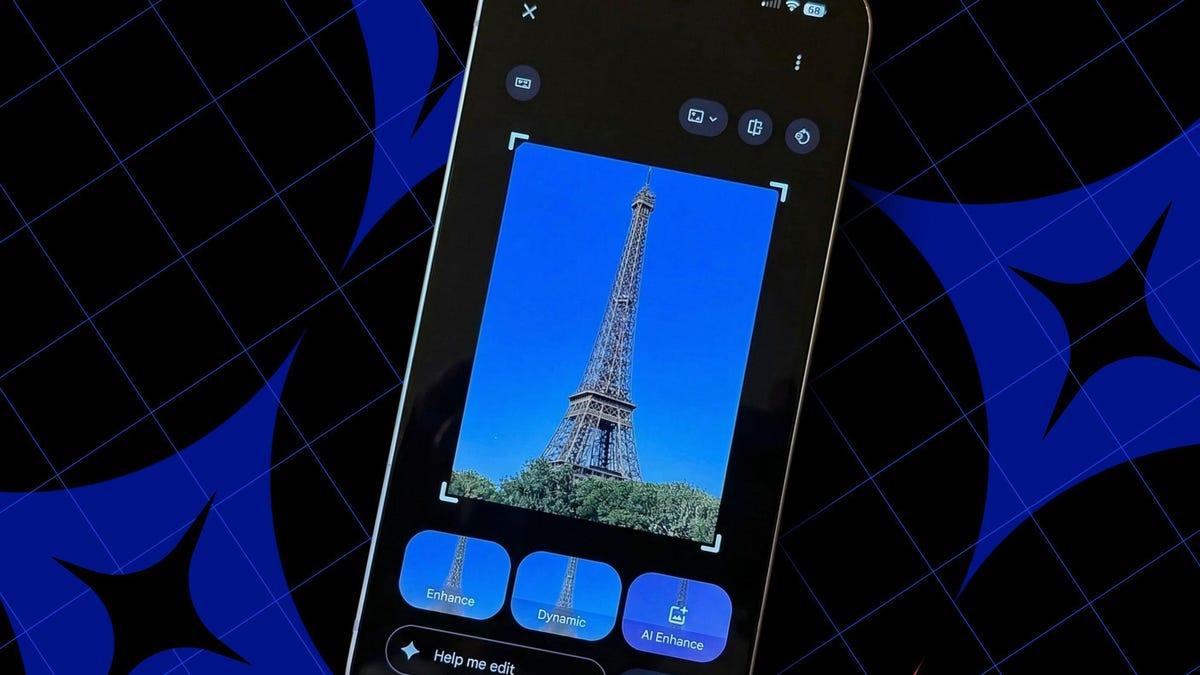
Google Photos' AI Enhance tool brings generative AI-powered photo editing directly to your phone, automatically cropping, relighting, and fixing imperfect shots in seconds. Rolling out globally to Android users, this feature promises to transform casual photography into polished results without manual editing. However, the tool's effectiveness varies significantly depending on your photo's content and lighting conditions.

What's New in Google Photos AI Enhance

Google Photos has introduced AI Enhance, a generative AI feature that analyzes your photos and applies intelligent improvements automatically. This tool represents a significant shift toward hands-free photo enhancement, bringing professional-grade editing capabilities to everyday smartphone users.

  • Automatic Cropping: The AI intelligently reframes your photos to improve composition, removing distracting elements and centering subjects for better visual balance
  • Smart Relighting: Generative AI adjusts lighting conditions in real-time, brightening underexposed areas and balancing harsh shadows for more flattering results
  • Photo Restoration: The tool fixes common photography issues like blur, noise, and color cast problems with a single tap
  • One-Tap Enhancement: All improvements apply instantly without requiring manual adjustment or multiple editing steps
  • Global Android Rollout: The feature is now available to Android users worldwide, making it accessible to millions of Google Photos users
  • Generative AI Integration: Uses advanced machine learning models trained on millions of photos to understand composition and lighting principles

Technical Specifications

AI Enhance leverages Google's generative AI infrastructure to process photos on-device and in the cloud, depending on complexity. The technology combines computer vision with generative modeling to understand and improve photographic elements.

  • Processing Method: Hybrid on-device and cloud-based processing for optimal speed and quality balance
  • AI Model: Built on Google's generative AI technology, trained on professional photography principles and composition standards
  • Supported Formats: Works with standard photo formats stored in Google Photos library (JPEG, PNG, and other common formats)
  • Device Requirements: Available on Android devices with Google Photos app version 6.0 and later
  • Processing Speed: Enhancements apply within seconds, with results visible immediately in the photo preview

Official Benefits

  • Instant Professional Results: Transform casual snapshots into polished photos without manual editing knowledge or software expertise
  • Time Savings: Eliminates the need for third-party editing apps or manual adjustment steps, saving minutes per photo
  • Improved Photo Quality: Automatically corrects common issues like poor lighting, awkward framing, and color problems
  • Accessibility: Makes professional-grade photo enhancement available to all users, regardless of editing experience level
  • Seamless Integration: Works directly within Google Photos, requiring no app switching or complex workflows

Real-World Translation

What Each Feature Actually Means:

  • Automatic Cropping: When you take a group photo where people are scattered across the frame, AI Enhance recognizes the subjects and reframes the shot to center them better, removing empty space and improving the overall composition automatically
  • Smart Relighting: If you photograph a friend indoors under dim lighting and their face appears dark, the tool brightens facial features while maintaining natural shadows, making the photo look like it was taken in better lighting conditions
  • Photo Restoration: A slightly blurry vacation photo gets sharpened, color-shifted sunset photos get corrected to show accurate tones, and grainy low-light shots become cleaner and more detailed
  • One-Tap Simplicity: Instead of opening a separate editing app, adjusting multiple sliders, and learning editing terminology, you simply tap "Enhance" and get results instantly
  • Generative Intelligence: The AI understands photographic principles like the rule of thirds, leading lines, and proper exposure, applying these principles to your specific photo rather than using generic filters

Before vs After

Before

Users had to manually edit photos using third-party apps like Snapseed or Lightroom, requiring knowledge of editing principles, multiple adjustment steps, and significant time investment. Photos with poor lighting, awkward framing, or minor imperfections often remained unpolished unless users invested effort in manual correction.

After

With AI Enhance, a single tap applies intelligent improvements to cropping, lighting, and overall quality. Users get professional-looking results instantly without opening separate apps or understanding editing terminology, making photo enhancement accessible to everyone.

📈 Expected Impact: Users can enhance photos 5-10x faster while achieving results comparable to manual editing for most everyday photography scenarios.

Job Relevance Analysis

Photographer

MEDIUM Impact
  • Use Case: Photographers can use AI Enhance as a quick preview tool to assess how photos might look with professional adjustments before applying their own editing style
  • Key Benefit: Provides instant feedback on composition and lighting choices, helping photographers understand how their shots compare to AI-optimized versions
  • Workflow Integration: Works as a supplementary tool alongside professional editing software like Lightroom or Capture One, not a replacement for professional workflows
  • Skill Development: Helps photographers learn composition principles by observing how the AI reframes and relights their images
  • Limitation: Professional photographers typically require more control over specific adjustments and color grading than AI Enhance provides
Photographer

uses AI to edit images, enhance headshots, restore old photos, make masks, product photography.

2,906 Tools
Photographer

Video Editor

LOW Impact
  • Use Case: Video editors working with still frames or thumbnail images can use AI Enhance to quickly improve individual shots for social media or promotional content
  • Key Benefit: Speeds up thumbnail and promotional image preparation without switching to dedicated photo editing software
  • Workflow Integration: Fits into pre-production workflows for preparing still images extracted from video projects
  • Skill Development: Limited application to core video editing skills, though useful for understanding AI-assisted image enhancement principles
  • Primary Focus: Video editors' primary tools remain video editing software; AI Enhance serves as a supplementary utility
Video Editor

Explore handpicked AI solutions & examples for Video Editor. Check key features at a glance; to save time and cut costs. Find the right AI tools now.

3,775 Tools
Video Editor

AI Researcher

HIGH Impact
  • Use Case: AI researchers studying generative models, computer vision, and image enhancement can analyze how Google's implementation handles composition, lighting, and restoration tasks
  • Key Benefit: Provides real-world examples of generative AI applied to consumer photography, offering insights into model behavior and limitations
  • Workflow Integration: Serves as a case study for understanding how generative AI handles variable inputs and produces consistent quality improvements
  • Skill Development: Researchers can study the tool's successes and failures to understand current limitations in generative image enhancement and identify research opportunities
  • Research Applications: Useful for benchmarking against other AI enhancement tools and analyzing how machine learning handles subjective photographic principles
AI Researcher

Advance innovation with AI tools for academic research, data analysis, knowledge representation, decision-making, and AI-powered chatbots.

6,692 Tools
AI Researcher

Getting Started

How to Access

  • Download or update Google Photos to version 6.0 or later from the Google Play Store
  • Ensure your Android device has sufficient storage and a stable internet connection
  • Open Google Photos and navigate to any photo in your library
  • Look for the "Enhance" button or AI Enhance option in the editing tools menu

Quick Start Guide

For Beginners:

  1. Open Google Photos and select any photo you want to improve
  2. Tap the edit button (pencil icon) at the bottom of the screen
  3. Look for "Enhance" or "AI Enhance" in the editing options menu
  4. Tap to apply the enhancement, then save your improved photo

For Power Users:

  1. Batch select multiple photos from your library that need enhancement
  2. Apply AI Enhance to all selected photos simultaneously for efficient processing
  3. Compare the enhanced versions with originals using the before/after toggle
  4. Fine-tune specific enhancements using additional editing tools if needed
  5. Export enhanced photos to other apps or cloud services for further processing

Pro Tips

  • Test on Varied Photos: Try AI Enhance on different photo types (portraits, landscapes, low-light shots) to understand where it performs best and where it struggles
  • Use Before/After Toggle: Always compare the original and enhanced versions to ensure the AI improvements match your vision before saving
  • Combine with Other Tools: Use AI Enhance as a starting point, then apply additional Google Photos editing tools for more precise control
  • Check Internet Connection: Ensure stable connectivity for optimal processing, as some enhancements may use cloud-based processing for complex adjustments

FAQ

Related Topics

Google Photos AI EnhanceAI photo editorphoto enhancement toolgenerative AI photography

Table of contents

What's New in Google Photos AI EnhanceTechnical SpecificationsOfficial BenefitsReal-World TranslationJob Relevance AnalysisGetting StartedFAQ
Impact LevelMEDIUM
Update ReleasedApril 7, 2026

Best for

AI ResearcherPhotographerVideo Editor

Related Use Cases

AI Travel ToolsAI Image EditorsAI Augmented Reality Tools

Related Articles

ChatGPT Pro $100/Month: New Tier Review
Google Gemini 3D Models: Interactive AI Simulations
Poke AI Agent: Text-Based Automation for Everyone
All AI Spotlights

Editor's Pick Articles

Poke AI Agent: Text-Based Automation for Everyone
Intel Joins Elon Musk's Terafab Semiconductor Project
Google's Offline AI Dictation App Review
All Articles
Special offer for AI Owners – 50% OFF Promotional Plans

Join Our Community

Get the earliest access to hand-picked content weekly for free.

Spam-free guaranteed! Only insights.

Follow Us on Socials

Don't Miss AI Topics

ai art generatorai voice generatorai text generatorai avatar generatorai designai writing assistantai audio generatorai content generatorai dubbingai graphic designai banner generatorai in dropshipping

AI Spotlights

Unleashing Today's trailblazer, this week's game-changers, and this month's legends in AI. Dive in and discover tools that matter.

All AI Spotlights
ChatGPT Pro $100/Month: New Tier Review

ChatGPT Pro $100/Month: New Tier Review

Google Gemini 3D Models: Interactive AI Simulations

Google Gemini 3D Models: Interactive AI Simulations

Poke AI Agent: Text-Based Automation for Everyone

Poke AI Agent: Text-Based Automation for Everyone

OSGym Review: $0.23/Day OS Infrastructure for AI Agents

OSGym Review: $0.23/Day OS Infrastructure for AI Agents

Tubi ChatGPT App: First Streamer Native Integration

Tubi ChatGPT App: First Streamer Native Integration

Google's Offline AI Dictation App Review

Google's Offline AI Dictation App Review

MaxToki Review: AI Predicts Cellular Aging

MaxToki Review: AI Predicts Cellular Aging

Apple Music AI Playlist Curation Review

Apple Music AI Playlist Curation Review

Microsoft's New Voice & Image AI Models

Microsoft's New Voice & Image AI Models

Trinity Large Thinking: Open-Source Reasoning Model

Trinity Large Thinking: Open-Source Reasoning Model

Gemini API Inference Tiers: Cost vs Reliability

Gemini API Inference Tiers: Cost vs Reliability

Slack AI Makeover: 30 New Features Transform Productivity

Slack AI Makeover: 30 New Features Transform Productivity

ChatGPT on Apple CarPlay: Voice AI Now in Your Car

ChatGPT on Apple CarPlay: Voice AI Now in Your Car

GLM-5V-Turbo Review: Vision Coding Model

GLM-5V-Turbo Review: Vision Coding Model

Harrier-OSS-v1: Microsoft's SOTA Multilingual Embedding Models

Harrier-OSS-v1: Microsoft's SOTA Multilingual Embedding Models

Copilot Researcher: Microsoft's AI Accuracy Upgrade

Copilot Researcher: Microsoft's AI Accuracy Upgrade

Google TurboQuant Review: Real-Time AI Quantization

Google TurboQuant Review: Real-Time AI Quantization

A-Evolve: Automated AI Agent Development Framework

A-Evolve: Automated AI Agent Development Framework

Gemini Switching Tools: Import Chats from Other AI Chatbots

Gemini Switching Tools: Import Chats from Other AI Chatbots

You Might Like These Latest News

All AI News

Stay informed with the latest AI news, breakthroughs, trends, and updates shaping the future of artificial intelligence.

Black Forest Labs Expands AI Image Generation to Physical AI

Apr 10, 2026
Black Forest Labs Expands AI Image Generation to Physical AI

Meta AI App Jumps to No. 5 After Muse Spark Launch

Apr 10, 2026
Meta AI App Jumps to No. 5 After Muse Spark Launch

Google and Intel Partner on Custom AI Chips

Apr 10, 2026
Google and Intel Partner on Custom AI Chips

Florida AG Investigates OpenAI Over FSU Shooting

Apr 10, 2026
Florida AG Investigates OpenAI Over FSU Shooting

AI Startup Mercor Faces Crisis After Data Breach

Apr 10, 2026
AI Startup Mercor Faces Crisis After Data Breach

Tech Giants Unite on AI Cybersecurity Initiative

Apr 9, 2026
Tech Giants Unite on AI Cybersecurity Initiative

Anthropic Launches AI Cybersecurity Initiative

Apr 9, 2026
Anthropic Launches AI Cybersecurity Initiative

Anthropic's AI Model Finds Security Flaws in Every OS

Apr 9, 2026
Anthropic's AI Model Finds Security Flaws in Every OS

Nvidia-Backed Firmus Hits $5.5B Valuation

Apr 9, 2026
Nvidia-Backed Firmus Hits $5.5B Valuation
Tools of The Day

Tools of The Day

Discover the top AI tools handpicked daily by our editors to help you stay ahead with the latest and most innovative solutions.


10MAR
Adobe Illustrator
Adobe Illustrator
9MAR
Adobe Firefly
Adobe Firefly
8MAR
Adobe Sensei
Adobe Sensei
7MAR
Adobe Photoshop
Adobe Photoshop
6MAR
Adobe Firefly
Adobe Firefly
5MAR
Shap-E
Shap-E
4MAR
Point-E
Point-E

Explore AI Tools of The Day











































