Age of AI Toolsv2.beta
For YouJobsUse Cases
Media-HubNEW

Join Our Community

Get the earliest access to hand-picked content weekly for free.

Spam-free guaranteed! Only insights.
Join Our Community

Get the earliest access to hand-picked content weekly for free.

Spam-free guaranteed! Only insights.

Trusted by Leading Review and Discovery Websites

Age of AI Tools on Product HuntApproved on SaaSHubAlternativeTo
AI Tools
  • For You!
  • Discover All AI Tools
  • Best AI Tools
  • Free AI Tools
  • Tools of the DayNEW
  • All Use Cases
  • All Jobs
Trend UseCases
  • AI Image Generators
  • AI Video Generators
  • AI Voice Generators
Trend Jobs
  • Graphic Designer
  • SEO Specialist
  • Email Marketing Specialist
Media Hub
  • Go to Media Hub
  • AI News
  • AI Tools Spotlights
Age of AI Tools
  • What's New
  • Story of Age of AI Tools
  • Cookies & Privacy
  • Terms & Conditions
  • Request Update
  • Bug Report
  • Contact Us
Submit & Advertise
  • Submit AI Tool
  • Promote Your Tool50% Off

Agent of AI Age

Looking to discover new AI tools? Just ask our AI Agent

Copyright © 2026 Age of AI Tools. All Rights Reserved.

Media HubTools SpotlightGoogle Gemini Mac App Review: AI Assistant
17 Apr 20265 min read

Google Gemini Mac App Review: AI Assistant

Google Gemini Mac App Review: AI Assistant

🎯 Quick Impact Summary

Google's new Gemini app for macOS fundamentally changes how Mac users interact with AI by eliminating the need to switch between applications. With a simple keyboard shortcut and floating chat bubble interface, Gemini becomes as accessible as Spotlight, letting you pull AI assistance into any task without disrupting your workflow. The app supports screen sharing for context-aware responses and multimodal generation including images, videos, and music.

What's New in Google Gemini for macOS

Google has brought its Gemini AI assistant to macOS as a native application, making conversational AI instantly accessible from anywhere on your desktop. This release transforms how Mac users integrate AI into their daily workflows.
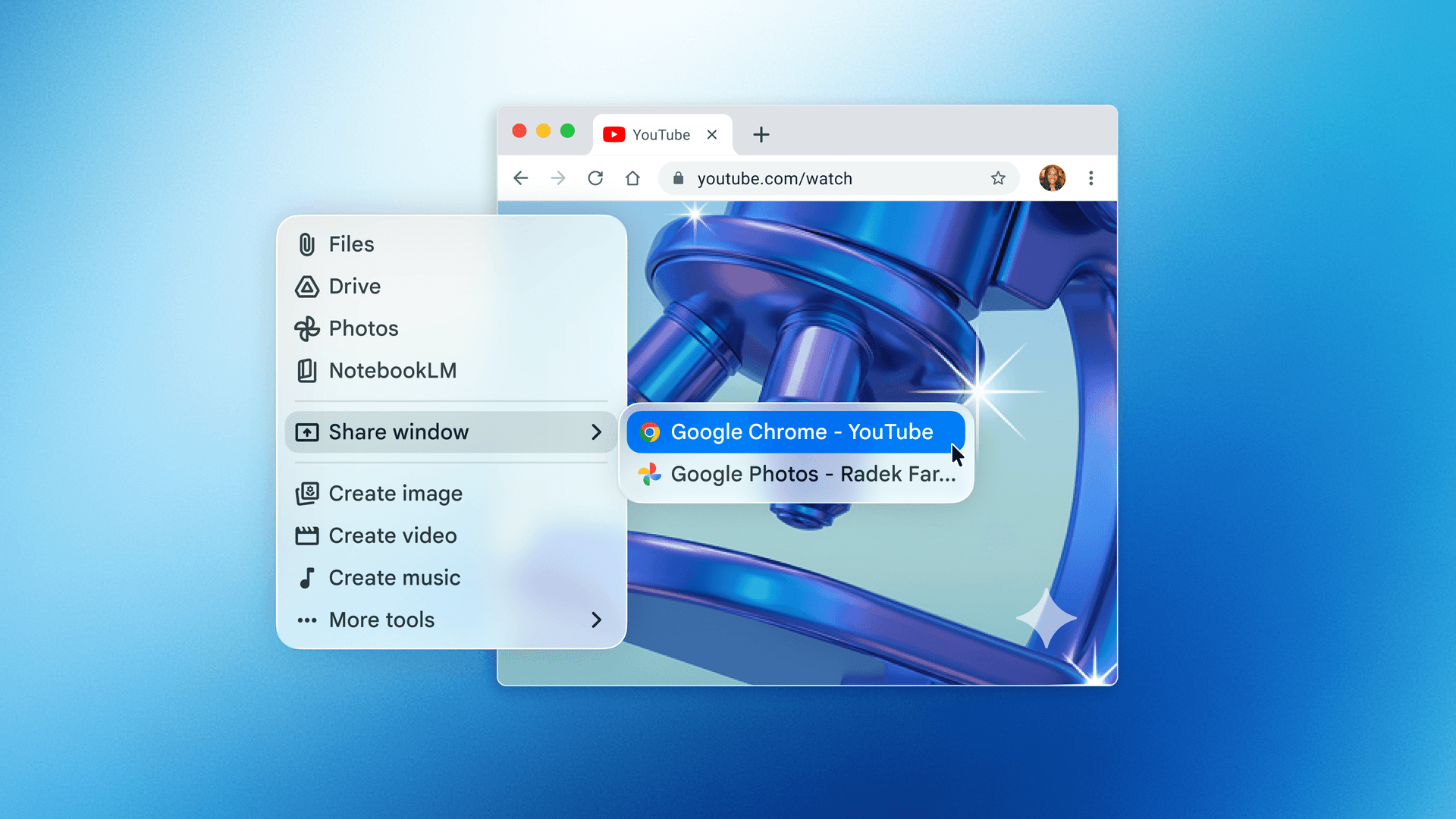
  • Option + Space Keyboard Shortcut: Summon a floating chat bubble instantly from anywhere on your Mac, similar to Spotlight search functionality
  • Screen Context Sharing: Grant Gemini permission to view your current window and use that visual context to provide more accurate, relevant answers
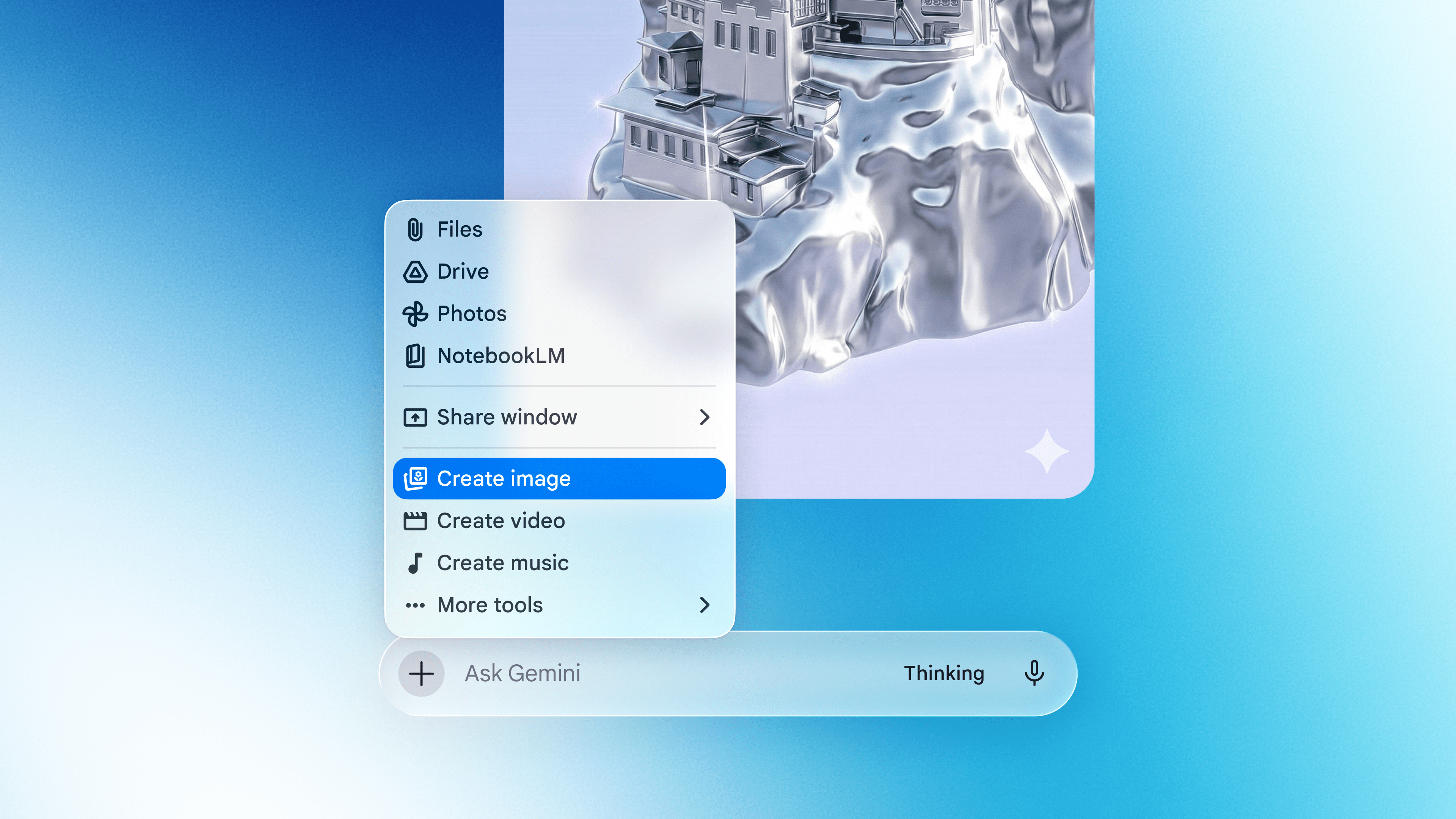
  • Multimodal Generation: Create images, videos, and music directly within the Gemini interface without switching to separate tools
  • Floating Chat Interface: Keep the Gemini bubble visible while working in other applications, enabling seamless multitasking
  • System Information Access: Gemini can access relevant system data to provide more intelligent, contextual responses tailored to your Mac environment
  • Native macOS Integration: Built specifically for macOS rather than a web wrapper, ensuring smooth performance and native keyboard shortcuts

Source image

Technical Specifications

The Gemini macOS app is engineered as a native application with deep system integration, delivering performance optimized for Apple's hardware architecture.
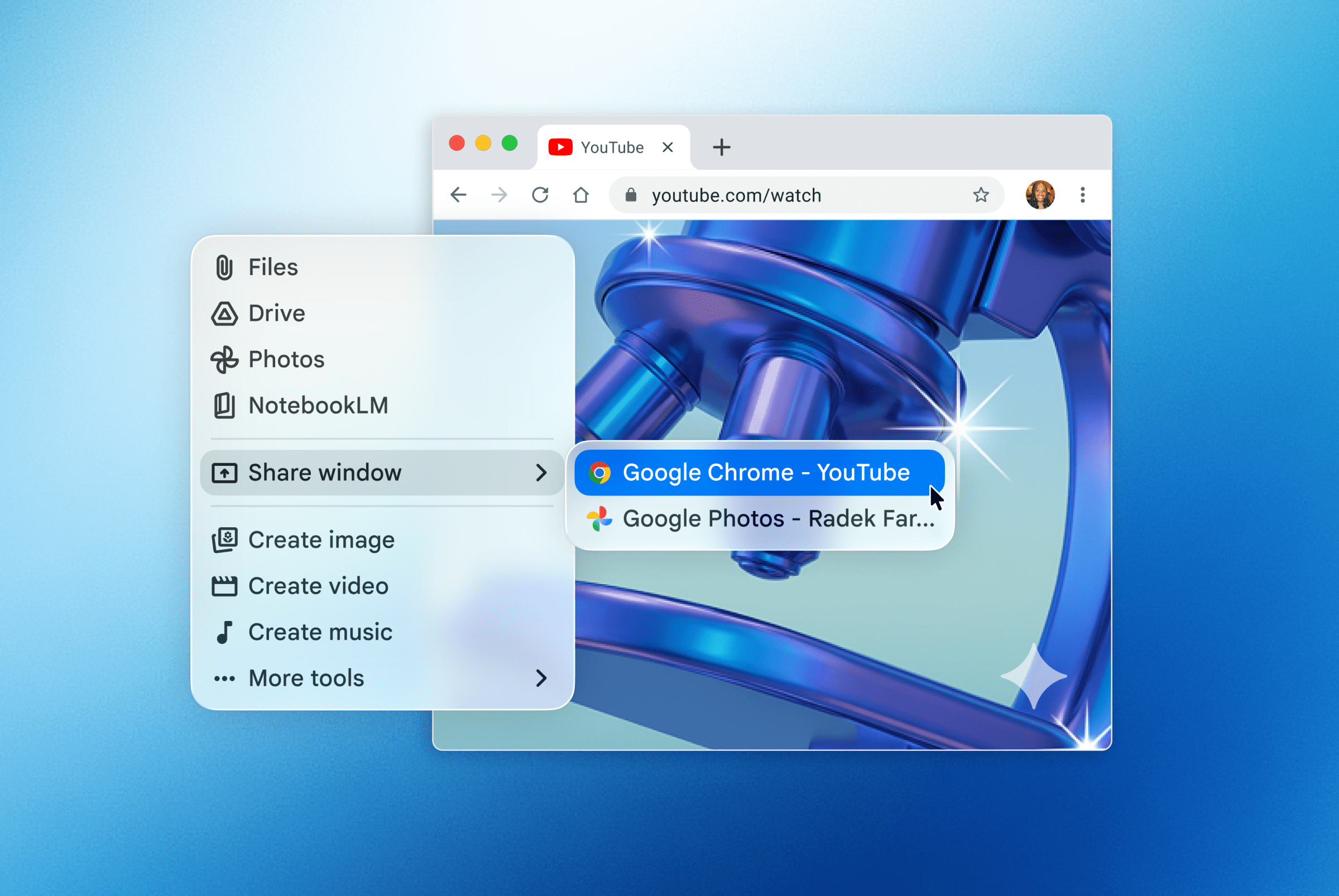
  • Platform: Native macOS application with support for Apple Silicon and Intel-based Macs
  • Activation Method: Option + Space keyboard shortcut for instant access from any application
  • Screen Sharing Protocol: Requires explicit user permission to access window content and system information before sharing context
  • Multimodal Capabilities: Supports text input, image generation, video creation, and music composition within a single interface
  • Architecture: Integrated with macOS system frameworks for seamless window management and floating UI elements

Source image

Official Benefits

  • Zero Context Switching: Access AI assistance without minimizing windows or opening new browser tabs, keeping your workflow uninterrupted
  • Screen-Aware Responses: Share your current window to receive answers tailored to what you're actually looking at, improving accuracy and relevance
  • All-in-One Creative Suite: Generate images, videos, and music directly within the app instead of juggling multiple specialized tools
  • Instant Availability: Option + Space puts Gemini one keystroke away from anywhere on your Mac, matching the speed of native system tools
  • Permission-Based Privacy: Users maintain explicit control over what system information Gemini can access before sharing any content

Real-World Translation

What Each Feature Actually Means:

  • Option + Space Activation: Instead of opening a browser, navigating to Google's website, and waiting for the page to load, you now press two keys and start typing your question immediately from any application
  • Screen Context Sharing: You're reading a complex technical document and need clarification. Rather than copying and pasting text into a separate chat window, you share your screen and Gemini analyzes the exact content you're viewing
  • Floating Chat Bubble: While designing a presentation, you can keep the Gemini window visible in the corner, ask questions about your content, and receive answers without minimizing your main application
  • Multimodal Generation: A game developer needs concept art while working in their development environment. Instead of switching to an image generator, they create the artwork directly within Gemini and drag it into their project
  • System Information Access: Gemini can understand your Mac's capabilities and suggest optimizations or workflows that match your specific hardware configuration

Before vs After

Before

Mac users had to open a web browser, navigate to Google's website, and wait for the page to load each time they wanted to use Gemini. Context switching between applications disrupted workflow, and generating creative content required jumping between multiple specialized tools. Screen sharing for context awareness wasn't available, forcing users to manually copy and paste information.

After

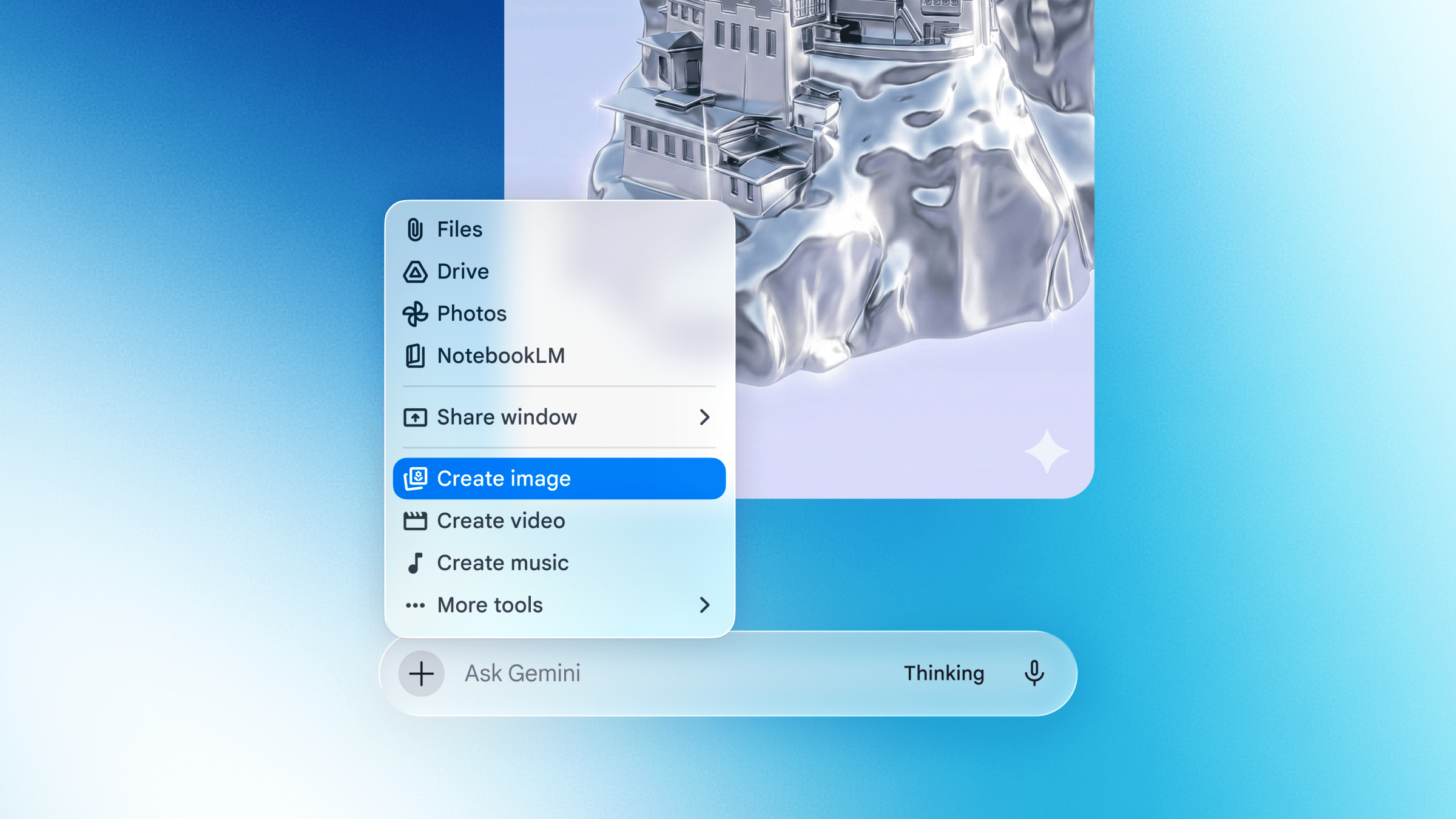
Gemini is now one keyboard shortcut away from any application on your Mac. You can instantly share your screen context for smarter answers, generate images and videos without leaving your workflow, and maintain focus on your primary task while accessing AI assistance. The floating interface keeps Gemini accessible without disrupting your main work.

📈 Expected Impact: Mac users will see a measurable reduction in context switching time and workflow interruptions, with faster access to AI assistance integrated directly into their existing applications.
Source image

Job Relevance Analysis

AI Researcher

HIGH Impact
  • Use Case: Researchers use Gemini to quickly brainstorm hypotheses, analyze research papers by sharing PDFs or documents on screen, and generate visualizations or diagrams to support their work without leaving their research environment
  • Key Benefit: Instant access to conversational AI for literature review, methodology discussion, and hypothesis generation accelerates the research ideation phase significantly
  • Workflow Integration: The Option + Space shortcut fits seamlessly into research workflows, allowing researchers to pause their work, ask Gemini clarifying questions, and resume without losing context
  • Skill Development: Researchers develop better prompt engineering skills and learn to leverage AI for accelerating repetitive analytical tasks, freeing time for higher-level thinking
  • Practical Scenario: An AI researcher reviewing competing papers can share their screen showing multiple research abstracts and ask Gemini to identify common methodologies and gaps in the literature instantly
AI Researcher

Advance innovation with AI tools for academic research, data analysis, knowledge representation, decision-making, and AI-powered chatbots.

6,692 Tools
AI Researcher

Game Developer

HIGH Impact
  • Use Case: Game developers use Gemini to generate concept art, brainstorm game mechanics, debug code logic, and create narrative elements without leaving their development environment or design tools
  • Key Benefit: The multimodal generation capability (images, videos, music) provides immediate creative assets that developers can iterate on and integrate into their projects
  • Workflow Integration: While working in game engines like Unity or Unreal, developers summon Gemini to generate placeholder assets, test dialogue, or explore design ideas without context switching
  • Skill Development: Developers learn to leverage AI for rapid prototyping, asset generation, and creative problem-solving, accelerating the iteration cycle from concept to implementation
  • Practical Scenario: A game developer designing a fantasy RPG can share their current level design on screen, ask Gemini to generate ambient music and concept art for NPCs, and receive creative assets within seconds
Game Developer

Use AI to simplify your game development from 3D rendering to character building, story development, debugging, and even AR!

4,918 Tools
Game Developer

3D Modeler

MEDIUM Impact
  • Use Case: 3D modelers use Gemini to generate reference images, brainstorm design variations, receive feedback on modeling approaches, and create texture concepts without switching away from their modeling software
  • Key Benefit: Quick access to AI-generated reference materials and design suggestions accelerates the modeling pipeline and helps overcome creative blocks
  • Workflow Integration: While working in Blender, Maya, or similar tools, modelers can quickly share their viewport and ask Gemini for design feedback or generate reference images for complex organic shapes
  • Skill Development: Modelers develop better communication skills for describing 3D concepts to AI and learn to leverage generative tools as part of their creative process
  • Practical Scenario: A 3D modeler creating a character model can share their current work-in-progress, ask Gemini to suggest anatomical improvements or generate reference poses, and use those suggestions to refine their model
3D Modeler

Create beautiful 3D renders in minutes with AI tools for 3D design, characters, animation, and VR.

2,644 Tools
3D Modeler

Getting Started

How to Access

  1. Visit Google's official Gemini app page or the Mac App Store to download the native Gemini application
  2. Install the app on your Mac by following the standard installation process
  3. Launch Gemini and sign in with your Google account to authenticate and enable all features
  4. Grant the necessary permissions for screen sharing and system information access when prompted

Quick Start Guide

For Beginners:

  1. Press Option + Space to open the Gemini floating chat bubble from any application
  2. Type your question directly into the chat field and press Enter to receive an answer
  3. For screen context, click the screen share button in the Gemini window and confirm the permission prompt
  4. Start with simple questions to familiarize yourself with response quality and formatting

For Power Users:

  1. Customize your keyboard shortcuts in System Preferences if you prefer a different activation key combination
  2. Enable persistent screen sharing for specific applications to streamline workflows requiring constant context
  3. Experiment with multimodal prompts that combine text, images, and requests for video or music generation
  4. Create custom workflows by chaining multiple Gemini requests together for complex tasks like research synthesis or creative projects
  5. Integrate Gemini responses into your clipboard for seamless pasting into other applications

Pro Tips

  • Leverage Screen Context: Always share your screen when asking questions about specific documents, code, or designs to receive more accurate and relevant responses
  • Use Keyboard Shortcuts: Master the Option + Space shortcut to make Gemini access a reflex, reducing friction and increasing adoption in your daily workflow
  • Batch Creative Requests: Generate multiple image or music variations in succession to explore different creative directions before selecting your favorite
  • Permission Management: Review and adjust what system information Gemini can access in your Mac's privacy settings to balance functionality with security preferences

FAQ

FAQ

Related Topics

Gemini macOS appGoogle Gemini Mac reviewAI assistant for MacmacOS AI tools

Table of contents

What's New in Google Gemini for macOSTechnical SpecificationsOfficial BenefitsReal-World TranslationJob Relevance AnalysisGetting StartedFAQFAQ
Impact LevelMEDIUM
Update ReleasedApril 1, 2026

Best for

AI ResearcherGame Developer3D Modeler

Related Use Cases

AI Chatbot ToolsAI Travel ToolsAI Social Media Chatbots

Related Articles

TinyFish AI Platform Review: Web Infrastructure for AI Agents
Google Home Gemini Update: Fixes Interruptions
OpenAI Agents SDK Update: Enterprise Safety & Capability
All AI Spotlights

Editor's Pick Articles

Anthropic's Mythos AI Model Triggers Cybersecurity Wake-Up Call
Google Photos AI Enhance: Smart Photo Editing Review
Poke AI Agent: Text-Based Automation for Everyone
All Articles
Special offer for AI Owners – 50% OFF Promotional Plans

Join Our Community

Get the earliest access to hand-picked content weekly for free.

Spam-free guaranteed! Only insights.

Follow Us on Socials

Don't Miss AI Topics

ai art generatorai voice generatorai text generatorai avatar generatorai designai writing assistantai audio generatorai content generatorai dubbingai graphic designai banner generatorai in dropshipping

AI Spotlights

Unleashing Today's trailblazer, this week's game-changers, and this month's legends in AI. Dive in and discover tools that matter.

All AI Spotlights
TinyFish AI Platform Review: Web Infrastructure for AI Agents

TinyFish AI Platform Review: Web Infrastructure for AI Agents

Google Home Gemini Update: Fixes Interruptions

Google Home Gemini Update: Fixes Interruptions

OpenAI Agents SDK Update: Enterprise Safety & Capability

OpenAI Agents SDK Update: Enterprise Safety & Capability

IBM Autonomous Security Service Review

IBM Autonomous Security Service Review

GPT-Rosalind Review: OpenAI's Life Sciences AI

GPT-Rosalind Review: OpenAI's Life Sciences AI

Claude Opus 4.7 Review: Enterprise AI Without Hallucinations

Claude Opus 4.7 Review: Enterprise AI Without Hallucinations

OpenAI Codex Update: Desktop Control & Image Generation

OpenAI Codex Update: Desktop Control & Image Generation

Google AI Mode Review: Side-by-Side Search

Google AI Mode Review: Side-by-Side Search

VimRAG Review: Alibaba's Multimodal RAG Framework

VimRAG Review: Alibaba's Multimodal RAG Framework

ChatGPT Pro $100/Month: New Tier Review

ChatGPT Pro $100/Month: New Tier Review

Google Gemini 3D Models: Interactive AI Simulations

Google Gemini 3D Models: Interactive AI Simulations

Google Photos AI Enhance: Smart Photo Editing Review

Google Photos AI Enhance: Smart Photo Editing Review

Poke AI Agent: Text-Based Automation for Everyone

Poke AI Agent: Text-Based Automation for Everyone

OSGym Review: $0.23/Day OS Infrastructure for AI Agents

OSGym Review: $0.23/Day OS Infrastructure for AI Agents

Tubi ChatGPT App: First Streamer Native Integration

Tubi ChatGPT App: First Streamer Native Integration

Google's Offline AI Dictation App Review

Google's Offline AI Dictation App Review

MaxToki Review: AI Predicts Cellular Aging

MaxToki Review: AI Predicts Cellular Aging

Apple Music AI Playlist Curation Review

Apple Music AI Playlist Curation Review

Microsoft's New Voice & Image AI Models

Microsoft's New Voice & Image AI Models

You Might Like These Latest News

All AI News

Stay informed with the latest AI news, breakthroughs, trends, and updates shaping the future of artificial intelligence.

Cursor Raises $2B at $50B Valuation

Apr 18, 2026
Cursor Raises $2B at $50B Valuation

Stellantis Partners With Microsoft on AI Strategy

Apr 17, 2026
Stellantis Partners With Microsoft on AI Strategy

Musk Sues OpenAI Over Mission Drift

Apr 17, 2026
Musk Sues OpenAI Over Mission Drift

Trump Officials Push Banks to Test Anthropic's AI Model

Apr 16, 2026
Trump Officials Push Banks to Test Anthropic's AI Model

Apple Testing Four Smart Glasses Designs

Apr 16, 2026
Apple Testing Four Smart Glasses Designs

Meta and KAUST Propose Neural Computers

Apr 16, 2026
Meta and KAUST Propose Neural Computers

Unitree's $4,370 Humanoid Robot Now Available on AliExpress

Apr 16, 2026
Unitree's $4,370 Humanoid Robot Now Available on AliExpress

Stanford Report: AI Experts and Public Growing Apart

Apr 16, 2026
Stanford Report: AI Experts and Public Growing Apart

Anthropic Mythos Prompting Security Concerns

Apr 16, 2026
Anthropic Mythos Prompting Security Concerns
Tools of The Day

Tools of The Day

Discover the top AI tools handpicked daily by our editors to help you stay ahead with the latest and most innovative solutions.


10MAR
Adobe Illustrator
Adobe Illustrator
9MAR
Adobe Firefly
Adobe Firefly
8MAR
Adobe Sensei
Adobe Sensei
7MAR
Adobe Photoshop
Adobe Photoshop
6MAR
Adobe Firefly
Adobe Firefly
5MAR
Shap-E
Shap-E
4MAR
Point-E
Point-E

Explore AI Tools of The Day