Age of AI Toolsv2.beta
For YouJobsUse Cases
Media-HubNEW

Join Our Community

Get the earliest access to hand-picked content weekly for free.

Spam-free guaranteed! Only insights.
Join Our Community

Get the earliest access to hand-picked content weekly for free.

Spam-free guaranteed! Only insights.

Trusted by Leading Review and Discovery Websites

Age of AI Tools on Product HuntApproved on SaaSHubAlternativeTo
AI Tools
  • For You!
  • Discover All AI Tools
  • Best AI Tools
  • Free AI Tools
  • Tools of the DayNEW
  • All Use Cases
  • All Jobs
Trend UseCases
  • AI Image Generators
  • AI Video Generators
  • AI Voice Generators
Trend Jobs
  • Graphic Designer
  • SEO Specialist
  • Email Marketing Specialist
Media Hub
  • Go to Media Hub
  • AI News
  • AI Tools Spotlights
Age of AI Tools
  • What's New
  • Story of Age of AI Tools
  • Cookies & Privacy
  • Terms & Conditions
  • Request Update
  • Bug Report
  • Contact Us
Submit & Advertise
  • Submit AI Tool
  • Promote Your Tool50% Off

Agent of AI Age

Looking to discover new AI tools? Just ask our AI Agent

Copyright © 2026 Age of AI Tools. All Rights Reserved.

Media HubTools SpotlightGoogle Create My Widget: AI-Powered Custom Widgets
13 May 20265 min read

Google Create My Widget: AI-Powered Custom Widgets

Google Create My Widget: AI-Powered Custom Widgets

🎯 Quick Impact Summary

Google's Create My Widget feature represents a significant shift in how users interact with their digital dashboards. By combining natural language processing with widget generation, this tool eliminates the need for coding knowledge or complex configuration. Users can now describe exactly what they want in plain English and instantly receive a functional, customizable widget ready for their home screen.

What's New in Google Create My Widget

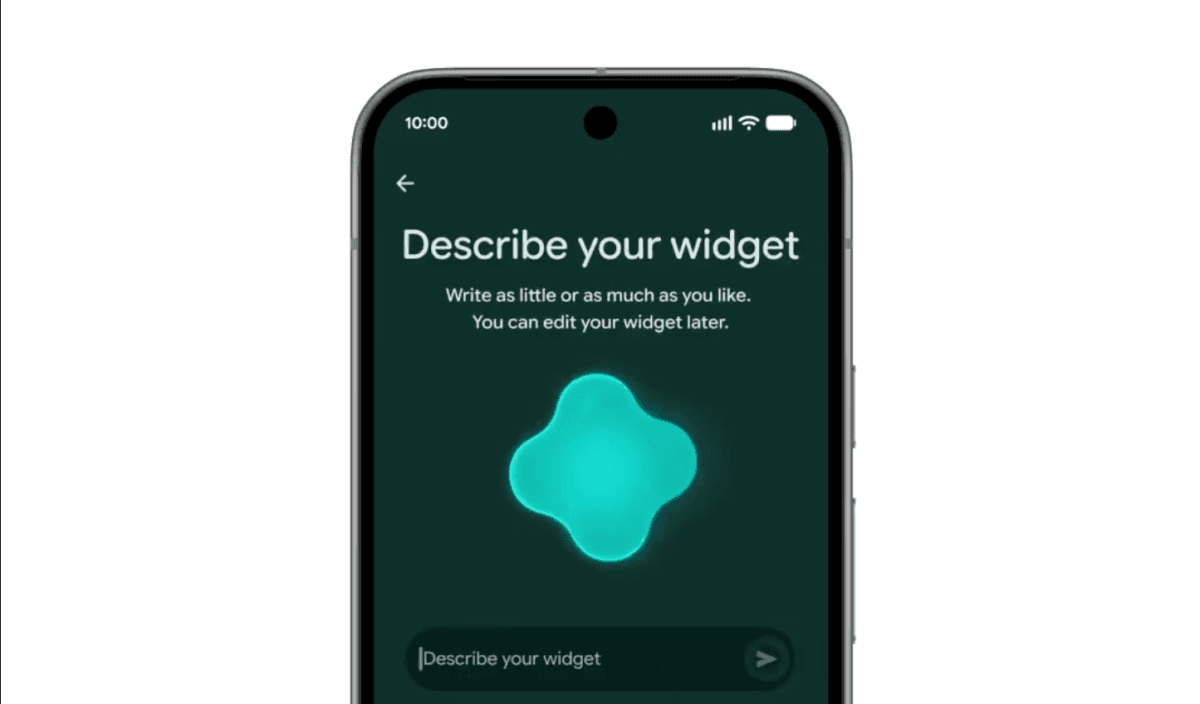
Google's Create My Widget feature transforms widget creation from a technical task into a conversational experience. This AI-powered tool interprets natural language descriptions and generates fully functional widgets tailored to your needs.

  • Natural Language Widget Generation: Describe your widget in plain English like "suggest three high-protein meal prep recipes every week" and receive a custom dashboard instantly without writing any code.
  • Instant Customization: Resize, reposition, and modify generated widgets directly on your home screen with intuitive drag-and-drop controls.
  • AI-Powered Content Integration: The feature intelligently pulls relevant data and content based on your description, creating contextually appropriate widgets.
  • Home Screen Optimization: Generated widgets automatically adapt to your device's screen size and existing layout for seamless integration.
  • Repeatable Widget Creation: Build multiple custom widgets for different purposes, from meal planning to fitness tracking to content curation.
  • Smart Suggestions: The AI learns from your descriptions and offers refinement suggestions to improve widget functionality and appearance.

Technical Specifications

Create My Widget leverages Google's advanced AI models to process natural language and generate functional widget code in real-time. The system handles complex requests while maintaining performance across diverse device configurations.

  • AI Model: Built on Google's natural language understanding technology to accurately interpret user intent from conversational descriptions.
  • Widget Framework: Generates widgets compatible with Android and Google's widget ecosystem, supporting standard widget dimensions and functionality.
  • Processing Speed: Converts natural language descriptions to functional widgets in seconds, enabling rapid iteration and refinement.
  • Data Integration: Connects with Google services and third-party APIs to populate widgets with live data, weather, calendar events, and content feeds.
  • Device Compatibility: Supports all modern Android devices and Google-enabled home screens with responsive design adaptation.

Official Benefits

  • Eliminates Coding Barriers: Anyone can create custom widgets regardless of technical skill level, democratizing widget development.
  • Saves Time: Generate fully functional widgets in seconds instead of hours spent coding or searching for pre-built options.
  • Increases Personalization: Create widgets perfectly tailored to your specific needs rather than settling for generic pre-made options.
  • Reduces App Clutter: Build single custom widgets that replace multiple apps, streamlining your home screen and improving device performance.
  • Enables Rapid Experimentation: Quickly test different widget ideas and configurations without technical constraints or development overhead.

Real-World Translation

What Each Feature Actually Means:

  • Natural Language Widget Generation: Instead of hunting through app stores or learning widget code, you simply tell Google what you want. A fitness enthusiast could say "show my daily step count and weekly workout summary," and a fully functional widget appears on their home screen within seconds, pulling data from their fitness tracker automatically.
  • Instant Customization: You're not locked into a fixed widget size or layout. If your meal prep widget is too large, you drag it smaller. If you want to move your weather widget to a different corner, you tap and move it like any other home screen icon, giving you complete control over your dashboard.
  • AI-Powered Content Integration: The widget doesn't just display static information. When you ask for "high-protein meal prep recipes," the AI understands you want recipes that are actually high in protein, then pulls relevant recipes from Google's database and formats them beautifully in your widget.
  • Repeatable Widget Creation: You can build a different widget for each area of your life. Create one for work tasks, another for personal fitness, a third for entertainment recommendations, each perfectly optimized for its specific purpose without any duplication or confusion.
  • Smart Suggestions: As you describe what you want, Google's AI offers refinements like "Would you also like to see estimated prep time?" or "Should this update daily or weekly?" helping you create a more useful widget than you initially imagined.

Before vs After

Before

Users either accepted generic pre-built widgets that didn't quite fit their needs or faced steep technical barriers to creating custom solutions. Finding the right widget meant browsing app stores, installing multiple apps, or learning widget development frameworks. Most people settled for whatever was available rather than investing time in customization.

After

Anyone can describe exactly what they want in natural language and instantly receive a perfectly tailored widget. No coding knowledge required, no app store browsing, no technical barriers. Your home screen becomes a personalized command center built specifically for your unique needs and workflows.

📈 Expected Impact: Users can create custom widgets 10x faster than traditional methods while achieving significantly higher personalization and relevance to their specific use cases.

Job Relevance Analysis

Web Designer

HIGH Impact
  • Use Case: Web designers can rapidly prototype dashboard interfaces and widget layouts for client projects without building from scratch, accelerating the design-to-implementation timeline.
  • Key Benefit: Quickly generate functional widget mockups to show clients interactive previews before committing to full development, improving client communication and approval speed.
  • Workflow Integration: Use Create My Widget to generate baseline designs that you then refine and customize, reducing initial design iteration time significantly.
  • Skill Development: Learn how AI interprets design requirements from natural language, helping you better understand user intent translation and responsive design principles.
  • Client Deliverables: Offer clients the ability to create their own custom widgets post-launch, extending your service value and enabling client self-service customization.
Web Designer

AI resources for website creation, formatting, graphics, and landing pages, SEO, WP usability, and streamlined UI.

4,003 Tools
Web Designer

Content Writer

MEDIUM Impact
  • Use Case: Content writers can create custom content curation widgets that display their published articles, blog posts, or curated content feeds directly on user home screens.
  • Key Benefit: Expand content reach by enabling readers to subscribe to personalized content widgets, increasing engagement and repeat visits without requiring app downloads.
  • Workflow Integration: Generate widgets that showcase your best-performing content or organize articles by topic, creating new distribution channels for your writing.
  • Skill Development: Practice translating content strategy into widget descriptions, developing skills in concise requirement communication and user-focused content presentation.
  • Audience Building: Create branded widgets that keep your content visible on user home screens, building audience loyalty and increasing content discoverability.
Content Writer

Discover curated AI tools with practical use cases for Content Writer. Evaluate capabilities & cost; to boost productivity. Choose smarter—see the tools.

4,281 Tools
Content Writer

Video Editor

MEDIUM Impact
  • Use Case: Video editors can create widgets that display video thumbnails, upcoming release schedules, or curated video playlists, keeping viewers engaged between content releases.
  • Key Benefit: Build persistent home screen presence for video content without requiring viewers to open an app, increasing viewership frequency and audience retention.
  • Workflow Integration: Generate widgets showcasing your latest videos or organizing content by series, creating new ways to promote your video work beyond traditional social media.
  • Skill Development: Learn how to structure visual content for widget displays, understanding optimal thumbnail sizes, text placement, and information hierarchy for small screens.
  • Promotion Strategy: Use widgets as a promotional tool to announce new video releases, behind-the-scenes content, or exclusive previews, driving traffic to your main content platforms.
Video Editor

Explore handpicked AI solutions & examples for Video Editor. Check key features at a glance; to save time and cut costs. Find the right AI tools now.

3,775 Tools
Video Editor

Getting Started

How to Access

  • Device Requirement: Ensure you have a modern Android device with Google Play Services installed and updated to the latest version.
  • Google Account: Sign in with your Google account to access Create My Widget and sync your custom widgets across devices.
  • Home Screen Access: Long-press on your home screen and select "Widgets" or "Add Widget," then look for "Create My Widget" in the widget menu.
  • Feature Availability: Check that your device and region support the Create My Widget feature, as rollout may be gradual across different markets.

Quick Start Guide

For Beginners:

  1. Long-press your home screen and tap "Add Widget" to open the widget selection menu.
  2. Search for "Create My Widget" and select it to launch the natural language interface.
  3. Describe what you want in plain English, such as "show today's weather and tomorrow's forecast" or "display my favorite recipe ideas."
  4. Review the generated widget preview and tap "Add to Home Screen" to place it on your dashboard.

For Power Users:

  1. Open Create My Widget and use advanced descriptors like "pull data from my Google Calendar and highlight meetings with specific people" to create more sophisticated widgets.
  2. Experiment with multiple widget instances for different purposes, using specific data sources and filtering criteria in your descriptions.
  3. Combine Create My Widget with IFTTT or Google Automation to trigger widget updates based on specific conditions or schedules.
  4. Test different widget sizes and positions to optimize your home screen layout, then save your preferred configuration as a template.
  5. Use natural language refinement suggestions offered by the AI to iteratively improve widget functionality and appearance.

Pro Tips

  • Be Specific in Descriptions: Include details like "high-protein" or "under 30 minutes" in your widget requests to get more relevant results than generic descriptions.
  • Start Simple: Create basic widgets first to understand how the feature works, then gradually add complexity and data sources as you become comfortable.
  • Use Data Sources: Mention specific Google services or data sources in your description, like "from my Google Fit data" or "from my YouTube subscriptions," for more accurate results.
  • Iterate Quickly: Don't settle on your first widget version. Use the AI's suggestions to refine and improve your widgets until they perfectly match your needs.

Getting Started

How to Access

  • Device Requirement: Ensure you have a modern Android device with Google Play Services installed and updated to the latest version.
  • Google Account: Sign in with your Google account to access Create My Widget and sync your custom widgets across devices.
  • Home Screen Access: Long-press on your home screen and select "Widgets" or "Add Widget," then look for "Create My Widget" in the widget menu.
  • Feature Availability: Check that your device and region support the Create My Widget feature, as rollout may be gradual across different markets.

Quick Start Guide

For Beginners:

  1. Long-press your home screen and tap "Add Widget" to open the widget selection menu.
  2. Search for "Create My Widget" and select it to launch the natural language interface.
  3. Describe what you want in plain English, such as "show today's weather and tomorrow's forecast" or "display my favorite recipe ideas."
  4. Review the generated widget preview and tap "Add to Home Screen" to place it on your dashboard.

For Power Users:

  1. Open Create My Widget and use advanced descriptors like "pull data from my Google Calendar and highlight meetings with specific people" to create more sophisticated widgets.
  2. Experiment with multiple widget instances for different purposes, using specific data sources and filtering criteria in your descriptions.
  3. Combine Create My Widget with IFTTT or Google Automation to trigger widget updates based on specific conditions or schedules.
  4. Test different widget sizes and positions to optimize your home screen layout, then save your preferred configuration as a template.
  5. Use natural language refinement suggestions offered by the AI to iteratively improve widget functionality and appearance.

Pro Tips

  • Be Specific in Descriptions: Include details like "high-protein" or "under 30 minutes" in your widget requests to get more relevant results than generic descriptions.
  • Start Simple: Create basic widgets first to understand how the feature works, then gradually add complexity and data sources as you become comfortable.
  • Use Data Sources: Mention specific Google services or data sources in your description, like "from my Google Fit data" or "from my YouTube subscriptions," for more accurate results.
  • Iterate Quickly: Don't settle on your first widget version. Use the AI's suggestions to refine and improve your widgets until they perfectly match your needs.

FAQ

Related Topics

google create my widgetai widget buildercustom widgetsnatural language widget generation

Table of contents

What's New in Google Create My WidgetTechnical SpecificationsOfficial BenefitsReal-World TranslationBefore vs AfterJob Relevance AnalysisGetting StartedGetting StartedFAQ
Impact LevelMEDIUM
Update ReleasedMay 12, 2026

Best for

Content WriterVideo EditorWeb Designer

Related Use Cases

AI Chatbot ToolsAI Web Design ToolsAI UI/UX Tools

Related Articles

Gemini Intelligence Review: AI Phone Control
Google Gboard Gemini Dictation: AI Voice Recognition
Wispr Flow Review: Hinglish Voice AI for India
All AI Spotlights

Editor's Pick Articles

Perplexity Personal Computer: AI Agents for Mac
Claude Personal App Connectors Review
ChatGPT Images 2.0 Review: Better Text & Details
All Articles
Special offer for AI Owners – 50% OFF Promotional Plans

Join Our Community

Get the earliest access to hand-picked content weekly for free.

Spam-free guaranteed! Only insights.

Follow Us on Socials

Don't Miss AI Topics

ai art generatorai voice generatorai text generatorai avatar generatorai designai writing assistantai audio generatorai content generatorai dubbingai graphic designai banner generatorai in dropshipping

AI Spotlights

Unleashing Today's trailblazer, this week's game-changers, and this month's legends in AI. Dive in and discover tools that matter.

All AI Spotlights
Gemini Intelligence Review: AI Phone Control

Gemini Intelligence Review: AI Phone Control

Google Gboard Gemini Dictation: AI Voice Recognition

Google Gboard Gemini Dictation: AI Voice Recognition

Wispr Flow Review: Hinglish Voice AI for India

Wispr Flow Review: Hinglish Voice AI for India

OpenAI Codex Chrome Extension Review

OpenAI Codex Chrome Extension Review

Perplexity Personal Computer: AI Agents for Mac

Perplexity Personal Computer: AI Agents for Mac

OpenAI Voice Intelligence API: New Features Review

OpenAI Voice Intelligence API: New Features Review

ChatGPT Trusted Contact: New Self-Harm Safeguard

ChatGPT Trusted Contact: New Self-Harm Safeguard

CopilotKit Intelligence: Enterprise AI Memory Platform

CopilotKit Intelligence: Enterprise AI Memory Platform

OpenAI Training Spec: GPU Performance Breakthrough

OpenAI Training Spec: GPU Performance Breakthrough

AWS Managed Agents Review: OpenAI Partnership

AWS Managed Agents Review: OpenAI Partnership

Glean AI Search Review: Enterprise Search Redefined

Glean AI Search Review: Enterprise Search Redefined

ChatGPT Security Update: Advanced Protection Features

ChatGPT Security Update: Advanced Protection Features

Mistral's Cloud Code Platform Review

Mistral's Cloud Code Platform Review

Meta Autodata: AI Framework for Autonomous Data Scientists

Meta Autodata: AI Framework for Autonomous Data Scientists

Gemini API Webhooks: Real-Time AI Automation

Gemini API Webhooks: Real-Time AI Automation

Zyphra TSP: 2.6x Faster AI Training Review

Zyphra TSP: 2.6x Faster AI Training Review

SoundHound OASYS: Self-Learning AI Agent Platform

SoundHound OASYS: Self-Learning AI Agent Platform

Google Home Gemini 3.1: Smarter AI Assistant

Google Home Gemini 3.1: Smarter AI Assistant

Grok Voice Think Fast 1.0 Review: AI Voice

Grok Voice Think Fast 1.0 Review: AI Voice

You Might Like These Latest News

All AI News

Stay informed with the latest AI news, breakthroughs, trends, and updates shaping the future of artificial intelligence.

Anthropic Launches AI Legal Services Tools

May 13, 2026
Anthropic Launches AI Legal Services Tools

Dessn Raises $6M for AI-Powered Design Tools

May 13, 2026
Dessn Raises $6M for AI-Powered Design Tools

Meta AI on Threads Can't Be Blocked by Users

May 13, 2026
Meta AI on Threads Can't Be Blocked by Users

OpenAI Launches Daybreak AI Cybersecurity Initiative

May 13, 2026
OpenAI Launches Daybreak AI Cybersecurity Initiative

OpenAI Launches AI Consulting Company

May 12, 2026
OpenAI Launches AI Consulting Company

AI Voice Assistants Transform Office Work Culture

May 11, 2026
AI Voice Assistants Transform Office Work Culture

Anthropic: Fictional AI Portrayals Shaped Claude's Behavior

May 11, 2026
Anthropic: Fictional AI Portrayals Shaped Claude's Behavior

AI Data Centers Face Growing Crisis

May 10, 2026
AI Data Centers Face Growing Crisis

SpaceX Plans $55B AI Chip Plant in Texas

May 8, 2026
SpaceX Plans $55B AI Chip Plant in Texas
Tools of The Day

Tools of The Day

Discover the top AI tools handpicked daily by our editors to help you stay ahead with the latest and most innovative solutions.


10MAR
Adobe Illustrator
Adobe Illustrator
9MAR
Adobe Firefly
Adobe Firefly
8MAR
Adobe Sensei
Adobe Sensei
7MAR
Adobe Photoshop
Adobe Photoshop
6MAR
Adobe Firefly
Adobe Firefly
5MAR
Shap-E
Shap-E
4MAR
Point-E
Point-E

Explore AI Tools of The Day