Age of AI Toolsv2.beta
For YouJobsUse Cases
Media-HubNEW

Join Our Community

Get the earliest access to hand-picked content weekly for free.

Spam-free guaranteed! Only insights.

Join Our Community

Get the earliest access to hand-picked content weekly for free.

Spam-free guaranteed! Only insights.

Trusted by Leading Review and Discovery Websites

Age of AI Tools on Product HuntApproved on SaaSHubAlternativeTo
AI Tools
  • For You!
  • Discover All AI Tools
  • Best AI Tools
  • Free AI Tools
  • Tools of the DayNEW
  • All Use Cases
  • All Jobs
Trend UseCases
  • AI Image Generators
  • AI Video Generators
  • AI Voice Generators
Trend Jobs
  • Graphic Designer
  • SEO Specialist
  • Email Marketing Specialist
Media Hub
  • Go to Media Hub
  • AI News
  • AI Tools Spotlights
Age of AI Tools
  • What's New
  • Story of Age of AI Tools
  • Cookies & Privacy
  • Terms & Conditions
  • Request Update
  • Bug Report
  • Contact Us
Submit & Advertise
  • Submit AI Tool
  • Promote Your Tool50% Off

Agent of AI Age

Looking to discover new AI tools? Just ask our AI Agent

Copyright © 2026 Age of AI Tools. All Rights Reserved.

Media HubTools SpotlightGoogle Chrome AI Co-Worker: Gemini Auto Browse
24 Apr 20265 min read

Google Chrome AI Co-Worker: Gemini Auto Browse

Google Chrome AI Co-Worker: Gemini Auto Browse

🎯 Quick Impact Summary

Google has integrated Gemini-powered "auto browse" capabilities directly into Chrome for enterprise users, effectively turning the browser into an AI co-worker that handles research, data entry, and task automation. This shift brings AI automation from standalone tools into the daily workflow of millions of workplace browsers, enabling workers to delegate routine tasks while focusing on higher-value work. The update represents a significant move toward embedding AI assistance into existing enterprise infrastructure rather than requiring separate applications.

What's New in Google Chrome AI Co-Worker

Google's latest Chrome update introduces Gemini-powered automation that transforms how enterprise workers interact with web-based tasks and information gathering.
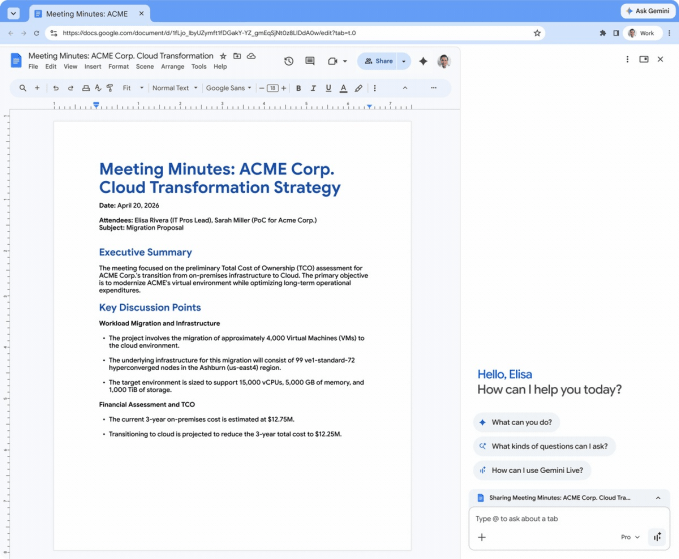
  • Auto Browse Capability: Gemini can now autonomously navigate websites, extract data, and complete multi-step tasks without manual intervention, handling complex workflows that previously required human attention
  • Research Automation: The AI co-worker automatically gathers information across multiple web pages, synthesizes findings, and compiles research reports in real-time
  • Data Entry Automation: Repetitive data entry tasks are now handled by the AI, reducing manual input errors and freeing workers for strategic activities
  • Enterprise Integration: Built directly into Chrome, the tool integrates seamlessly with existing workplace browsers and web applications without requiring separate software installations
  • Gemini-Powered Intelligence: Leverages Google's advanced Gemini model for understanding context, making decisions, and executing complex sequences of actions
  • Task Workflow Automation: Can chain multiple actions together, such as researching competitors, extracting pricing data, and populating spreadsheets in a single automated workflow

Google Chrome Gemini auto browse interface showing AI automation capabilities

Technical Specifications

The Chrome AI co-worker is built on enterprise-grade infrastructure designed for workplace reliability and security.
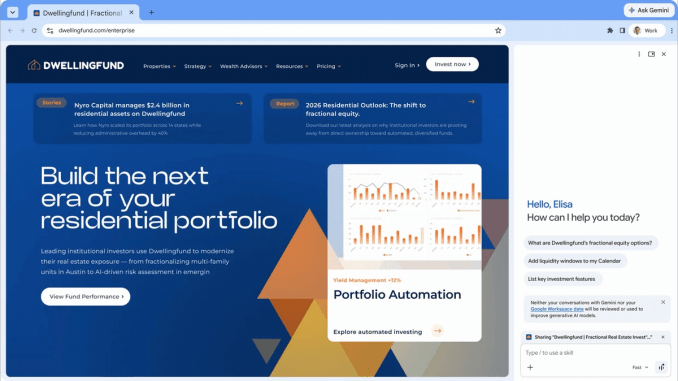
  • AI Model: Powered by Google's Gemini large language model with enhanced web navigation and task execution capabilities
  • Browser Integration: Native Chrome extension architecture enabling direct browser automation without external API calls or third-party dependencies
  • Web Automation Engine: Supports DOM manipulation, form filling, link navigation, and dynamic content handling across modern web applications
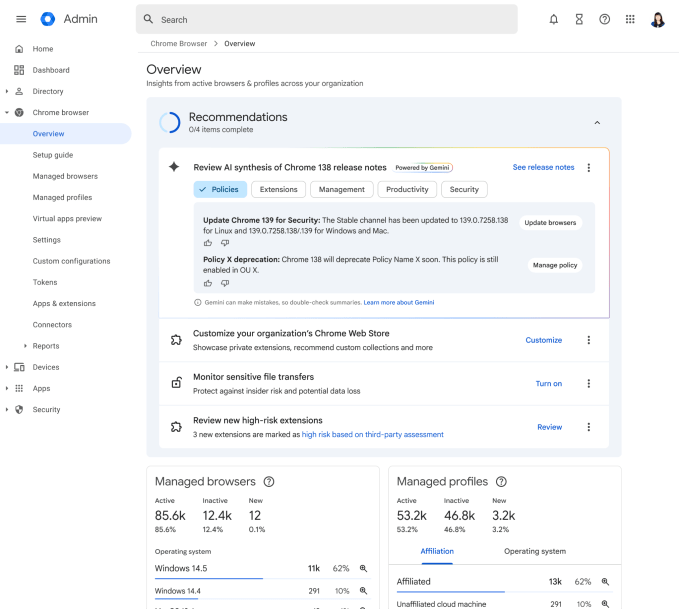
  • Enterprise Security: Operates within Chrome's existing security sandbox with enterprise admin controls for deployment, monitoring, and policy enforcement
  • Supported Platforms: Available on Chrome for Windows, macOS, and Linux with enterprise deployment through Google Workspace administration console

Technical architecture diagram of Chrome Gemini integration

Official Benefits

  • Significant Time Savings: Automates routine tasks that consume 20-30% of knowledge worker time, redirecting hours toward strategic work
  • Error Reduction: Eliminates manual data entry mistakes, improving data accuracy and reducing downstream corrections
  • Workflow Acceleration: Completes multi-step research and data compilation tasks in minutes rather than hours
  • Enterprise Scalability: Deploys across entire organizations through existing Chrome infrastructure without additional software procurement
  • Seamless Integration: Works within current web applications and tools without requiring API modifications or custom development
Source image

Real-World Translation

What Each Feature Actually Means:

  • Auto Browse: Instead of manually clicking through five websites to gather competitor pricing, the AI visits each site, extracts current prices, and compiles them into a spreadsheet automatically while you work on strategy
  • Research Automation: A market analyst no longer spends two hours daily gathering industry news and reports; Gemini scans dozens of sources, summarizes findings, and flags relevant updates for review
  • Data Entry Automation: HR teams stop manually transferring candidate information from application portals into tracking systems; the AI reads forms and populates databases in real-time
  • Task Chaining: A sales team can set up a single workflow that researches prospects, gathers contact information, checks social profiles, and updates CRM records without human intervention
  • Enterprise Deployment: IT administrators deploy the capability to 10,000 employees through a single Chrome policy rather than installing separate software on each machine

Before vs After

Before

Enterprise workers manually navigated websites, copied and pasted data between systems, and spent significant time on research and data entry tasks. These repetitive workflows consumed 20-30% of productive time and introduced human error into critical business processes. Organizations relied on expensive RPA (Robotic Process Automation) solutions or custom development to automate web-based tasks.

After

Workers can now delegate research, data gathering, and data entry directly to an AI co-worker built into their browser. Complex multi-step workflows that previously took hours are completed in minutes with higher accuracy. Organizations gain automation capabilities without separate software purchases or IT infrastructure changes.

📈 Expected Impact: Enterprise productivity increases by 15-25% as workers reclaim 2-4 hours weekly previously spent on routine web-based tasks. *

Job Relevance Analysis

AI Researcher

HIGH Impact
  • Use Case: AI researchers use auto browse to systematically gather research papers, benchmark results, and competitive AI tool analyses across dozens of academic and commercial sources simultaneously
  • Key Benefit: Accelerates literature review and competitive analysis from weeks to days by automating the data collection phase of research projects
  • Workflow Integration: Integrates directly into research workflows by automating the repetitive web scraping and data compilation tasks that precede actual analysis
  • Skill Development: Researchers develop expertise in prompt engineering and workflow design for complex automation tasks, enhancing their AI systems thinking
  • Practical Scenario: An AI researcher studying language model performance can set up auto browse to gather benchmark results from 20+ sources weekly, compile them into comparison tables, and flag performance improvements automatically
AI Researcher

Advance innovation with AI tools for academic research, data analysis, knowledge representation, decision-making, and AI-powered chatbots.

6,692 Tools
AI Researcher

Automation Engineer

HIGH Impact
  • Use Case: Automation engineers leverage Chrome's auto browse as a rapid prototyping tool for web automation workflows before deploying to enterprise RPA platforms or custom solutions
  • Key Benefit: Reduces development time for browser automation tasks by 40-60% by eliminating the need to write custom scripts for common web navigation patterns
  • Workflow Integration: Becomes a primary tool in the automation engineer's toolkit for testing workflows, validating web application behavior, and designing automation logic
  • Skill Development: Engineers deepen their understanding of AI-driven automation, prompt-based task definition, and enterprise deployment patterns for AI tools
  • Practical Scenario: An automation engineer designing a workflow to extract data from 15 different vendor portals can prototype and validate the entire process in Chrome before implementing in production systems
Automation Engineer

Increase your productivity with these AI solutions for automation, quality assurance, integration, collaboration, and code creation.

5,288 Tools
Automation Engineer

Web Designer

MEDIUM Impact
  • Use Case: Web designers use auto browse to test website usability, gather competitive design patterns, and validate that their sites work correctly with AI automation tools
  • Key Benefit: Provides insights into how AI systems interact with web interfaces, enabling designers to create more AI-friendly layouts and navigation patterns
  • Workflow Integration: Becomes part of the QA and testing process, ensuring websites are optimized for both human users and AI automation workflows
  • Skill Development: Web designers develop awareness of AI accessibility and automation-friendly design principles, a growing requirement in enterprise web development
  • Practical Scenario: A web designer testing a new e-commerce site uses auto browse to verify that product pages, filters, and checkout flows work correctly when accessed by AI systems, identifying UX issues that might frustrate automated workflows
Web Designer

AI resources for website creation, formatting, graphics, and landing pages, SEO, WP usability, and streamlined UI.

4,003 Tools
Web Designer

Getting Started

How to Access

  • Enterprise Enrollment: Contact your Google Workspace administrator to enable Gemini auto browse capabilities for your organization
  • Chrome Update: Ensure you're running the latest version of Chrome (check Settings > About Chrome for automatic updates)
  • Workspace Account: Log in with your enterprise Google Workspace account to access AI co-worker features
  • Admin Approval: Wait for IT to deploy the feature through your organization's Chrome policies and security controls

Quick Start Guide

For Beginners:

  1. Open Chrome and navigate to a website where you want to automate a task (like a data entry form or research site)
  2. Click the Gemini icon in your Chrome toolbar and select "Auto Browse" or "Create Automation"
  3. Describe the task in plain language (example: "Extract all product names and prices from this page and put them in a spreadsheet")
  4. Review the proposed workflow and click "Execute" to let the AI complete the task

For Power Users:

  1. Access the advanced automation builder by right-clicking on the Gemini icon and selecting "Workflow Designer"
  2. Chain multiple tasks together using conditional logic ("If price is above $100, flag for review")
  3. Set up recurring automations that run on schedules or trigger based on specific conditions
  4. Export automation workflows as templates to share with team members or deploy across departments
  5. Monitor automation performance through the Chrome admin console and adjust prompts based on success rates

Pro Tips

  • Be Specific with Instructions: Instead of "get data," try "extract product name, SKU, and current price from each row in the table and create a CSV file"
  • Test on Staging First: Validate automation workflows on test websites or staging environments before running them on production systems
  • Use Conditional Logic: Build intelligence into workflows by setting up rules like "only process items marked as 'in stock'" to reduce manual review work
  • Monitor and Iterate: Check automation results regularly and refine prompts based on what works, treating automation as an evolving process rather than a one-time setup

FAQ

Related Topics

chrome gemini auto browseai automation toolsenterprise ai productivitygoogle workspace automation

Table of contents

What's New in Google Chrome AI Co-WorkerTechnical SpecificationsOfficial BenefitsReal-World TranslationJob Relevance AnalysisGetting StartedFAQ
Impact LevelHIGH
Update ReleasedApril 22, 2026

Best for

AI ResearcherAutomation EngineerWeb Designer

Related Use Cases

AI Search EnginesAI Productivity ToolsAI Automation Tools

Related Articles

Qwen3.6-27B Review: Dense Model Outperforms 397B MoE
ChatGPT Workspace Agents: Custom AI Bots for Teams
Google Gemini Enterprise Agent Platform Review
All AI Spotlights

Editor's Pick Articles

Claude Personal App Connectors Review
ChatGPT Images 2.0 Review: Better Text & Details
Google Gemini Mac App Review: AI Assistant
All Articles
Special offer for AI Owners – 50% OFF Promotional Plans

Join Our Community

Get the earliest access to hand-picked content weekly for free.

Spam-free guaranteed! Only insights.

Follow Us on Socials

Don't Miss AI Topics

ai art generatorai voice generatorai text generatorai avatar generatorai designai writing assistantai audio generatorai content generatorai dubbingai graphic designai banner generatorai in dropshipping

AI Spotlights

Unleashing Today's trailblazer, this week's game-changers, and this month's legends in AI. Dive in and discover tools that matter.

All AI Spotlights
Qwen3.6-27B Review: Dense Model Outperforms 397B MoE

Qwen3.6-27B Review: Dense Model Outperforms 397B MoE

ChatGPT Workspace Agents: Custom AI Bots for Teams

ChatGPT Workspace Agents: Custom AI Bots for Teams

Google Gemini Enterprise Agent Platform Review

Google Gemini Enterprise Agent Platform Review

Google Workspace Intelligence: AI Office Automation

Google Workspace Intelligence: AI Office Automation

GPT-5.5 Review: OpenAI's Smarter Coding & Automation Model

GPT-5.5 Review: OpenAI's Smarter Coding & Automation Model

OpenAI Codex with GPT-5.5: AI Coding Revolution

OpenAI Codex with GPT-5.5: AI Coding Revolution

Claude Personal App Connectors Review

Claude Personal App Connectors Review

Noscroll Review: AI Bot Stops Doomscrolling

Noscroll Review: AI Bot Stops Doomscrolling

X's AI Custom Feeds: Grok-Powered Personalization

X's AI Custom Feeds: Grok-Powered Personalization

Anthropic's Mythos Finds 271 Firefox Bugs

Anthropic's Mythos Finds 271 Firefox Bugs

ChatGPT Images 2.0 Review: Better Text & Details

ChatGPT Images 2.0 Review: Better Text & Details

Adobe AI Agent Platform for CX Review

Adobe AI Agent Platform for CX Review

Google Gemini Mac App Review: AI Assistant

Google Gemini Mac App Review: AI Assistant

TinyFish AI Platform Review: Web Infrastructure for AI Agents

TinyFish AI Platform Review: Web Infrastructure for AI Agents

Google Home Gemini Update: Fixes Interruptions

Google Home Gemini Update: Fixes Interruptions

OpenAI Agents SDK Update: Enterprise Safety & Capability

OpenAI Agents SDK Update: Enterprise Safety & Capability

IBM Autonomous Security Service Review

IBM Autonomous Security Service Review

GPT-Rosalind Review: OpenAI's Life Sciences AI

GPT-Rosalind Review: OpenAI's Life Sciences AI

Claude Opus 4.7 Review: Enterprise AI Without Hallucinations

Claude Opus 4.7 Review: Enterprise AI Without Hallucinations

You Might Like These Latest News

All AI News

Stay informed with the latest AI news, breakthroughs, trends, and updates shaping the future of artificial intelligence.

AI Models Show Alarming Scam and Social Engineering Skills

Apr 24, 2026
AI Models Show Alarming Scam and Social Engineering Skills

Google Cloud Launches New AI Chips to Challenge Nvidia

Apr 24, 2026
Google Cloud Launches New AI Chips to Challenge Nvidia

AI Bubble Risk Triggers Financial Crisis Warning

Apr 24, 2026
AI Bubble Risk Triggers Financial Crisis Warning

Sierra Acquires Fragment to Expand AI Customer Service

Apr 24, 2026
Sierra Acquires Fragment to Expand AI Customer Service

Meta Cuts 10% of Staff Amid AI Investment Push

Apr 24, 2026
Meta Cuts 10% of Staff Amid AI Investment Push

Anthropic's Mythos AI breach undermines safety claims

Apr 24, 2026
Anthropic's Mythos AI breach undermines safety claims

Tim Cook's Apple Legacy Shift Signals Major Changes

Apr 24, 2026
Tim Cook's Apple Legacy Shift Signals Major Changes

Stanford's Viral AI Course Draws Silicon Valley Leaders

Apr 24, 2026
Stanford's Viral AI Course Draws Silicon Valley Leaders

First Quantum-Safe Ransomware Detected

Apr 24, 2026
First Quantum-Safe Ransomware Detected
Tools of The Day

Tools of The Day

Discover the top AI tools handpicked daily by our editors to help you stay ahead with the latest and most innovative solutions.


10MAR
Adobe Illustrator
Adobe Illustrator
9MAR
Adobe Firefly
Adobe Firefly
8MAR
Adobe Sensei
Adobe Sensei
7MAR
Adobe Photoshop
Adobe Photoshop
6MAR
Adobe Firefly
Adobe Firefly
5MAR
Shap-E
Shap-E
4MAR
Point-E
Point-E

Explore AI Tools of The Day