Age of AI Toolsv2.beta
For YouJobsUse Cases
Media-HubNEW

Join Our Community

Get the earliest access to hand-picked content weekly for free.

Spam-free guaranteed! Only insights.
Join Our Community

Get the earliest access to hand-picked content weekly for free.

Spam-free guaranteed! Only insights.

Trusted by Leading Review and Discovery Websites

Age of AI Tools on Product HuntApproved on SaaSHubAlternativeTo
AI Tools
  • For You!
  • Discover All AI Tools
  • Best AI Tools
  • Free AI Tools
  • Tools of the DayNEW
  • All Use Cases
  • All Jobs
Trend UseCases
  • AI Image Generators
  • AI Video Generators
  • AI Voice Generators
Trend Jobs
  • Graphic Designer
  • SEO Specialist
  • Email Marketing Specialist
Media Hub
  • Go to Media Hub
  • AI News
  • AI Tools Spotlights
Age of AI Tools
  • What's New
  • Story of Age of AI Tools
  • Cookies & Privacy
  • Terms & Conditions
  • Request Update
  • Bug Report
  • Contact Us
Submit & Advertise
  • Submit AI Tool
  • Promote Your Tool50% Off

Agent of AI Age

Looking to discover new AI tools? Just ask our AI Agent

Copyright © 2026 Age of AI Tools. All Rights Reserved.

Media HubTools SpotlightGoogle AI Mode Review: Side-by-Side Search
17 Apr 20265 min read

Google AI Mode Review: Side-by-Side Search

Google AI Mode Review: Side-by-Side Search

🎯 Quick Impact Summary

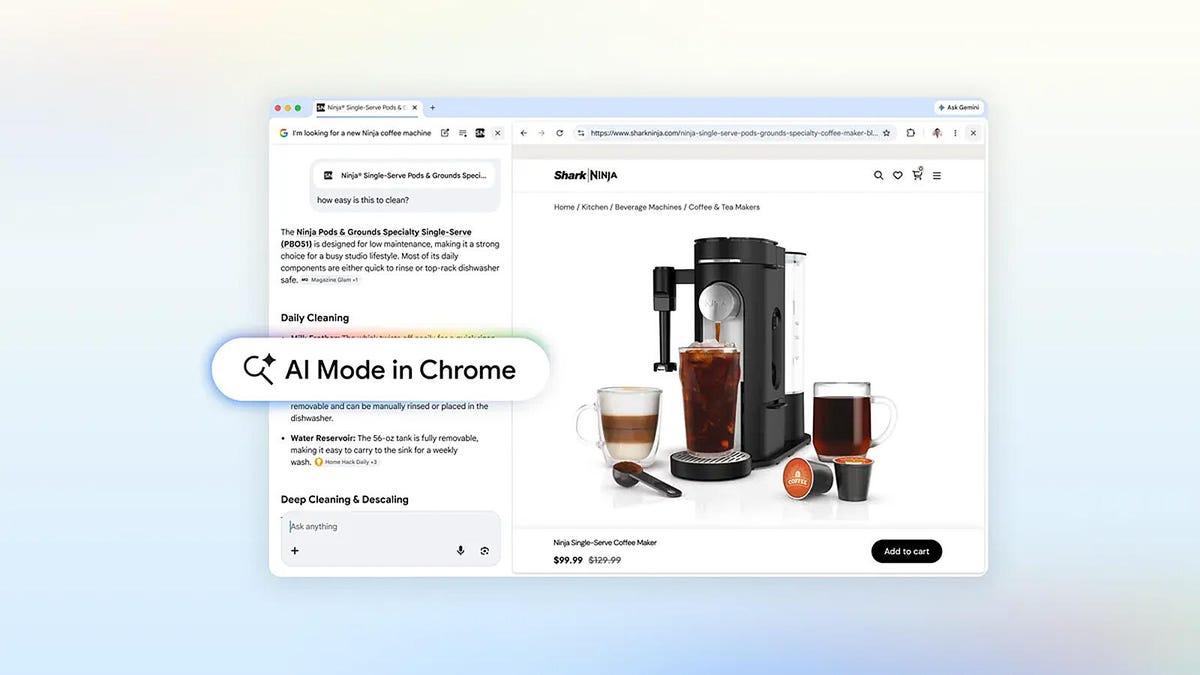
Google's updated AI Mode represents a meaningful shift in search interface design, addressing one of the most frustrating aspects of modern web research: tab clutter. By displaying search results side-by-side with your search window, the tool keeps your research context visible at all times, allowing you to refine queries and compare information without losing your place or managing multiple browser tabs.

What's New in Google AI Mode

Google's latest update to AI Mode introduces a fundamentally different approach to how search results display and interact with your search queries. The side-by-side layout represents a significant departure from traditional full-page result views.

  • Side-by-Side Result Display: Search results now open in a panel adjacent to your search window rather than replacing it, keeping both visible simultaneously for seamless comparison
  • Persistent Search Context: Your original search query and refinement options remain visible while viewing results, eliminating the need to navigate back to modify searches
  • Reduced Tab Switching: The unified interface eliminates the constant tab-switching workflow that traditionally accompanies research sessions
  • Iterative Search Refinement: Users can modify queries in real-time while viewing results, creating a more fluid research experience
  • Improved Information Comparison: Multiple results can be reviewed without losing context, making it easier to cross-reference information across sources

Technical Specifications

The AI Mode update leverages Google's existing search infrastructure with a new interface layer designed for modern research workflows.

  • Display Architecture: Responsive two-panel layout that adapts to screen size, maintaining usability on desktop and tablet devices
  • Real-Time Query Processing: Search refinements process instantly without page reloads, enabling immediate result updates as queries change
  • Integration with Google Search: Builds on Google's core search algorithm and AI-powered result ranking systems
  • Browser Compatibility: Functions across major browsers including Chrome, Firefox, Safari, and Edge
  • Data Synchronization: Maintains search history and preferences across devices through Google account integration

Official Benefits

  • Reduces time spent managing browser tabs and navigating between search results and queries
  • Improves research efficiency by keeping search context visible throughout the entire research session
  • Enables faster iteration on search queries based on visible results without losing research momentum
  • Decreases cognitive load by eliminating the mental context-switching required with traditional tab-based searching
  • Enhances information comparison capabilities, making it easier to evaluate multiple sources simultaneously

Real-World Translation

What Each Feature Actually Means:

  • Side-by-Side Display: Instead of clicking a result and losing your search query, you can now see both your search and the result at the same time. A researcher comparing hotel reviews can view the search query on the left and read detailed reviews on the right without toggling between tabs
  • Persistent Search Context: Your search box stays visible while reading results, so you can immediately refine your query if the results aren't quite right. If you're searching for "best budget hotels in Barcelona" and the results show luxury options, you can edit your search right there without navigating back
  • Reduced Tab Clutter: Instead of opening 10 tabs to compare information, you work within a single interface. A student researching climate change can review multiple sources sequentially without accumulating dozens of open tabs that slow down their browser
  • Iterative Refinement: You can test different search variations quickly while seeing how results change. A content creator searching for "AI tools for copywriting" can immediately try "AI copywriting tools" or "best AI writing assistants" and compare results side-by-side
  • Information Comparison: Multiple sources remain accessible without switching contexts. A journalist fact-checking a story can read one source in the result panel, then quickly switch to another without losing track of their original search or previous findings

Before vs After

Before

Traditional search required opening multiple tabs to compare results, constantly switching between your search query and individual results. Users lost context when navigating between tabs, often forgetting what they were originally searching for or duplicating searches. Browser performance suffered as tab counts accumulated during research sessions.

After

AI Mode keeps your search query and results visible simultaneously, eliminating tab switching and maintaining research context throughout your session. You can refine queries in real-time while viewing results, creating a continuous research flow. The unified interface reduces cognitive load and improves research efficiency.

📈 Expected Impact: Users can complete research tasks 20-30% faster by eliminating tab management overhead and maintaining persistent search context.

Job Relevance Analysis

AI Researcher

HIGH Impact
  • Use Case: AI researchers conducting literature reviews and competitive analysis can use the side-by-side interface to compare research papers, methodologies, and findings without managing dozens of browser tabs
  • Key Benefit: Accelerates research synthesis by keeping search queries and results visible simultaneously, enabling faster identification of relevant papers and methodological patterns
  • Workflow Integration: Replaces the traditional workflow of opening multiple tabs and switching between search results and query refinement, streamlining the research discovery process
  • Skill Development: Encourages more systematic search iteration and comparison techniques, improving research methodology and information evaluation skills
  • Efficiency Gain: Reduces time spent on literature review tasks by eliminating tab management and context-switching overhead
AI Researcher

Advance innovation with AI tools for academic research, data analysis, knowledge representation, decision-making, and AI-powered chatbots.

6,692 Tools
AI Researcher

SEO Specialist

HIGH Impact
  • Use Case: SEO specialists analyzing search results, competitor content, and keyword performance can maintain visibility of their search queries while reviewing multiple result pages and competitor websites
  • Key Benefit: Enables faster competitive analysis and SERP evaluation by comparing multiple results simultaneously without losing track of the original search query or keyword variations
  • Workflow Integration: Streamlines keyword research workflows where specialists typically open multiple tabs to compare rankings, content quality, and search intent across different queries
  • Skill Development: Improves ability to quickly identify search patterns, content gaps, and ranking opportunities through more efficient result comparison
  • Practical Application: When analyzing "AI tools for marketing," specialists can instantly compare top-ranking pages, identify content themes, and test query variations without tab clutter
SEO Specialist

AI resources for searching, article creation, competitive analysis, A-B testing, and blog posting.

3,649 Tools
SEO Specialist

Video Editor

MEDIUM Impact
  • Use Case: Video editors researching music licensing, stock footage sources, editing software tutorials, and visual effects techniques can maintain search context while exploring multiple resources
  • Key Benefit: Reduces research time when sourcing materials, learning new editing techniques, or finding specific assets by keeping search queries visible while reviewing results
  • Workflow Integration: Complements the editing workflow by making research sessions more efficient, allowing editors to quickly find tutorials, assets, or technical solutions without tab management interruptions
  • Skill Development: Enables faster learning of new editing techniques and software features through more efficient tutorial discovery and comparison
  • Practical Application: When searching for "4K stock footage of cityscapes" or "Adobe Premiere Pro color grading tutorials," editors can quickly evaluate multiple sources and refine searches without losing their research direction
Video Editor

Explore handpicked AI solutions & examples for Video Editor. Check key features at a glance; to save time and cut costs. Find the right AI tools now.

3,775 Tools
Video Editor

Getting Started

How to Access

  • Visit Google.com and perform any search query
  • Look for the "AI Mode" option in your search results (typically appears as a toggle or button near the top of results)
  • Click to activate AI Mode and the interface will automatically switch to the side-by-side layout
  • Your search results will now display in a panel adjacent to your search window

Quick Start Guide

For Beginners:

  1. Go to Google.com and search for any topic you're researching
  2. Enable AI Mode by clicking the toggle or button that appears in your search interface
  3. Click on any search result to view it in the side panel while keeping your search visible
  4. Modify your search query in the left panel and watch results update in real-time

For Power Users:

  1. Enable AI Mode and perform your initial search with specific keywords or search operators
  2. Use the persistent search box to rapidly test query variations and compare how results change
  3. Bookmark or save particularly relevant results while maintaining your search context
  4. Chain multiple related searches together without opening new tabs, building a comprehensive research session
  5. Use the side-by-side layout to cross-reference information across multiple sources simultaneously

Pro Tips

  • Optimize Your Initial Query: Start with specific, well-formed search queries to get better results from the start, reducing the need for multiple refinements
  • Use Search Operators: Combine AI Mode with Google search operators (site:, filetype:, etc.) to narrow results and make side-by-side comparison more meaningful
  • Refine Iteratively: Take advantage of the persistent search box to test slight variations of your query and observe how results change, helping you find exactly what you need
  • Compare Systematically: Use the side-by-side layout to evaluate multiple sources for consistency, credibility, and relevance before making decisions based on your research

FAQ

Related Topics

Google AI Mode reviewAI search engine interfaceside-by-side search resultsGoogle search update

Table of contents

What's New in Google AI ModeTechnical SpecificationsOfficial BenefitsReal-World TranslationJob Relevance AnalysisGetting StartedFAQ
Impact LevelMEDIUM
Update ReleasedApril 16, 2026

Best for

AI ResearcherSEO SpecialistVideo Editor

Related Use Cases

AI Travel ToolsAI Search EnginesSocial Networking AI Tools

Related Articles

Google Gemini Mac App Review: AI Assistant
TinyFish AI Platform Review: Web Infrastructure for AI Agents
Google Home Gemini Update: Fixes Interruptions
All AI Spotlights

Editor's Pick Articles

Google Gemini Mac App Review: AI Assistant
Anthropic's Mythos AI Model Triggers Cybersecurity Wake-Up Call
Google Photos AI Enhance: Smart Photo Editing Review
All Articles
Special offer for AI Owners – 50% OFF Promotional Plans

Join Our Community

Get the earliest access to hand-picked content weekly for free.

Spam-free guaranteed! Only insights.

Follow Us on Socials

Don't Miss AI Topics

ai art generatorai voice generatorai text generatorai avatar generatorai designai writing assistantai audio generatorai content generatorai dubbingai graphic designai banner generatorai in dropshipping

AI Spotlights

Unleashing Today's trailblazer, this week's game-changers, and this month's legends in AI. Dive in and discover tools that matter.

All AI Spotlights
Google Gemini Mac App Review: AI Assistant

Google Gemini Mac App Review: AI Assistant

TinyFish AI Platform Review: Web Infrastructure for AI Agents

TinyFish AI Platform Review: Web Infrastructure for AI Agents

Google Home Gemini Update: Fixes Interruptions

Google Home Gemini Update: Fixes Interruptions

OpenAI Agents SDK Update: Enterprise Safety & Capability

OpenAI Agents SDK Update: Enterprise Safety & Capability

IBM Autonomous Security Service Review

IBM Autonomous Security Service Review

GPT-Rosalind Review: OpenAI's Life Sciences AI

GPT-Rosalind Review: OpenAI's Life Sciences AI

Claude Opus 4.7 Review: Enterprise AI Without Hallucinations

Claude Opus 4.7 Review: Enterprise AI Without Hallucinations

OpenAI Codex Update: Desktop Control & Image Generation

OpenAI Codex Update: Desktop Control & Image Generation

VimRAG Review: Alibaba's Multimodal RAG Framework

VimRAG Review: Alibaba's Multimodal RAG Framework

ChatGPT Pro $100/Month: New Tier Review

ChatGPT Pro $100/Month: New Tier Review

Google Gemini 3D Models: Interactive AI Simulations

Google Gemini 3D Models: Interactive AI Simulations

Google Photos AI Enhance: Smart Photo Editing Review

Google Photos AI Enhance: Smart Photo Editing Review

Poke AI Agent: Text-Based Automation for Everyone

Poke AI Agent: Text-Based Automation for Everyone

OSGym Review: $0.23/Day OS Infrastructure for AI Agents

OSGym Review: $0.23/Day OS Infrastructure for AI Agents

Tubi ChatGPT App: First Streamer Native Integration

Tubi ChatGPT App: First Streamer Native Integration

Google's Offline AI Dictation App Review

Google's Offline AI Dictation App Review

MaxToki Review: AI Predicts Cellular Aging

MaxToki Review: AI Predicts Cellular Aging

Apple Music AI Playlist Curation Review

Apple Music AI Playlist Curation Review

Microsoft's New Voice & Image AI Models

Microsoft's New Voice & Image AI Models

You Might Like These Latest News

All AI News

Stay informed with the latest AI news, breakthroughs, trends, and updates shaping the future of artificial intelligence.

Stellantis Partners With Microsoft on AI Strategy

Apr 17, 2026
Stellantis Partners With Microsoft on AI Strategy

Musk Sues OpenAI Over Mission Drift

Apr 17, 2026
Musk Sues OpenAI Over Mission Drift

Trump Officials Push Banks to Test Anthropic's AI Model

Apr 16, 2026
Trump Officials Push Banks to Test Anthropic's AI Model

Apple Testing Four Smart Glasses Designs

Apr 16, 2026
Apple Testing Four Smart Glasses Designs

Meta and KAUST Propose Neural Computers

Apr 16, 2026
Meta and KAUST Propose Neural Computers

Unitree's $4,370 Humanoid Robot Now Available on AliExpress

Apr 16, 2026
Unitree's $4,370 Humanoid Robot Now Available on AliExpress

Stanford Report: AI Experts and Public Growing Apart

Apr 16, 2026
Stanford Report: AI Experts and Public Growing Apart

Anthropic Mythos Prompting Security Concerns

Apr 16, 2026
Anthropic Mythos Prompting Security Concerns

Gizmo AI Learning App Hits 13M Users, Raises $22M

Apr 16, 2026
Gizmo AI Learning App Hits 13M Users, Raises $22M
Tools of The Day

Tools of The Day

Discover the top AI tools handpicked daily by our editors to help you stay ahead with the latest and most innovative solutions.


10MAR
Adobe Illustrator
Adobe Illustrator
9MAR
Adobe Firefly
Adobe Firefly
8MAR
Adobe Sensei
Adobe Sensei
7MAR
Adobe Photoshop
Adobe Photoshop
6MAR
Adobe Firefly
Adobe Firefly
5MAR
Shap-E
Shap-E
4MAR
Point-E
Point-E

Explore AI Tools of The Day