Age of AI Toolsv2.beta
For YouJobsUse Cases
Media-HubNEW

Join Our Community

Get the earliest access to hand-picked content weekly for free.

Spam-free guaranteed! Only insights.

Join Our Community

Get the earliest access to hand-picked content weekly for free.

Spam-free guaranteed! Only insights.

Trusted by Leading Review and Discovery Websites

Age of AI Tools on Product HuntApproved on SaaSHubAlternativeTo
AI Tools
  • For You!
  • Discover All AI Tools
  • Best AI Tools
  • Free AI Tools
  • Tools of the DayNEW
  • All Use Cases
  • All Jobs
Trend UseCases
  • AI Image Generators
  • AI Video Generators
  • AI Voice Generators
Trend Jobs
  • Graphic Designer
  • SEO Specialist
  • Email Marketing Specialist
Media Hub
  • Go to Media Hub
  • AI News
  • AI Tools Spotlights
Age of AI Tools
  • What's New
  • Story of Age of AI Tools
  • Cookies & Privacy
  • Terms & Conditions
  • Request Update
  • Bug Report
  • Contact Us
Submit & Advertise
  • Submit AI Tool
  • Promote Your Tool50% Off

Agent of AI Age

Looking to discover new AI tools? Just ask our AI Agent

Copyright © 2026 Age of AI Tools. All Rights Reserved.

Media HubTools SpotlightGmail AI Inbox: Talk to Your Email with Gemini
20 May 20265 min read

Gmail AI Inbox: Talk to Your Email with Gemini

Gmail AI Inbox: Talk to Your Email with Gemini

🎯 Quick Impact Summary

Google's Gmail AI Inbox now features conversational voice search powered by Gemini, letting you talk to your inbox like a personal assistant. This breakthrough transforms email discovery from keyword hunting to natural conversation, making it possible to ask complex questions and get instant answers from your buried messages. The feature represents a fundamental shift in how people interact with email, turning search into dialogue.

What's New in Gmail AI Inbox

Google introduced conversational voice search at Google I/O 2026, fundamentally changing how users interact with their email. This update brings Gemini's natural language understanding directly into Gmail's search experience.
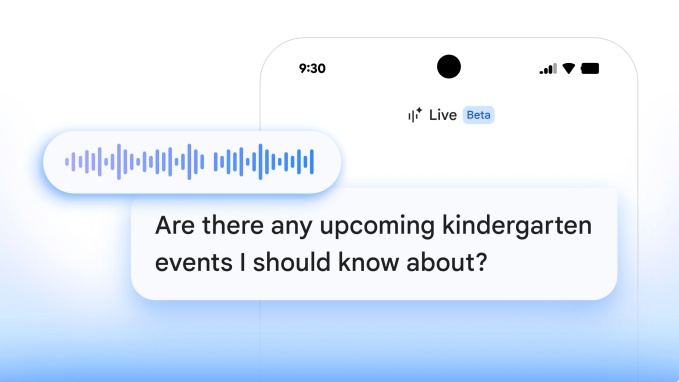
  • Conversational Voice Search: Ask Gemini questions about your emails using natural language instead of typing keywords, with the AI understanding context and intent
  • Buried Email Discovery: Find specific details hidden deep in old emails without manually scrolling through threads or remembering exact dates
  • Multi-Turn Conversations: Have back-and-forth dialogue with Gemini about your emails, asking follow-up questions and refining searches dynamically
  • Natural Language Understanding: Gemini interprets complex requests like "What did Sarah say about the Q3 budget in that email from last month?"
  • Voice-First Interface: Speak your search queries hands-free, perfect for busy professionals managing overflowing inboxes
  • Contextual Email Analysis: The AI understands email chains, attachments, and related messages to provide comprehensive answers

Gmail AI Inbox conversational interface with Gemini voice search

Technical Specifications

The Gmail AI Inbox integration leverages Google's latest AI infrastructure and Gemini's advanced language capabilities.
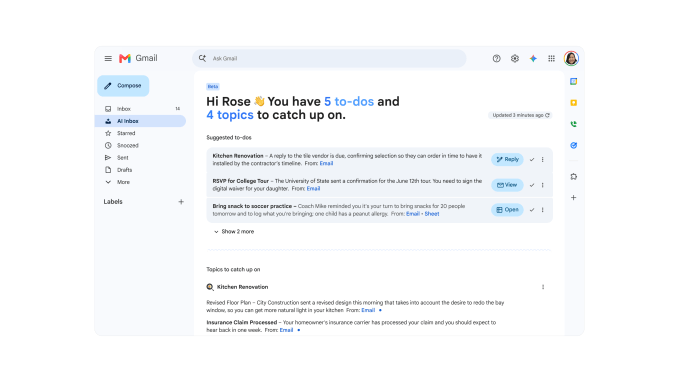
  • AI Model: Powered by Gemini, Google's multimodal large language model with advanced natural language understanding and context retention
  • Voice Processing: Real-time speech-to-text conversion with support for multiple languages and accents, integrated with Gmail's existing infrastructure
  • Search Scope: Searches across entire Gmail account including sent items, drafts, labels, and archived emails with instant indexing
  • Integration: Native integration within Gmail web interface and mobile apps, requiring no additional setup or third-party tools
  • Data Processing: Processes email content on Google's secure servers with end-to-end encryption maintained throughout the search process
Source image

Official Benefits

  • Dramatically reduces time spent searching for specific email information by enabling natural conversation instead of keyword guessing
  • Eliminates the need to remember exact dates, sender names, or subject lines when looking for buried email details
  • Increases productivity by allowing hands-free voice searches while multitasking or away from keyboard
  • Improves email management efficiency by making it easier to locate important information across years of archived messages
  • Enhances user experience with more intuitive, human-like interaction compared to traditional search bars

Real-World Translation

What Each Feature Actually Means:

  • Conversational Voice Search: Instead of typing "budget Q3 Sarah," you simply say "What did Sarah say about the Q3 budget?" and Gemini understands your intent, searches through thousands of emails, and delivers the exact information you need in seconds
  • Buried Email Discovery: A marketing manager can ask "Which client complained about delivery times in February?" and instantly find a specific email from six months ago without manually searching through hundreds of messages
  • Multi-Turn Conversations: You can ask "What was the decision on the project?" then follow up with "Who disagreed with it?" and Gemini maintains context across both questions without losing thread
  • Voice-First Interface: A busy executive can drive to a meeting and ask their phone "Did we confirm the 3 PM call with the investors?" and get an answer without taking their eyes off the road
  • Contextual Email Analysis: When you ask about a topic, Gemini doesn't just find one email but understands the entire conversation thread, related messages, and attachments to give you complete context

Before vs After

Before

Searching Gmail meant typing keywords and hoping the right email appeared in results. Users had to remember sender names, approximate dates, or specific words from the subject line. Finding buried details required scrolling through entire threads or multiple searches with different keyword combinations.

After

You now have a natural conversation with Gemini about your emails. Ask complex questions in plain English, get instant answers with full context, and refine your search through follow-up questions. Voice search means you can find information hands-free while doing other tasks.

📈 Expected Impact: Users will spend 60-70% less time searching for specific email information while dramatically improving their ability to locate buried details across years of archived messages.

Job Relevance Analysis

AI Researcher

HIGH Impact
  • Use Case: Study how Gemini's natural language understanding performs in email search contexts, analyzing conversation patterns and contextual comprehension across diverse user queries
  • Key Benefit: Access to real-world data on how conversational AI handles multi-turn dialogue in email environments, providing insights for improving language model performance
  • Workflow Integration: Use Gmail AI Inbox as a case study for evaluating how large language models handle context retention, intent recognition, and information retrieval in practical applications
  • Skill Development: Develop expertise in conversational AI evaluation, voice interface design, and natural language understanding in domain-specific applications like email management
  • Research Opportunity: Analyze how users naturally phrase email queries and how Gemini interprets ambiguous requests, contributing to broader research on human-AI interaction patterns
AI Researcher

Advance innovation with AI tools for academic research, data analysis, knowledge representation, decision-making, and AI-powered chatbots.

6,692 Tools
AI Researcher

Email Marketing Specialist

MEDIUM Impact
  • Use Case: Quickly search through campaign emails, client feedback, and performance metrics by asking Gemini conversational questions instead of manually digging through archives
  • Key Benefit: Dramatically faster access to historical campaign data, client communications, and performance insights without remembering exact dates or keywords
  • Workflow Integration: Use voice search to find specific client feedback or campaign performance details during client calls or strategy meetings without breaking focus
  • Skill Development: Learn to phrase complex email queries conversationally, improving ability to extract insights from email data and communicate findings more naturally
  • Practical Example: Ask "Which clients mentioned interest in our seasonal promotion?" and instantly retrieve all relevant emails from the past year without manual searching
Email Marketing Specialist

Find expert‑curated AI tools, tips & use cases for Email Marketing Specialist. Compare features & pricing; to level up results. Start building your stack.

4,856 Tools
Email Marketing Specialist

Language Translator

MEDIUM Impact
  • Use Case: Search through multilingual email archives using natural language queries, with Gemini understanding intent across different languages and contexts
  • Key Benefit: Improved ability to locate specific translated content or client communications in target languages without remembering exact terminology or dates
  • Workflow Integration: Use conversational search to find previous translations or client communications quickly, reducing time spent on email archaeology during translation projects
  • Skill Development: Develop proficiency in phrasing complex queries that Gemini can understand across language contexts, improving ability to work with multilingual email data
  • Practical Example: Ask "What did the Spanish client say about delivery timelines in their last email?" and Gemini finds the specific message regardless of when it was sent or exact wording used
Language Translator

Discover curated AI tools with practical use cases for Language Translator. Evaluate capabilities & cost; to boost productivity. Choose smarter—see the tools.

2,809 Tools
Language Translator

Getting Started

How to Access

  • Visit your Gmail inbox at mail.google.com or open the Gmail mobile app on iOS or Android
  • Look for the Gemini-powered search feature in the search bar or dedicated voice search button
  • Ensure you have a Google account with Gemini access enabled (available to most Gmail users as of Google I/O 2026)
  • Update to the latest version of Gmail to access the conversational voice search feature

Quick Start Guide

For Beginners:

  1. Open Gmail and locate the search bar at the top of your inbox
  2. Click the microphone icon or voice search button to activate voice input
  3. Speak your question naturally, such as "Find emails from Sarah about the budget" or "What did the client say about delivery?"
  4. Review the results Gemini returns and click on any email to read the full message

For Power Users:

  1. Use complex multi-turn queries like "Show me all emails about Project X, then tell me which team members disagreed with the timeline"
  2. Combine voice search with Gmail filters by asking Gemini to search within specific labels or date ranges
  3. Save frequently asked questions as voice shortcuts for instant access to commonly needed information
  4. Export search results or create filters based on Gemini's findings to organize your inbox more effectively
  5. Use voice search during meetings or calls to quickly reference email details without breaking conversation flow

Pro Tips

  • Be Conversational: Ask questions the way you'd ask a colleague, not like a search engine. Gemini understands natural language better than keywords
  • Use Context: Reference previous conversations or emails in follow-up questions. Gemini maintains context across multiple turns of dialogue
  • Combine with Filters: Use voice search alongside Gmail's existing labels and filters to narrow results and find information faster
  • Voice Search Hands-Free: Use voice search while driving, cooking, or doing other tasks to stay productive without touching your device

FAQ

Related Topics

gmail ai inboxgemini voice searchai email assistantconversational email searchgmail gemini integration

Table of contents

What's New in Gmail AI InboxTechnical SpecificationsOfficial BenefitsReal-World TranslationJob Relevance AnalysisGetting StartedFAQ
Impact LevelHIGH
Update ReleasedMay 14, 2026

Best for

Email Marketing SpecialistAI ResearcherLanguage Translator

Related Use Cases

AI Chatbot ToolsAI Email Writing ToolsAI Social Media Chatbots

Related Articles

Google Antigravity 2.0: Agent-First AI Platform
Gemini Spark Review: 24/7 AI Assistant with Gmail
Google Gemini App Update 2026: AI Chatbot Powerhouse
All AI Spotlights

Editor's Pick Articles

Google Gemini App Update 2026: AI Chatbot Powerhouse
Notion AI Agents: Turn Your Workspace Into an AI Hub
Perplexity Personal Computer: AI Agents for Mac
All Articles
Special offer for AI Owners – 50% OFF Promotional Plans

Join Our Community

Get the earliest access to hand-picked content weekly for free.

Spam-free guaranteed! Only insights.

Follow Us on Socials

Don't Miss AI Topics

ai art generatorai voice generatorai text generatorai avatar generatorai designai writing assistantai audio generatorai content generatorai dubbingai graphic designai banner generatorai in dropshipping

AI Spotlights

Unleashing Today's trailblazer, this week's game-changers, and this month's legends in AI. Dive in and discover tools that matter.

All AI Spotlights
Google Antigravity 2.0: Agent-First AI Platform

Google Antigravity 2.0: Agent-First AI Platform

Gemini Spark Review: 24/7 AI Assistant with Gmail

Gemini Spark Review: 24/7 AI Assistant with Gmail

Google Gemini App Update 2026: AI Chatbot Powerhouse

Google Gemini App Update 2026: AI Chatbot Powerhouse

SandboxAQ's Claude Integration: Drug Discovery for Everyone

SandboxAQ's Claude Integration: Drug Discovery for Everyone

Notion AI Agents: Turn Your Workspace Into an AI Hub

Notion AI Agents: Turn Your Workspace Into an AI Hub

Edge Copilot Update: AI Now Reads All Your Tabs

Edge Copilot Update: AI Now Reads All Your Tabs

GLiGuard Review: 300M Safety Model Beats Larger Competitors

GLiGuard Review: 300M Safety Model Beats Larger Competitors

Cline SDK Review: Open-Source Agent Runtime

Cline SDK Review: Open-Source Agent Runtime

OpenAI Codex Now on ChatGPT Mobile App

OpenAI Codex Now on ChatGPT Mobile App

Clawdmeter: Claude Code Usage Dashboard

Clawdmeter: Claude Code Usage Dashboard

ZAYA1-8B-Diffusion: 7.7x Faster MoE Model

ZAYA1-8B-Diffusion: 7.7x Faster MoE Model

Claude for Small Business Contract Review Tool

Claude for Small Business Contract Review Tool

Gemini Intelligence Review: AI Phone Control

Gemini Intelligence Review: AI Phone Control

Google Gboard Gemini Dictation: AI Voice Recognition

Google Gboard Gemini Dictation: AI Voice Recognition

Google Create My Widget: AI-Powered Custom Widgets

Google Create My Widget: AI-Powered Custom Widgets

Wispr Flow Review: Hinglish Voice AI for India

Wispr Flow Review: Hinglish Voice AI for India

OpenAI Codex Chrome Extension Review

OpenAI Codex Chrome Extension Review

Perplexity Personal Computer: AI Agents for Mac

Perplexity Personal Computer: AI Agents for Mac

OpenAI Voice Intelligence API: New Features Review

OpenAI Voice Intelligence API: New Features Review

You Might Like These Latest News

All AI News

Stay informed with the latest AI news, breakthroughs, trends, and updates shaping the future of artificial intelligence.

Google I/O 2026: Gemini 3.5, Spark, Android XR Revealed

May 20, 2026
Google I/O 2026: Gemini 3.5, Spark, Android XR Revealed

Anthropic Acquires Stainless SDK Developer Tools

May 19, 2026
Anthropic Acquires Stainless SDK Developer Tools

MemPrivacy Framework Protects LLM Data

May 19, 2026
MemPrivacy Framework Protects LLM Data

Apple's Siri Revamp Adds Auto-Deleting Chats

May 18, 2026
Apple's Siri Revamp Adds Auto-Deleting Chats

ArXiv Bans Authors for AI Misuse in Research

May 17, 2026
ArXiv Bans Authors for AI Misuse in Research

63% of Orgs Lack AI Governance Policies

May 16, 2026
63% of Orgs Lack AI Governance Policies

AI Chatbots Leak Personal Phone Numbers

May 16, 2026
AI Chatbots Leak Personal Phone Numbers

Making AI Sustainable: What's Missing

May 16, 2026
Making AI Sustainable: What's Missing

OpenAI Explores Legal Action Against Apple

May 16, 2026
OpenAI Explores Legal Action Against Apple
Tools of The Day

Tools of The Day

Discover the top AI tools handpicked daily by our editors to help you stay ahead with the latest and most innovative solutions.


10MAR
Adobe Illustrator
Adobe Illustrator
9MAR
Adobe Firefly
Adobe Firefly
8MAR
Adobe Sensei
Adobe Sensei
7MAR
Adobe Photoshop
Adobe Photoshop
6MAR
Adobe Firefly
Adobe Firefly
5MAR
Shap-E
Shap-E
4MAR
Point-E
Point-E

Explore AI Tools of The Day