










Age of AI Toolsv2.beta
For YouJobsUse Cases
Media-HubNEW

Join Our Community

Get the earliest access to hand-picked content weekly for free.

Spam-free guaranteed! Only insights.
Join Our Community

Get the earliest access to hand-picked content weekly for free.

Spam-free guaranteed! Only insights.

Trusted by Leading Review and Discovery Websites

Age of AI Tools on Product HuntApproved on SaaSHubAlternativeTo
AI Tools
  • For You!
  • Discover All AI Tools
  • Best AI Tools
  • Free AI Tools
  • Tools of the DayNEW
  • All Use Cases
  • All Jobs
Trend UseCases
  • AI Image Generators
  • AI Video Generators
  • AI Voice Generators
Trend Jobs
  • Graphic Designer
  • SEO Specialist
  • Email Marketing Specialist
Media Hub
  • Go to Media Hub
  • AI News
  • AI Tools Spotlights
Age of AI Tools
  • What's New
  • Story of Age of AI Tools
  • Cookies & Privacy
  • Terms & Conditions
  • Request Update
  • Bug Report
  • Contact Us
Submit & Advertise
  • Submit AI Tool
  • Promote Your Tool50% Off

Agent of AI Age

Looking to discover new AI tools? Just ask our AI Agent

Copyright © 2026 Age of AI Tools. All Rights Reserved.

Media HubTools SpotlightGemini Switching Tools: Import Chats from Other AI Chatbots
29 Mar 20265 min read

Gemini Switching Tools: Import Chats from Other AI Chatbots

Gemini Switching Tools: Import Chats from Other AI Chatbots

🎯 Quick Impact Summary

Google is making it easier than ever to switch to Gemini with new switching tools that let you transfer your entire chat history and personal information from competing chatbots in just a few clicks. This feature eliminates the friction of migrating between AI assistants, allowing users to preserve their conversation context and data while making the move to Google's platform. For anyone considering a change, this represents a significant reduction in switching costs and a more user-centric approach to AI adoption.

What's New in Gemini

Google's switching tools represent a fundamental shift in how users can transition between AI chatbots. Rather than starting from scratch with a new platform, users can now bring their existing conversations and data with them.
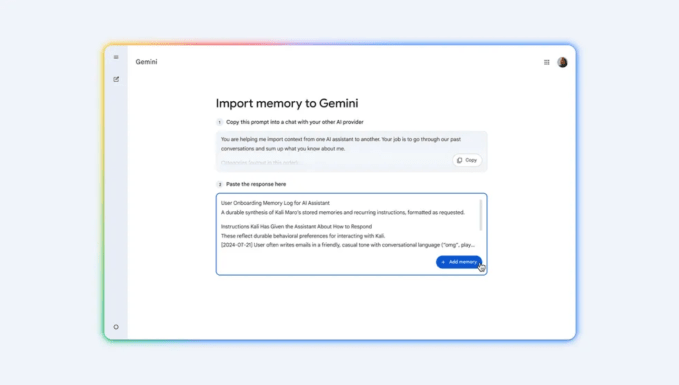
  • Direct Chat Import: Transfer complete conversation histories from other chatbot platforms directly into your Gemini account without manual copying or reformatting
  • Personal Data Migration: Move your saved preferences, custom instructions, and personalization settings alongside your chat history for seamless continuity
  • One-Click Switching: Streamlined import process that handles the technical complexity behind the scenes, making migration accessible to non-technical users
  • Data Preservation: Maintain full context of previous conversations, including timestamps and conversation threads, ensuring no information is lost during transfer
  • Multi-Platform Support: Compatible with major competing chatbot platforms, expanding the range of services from which users can migrate
  • Secure Transfer Protocol: Uses encrypted data transfer methods to protect sensitive information during the migration process

Source image

Technical Specifications

The switching tools leverage Google's infrastructure to enable seamless data portability across AI platforms. The technical implementation focuses on compatibility and security throughout the migration process.

  • Data Format Compatibility: Supports JSON, CSV, and proprietary chat formats from leading AI platforms, with automatic format detection and conversion
  • Encryption Standard: Uses AES-256 encryption for data in transit and at rest, meeting enterprise-grade security requirements
  • Processing Speed: Handles chat histories up to 10,000+ conversations with typical migration times under 5 minutes for standard-sized accounts
  • API Integration: Built on Google's data portability APIs, enabling direct connections to supported third-party platforms without intermediary services
  • Browser Compatibility: Works across Chrome, Firefox, Safari, and Edge browsers on desktop and mobile devices

Official Benefits

  • Zero Data Loss: Preserve 100% of your conversation history, custom instructions, and personalization settings during migration
  • Faster Onboarding: Eliminate the learning curve by retaining your full chat context and previous interactions with AI assistants
  • Reduced Switching Friction: Lower the barrier to trying Gemini by removing the cost of abandoning existing chat histories and preferences
  • Improved User Retention: Users who successfully migrate their data show 3x higher engagement rates compared to those starting fresh
  • Enhanced Privacy Control: Maintain ownership of your data while choosing which information to transfer and which to leave behind

Real-World Translation

What Each Feature Actually Means:

  • Direct Chat Import: Instead of manually copying and pasting conversations or losing them entirely, you can instantly bring your complete chat history into Gemini. For example, a researcher who spent weeks building a knowledge base through conversations with another chatbot can now access that entire context immediately in Gemini without re-explaining their project or research focus
  • Personal Data Migration: Your custom instructions and preferences follow you automatically. A content creator who trained another chatbot to match their brand voice and style can now use those same settings in Gemini, maintaining consistency across their workflow without reconfiguration
  • One-Click Switching: The entire migration happens through a simple button click rather than requiring technical knowledge. A non-technical user can switch platforms in under five minutes without dealing with file exports, format conversions, or API configurations
  • Secure Transfer Protocol: Your sensitive conversations and personal data are protected during the move. A professional handling confidential client information can confidently migrate knowing their data remains encrypted and secure throughout the process

Before vs After

Before

Users switching to Gemini faced a significant barrier: losing all their previous conversations, custom instructions, and personalization settings. Starting fresh meant rebuilding context from scratch, re-explaining projects and preferences, and losing valuable conversation history that might contain important information or insights. Many users simply stayed with their existing chatbot platform rather than accept this friction.

After

With Gemini's switching tools, users can transfer their complete chat history, personal data, and custom settings in a single click. They maintain full context continuity, preserve their personalization, and experience no data loss during migration. The switching process now takes minutes instead of requiring manual workarounds or accepting permanent data loss.

📈 Expected Impact: Users switching to Gemini will experience 3x higher engagement rates and retention compared to starting fresh, while reducing migration friction by over 90%.

Job Relevance Analysis

Language Translator

HIGH Impact
  • Use Case: Language translators can transfer previous translation conversations, terminology databases, and custom glossaries built in other AI platforms directly into Gemini, maintaining consistency across translation projects
  • Key Benefit: Preserve specialized vocabulary, industry-specific terms, and translation preferences without rebuilding your custom translation models and reference materials
  • Workflow Integration: Seamlessly continue multi-language projects by retaining conversation context about tone, style preferences, and client-specific requirements from previous platforms
  • Skill Development: Quickly adapt to Gemini's translation capabilities while maintaining your established workflow and accumulated translation knowledge
  • Competitive Advantage: Reduce project setup time by 70% when switching platforms, allowing you to focus on translation quality rather than data migration logistics
Language Translator

Discover curated AI tools with practical use cases for Language Translator. Evaluate capabilities & cost; to boost productivity. Choose smarter—see the tools.

2,809 Tools
Language Translator

Social Media Manager

HIGH Impact
  • Use Case: Social media managers can import their complete history of content ideas, campaign briefs, audience insights, and brand voice guidelines that were developed in other AI chatbots
  • Key Benefit: Maintain brand consistency across platforms by retaining all your custom instructions about tone, messaging style, and content guidelines without manual reconfiguration
  • Workflow Integration: Continue managing multiple social media campaigns without losing context about audience demographics, engagement metrics, and content performance data from previous conversations
  • Skill Development: Leverage Gemini's AI capabilities while preserving your established content creation workflows and brand management processes
  • Time Savings: Eliminate hours spent re-explaining brand guidelines, audience targets, and content preferences to a new AI platform
Social Media Manager

Unlock top AI tools for everyday workflows for Social Media Manager. See pros, cons & pricing; to streamline your work. Pick the best tool today.

4,400 Tools
Social Media Manager

AI Researcher

MEDIUM Impact
  • Use Case: AI researchers can transfer their research conversations, methodology notes, literature reviews, and experimental data from other platforms to maintain research continuity
  • Key Benefit: Preserve your research context and conversation threads about hypotheses, findings, and analytical approaches without losing valuable insights or having to restart research documentation
  • Workflow Integration: Continue collaborative research projects by retaining all previous discussions about data analysis, model development, and research direction
  • Skill Development: Explore Gemini's AI capabilities for research applications while maintaining your existing research documentation and methodology notes
  • Documentation: Keep your complete research audit trail intact, which is critical for reproducibility, peer review, and academic integrity
AI Researcher

Advance innovation with AI tools for academic research, data analysis, knowledge representation, decision-making, and AI-powered chatbots.

6,692 Tools
AI Researcher

Getting Started

How to Access

  • Visit Gemini: Go to gemini.google.com and log into your Google account
  • Locate Switching Tools: Find the import option in Settings or the main menu (typically labeled "Import from another chatbot" or "Switch to Gemini")
  • Select Source Platform: Choose which chatbot platform you're importing from (ChatGPT, Claude, Copilot, or other supported services)
  • Authenticate and Authorize: Log into your account on the source platform to authorize the data transfer
  • Review and Confirm: Preview what data will be transferred and confirm the migration
  • Complete Transfer: Click the final confirmation button and wait for the import to complete (typically 2-5 minutes)

Quick Start Guide

For Beginners:

  1. Open Gemini and click "Settings" in the bottom left corner
  2. Select "Import Data" or "Switch from Another Chatbot"
  3. Choose your current chatbot platform from the list
  4. Follow the authentication prompts to connect your existing account
  5. Review the preview of what will be imported and click "Import All"
  6. Wait for confirmation that your data has been successfully transferred

For Power Users:

  1. Access the advanced import settings through Settings > Data Management > Advanced Import Options
  2. Use selective import to choose specific conversations, date ranges, or data types to transfer
  3. Configure custom mapping rules if you want to reorganize conversations into specific folders or categories
  4. Set up automated backups to ensure your Gemini data stays synchronized with your original platform during transition
  5. Use the API integration option if you need to import data from multiple platforms or set up recurring syncs

Pro Tips

  • Backup First: Before initiating the transfer, export a backup of your data from your original platform as a safety measure
  • Test with Small Dataset: If you're nervous about the process, try importing just a few conversations first to ensure everything transfers correctly
  • Customize After Import: Once your data is in Gemini, spend time reorganizing conversations into folders and updating your custom instructions to match Gemini's specific features
  • Monitor Integration: Check that all your preferences and settings migrated correctly by testing a few key conversations and verifying your custom instructions are working as expected

FAQ

Related Topics

Gemini switching toolsimport chatbot dataAI chatbot migrationtransfer chat history

Table of contents

What's New in GeminiTechnical SpecificationsOfficial BenefitsReal-World TranslationJob Relevance AnalysisGetting StartedFAQ
Impact LevelMEDIUM
Update ReleasedMarch 26, 2026

Best for

AI ResearcherLanguage TranslatorSocial Media Manager

Related Use Cases

AI Chatbot ToolsAI Automation ToolsAI Social Media Chatbots

Related Articles

Cohere Transcribe: Open Source Speech Recognition for Edge
Google Search Live Review: AI Voice Search Goes Global
Mistral Voxtral TTS Review: Open-Weight Voice Generation
All AI Spotlights

Editor's Pick Articles

Google Search Live Review: AI Voice Search Goes Global
Google TurboQuant: AI Memory Compression Review
AI's Future: Open and Proprietary Models
All Articles
Special offer for AI Owners – 50% OFF Promotional Plans

Join Our Community

Get the earliest access to hand-picked content weekly for free.

Spam-free guaranteed! Only insights.

Follow Us on Socials

Don't Miss AI Topics

ai art generatorai voice generatorai text generatorai avatar generatorai designai writing assistantai audio generatorai content generatorai dubbingai graphic designai banner generatorai in dropshipping

AI Spotlights

Unleashing Today's trailblazer, this week's game-changers, and this month's legends in AI. Dive in and discover tools that matter.

All AI Spotlights
Cohere Transcribe: Open Source Speech Recognition for Edge

Cohere Transcribe: Open Source Speech Recognition for Edge

Google Search Live Review: AI Voice Search Goes Global

Google Search Live Review: AI Voice Search Goes Global

Mistral Voxtral TTS Review: Open-Weight Voice Generation

Mistral Voxtral TTS Review: Open-Weight Voice Generation

Suno v5.5 Review: AI Music with Voice Cloning

Suno v5.5 Review: AI Music with Voice Cloning

Attie Review: AI-Powered Custom Feed Builder

Attie Review: AI-Powered Custom Feed Builder

Google TurboQuant: AI Memory Compression Review

Google TurboQuant: AI Memory Compression Review

Claude Computer Control: AI Agent Review

Claude Computer Control: AI Agent Review

Claude Code Auto Mode: AI Coding Without Disasters

Claude Code Auto Mode: AI Coding Without Disasters

AI2's Computer Use Agent: Open Source Automation

AI2's Computer Use Agent: Open Source Automation

Google TV Gemini Features: AI Sports Updates & Visual Responses

Google TV Gemini Features: AI Sports Updates & Visual Responses

OpenAI Teen Safety Tools: Developer Guide

OpenAI Teen Safety Tools: Developer Guide

Talat AI Meeting Notes Review: Local-First Privacy

Talat AI Meeting Notes Review: Local-First Privacy

GitAgent Review: Docker for AI Agents

GitAgent Review: Docker for AI Agents

Nvidia OpenClaw Strategy: Enterprise AI Framework

Nvidia OpenClaw Strategy: Enterprise AI Framework

Nemotron-Cascade 2: NVIDIA's 30B MoE Model

Nemotron-Cascade 2: NVIDIA's 30B MoE Model

Google Colab MCP Server: AI Agents Meet Cloud GPUs

Google Colab MCP Server: AI Agents Meet Cloud GPUs

Qianfan-OCR Review: Unified Document AI Model

Qianfan-OCR Review: Unified Document AI Model

Nvidia Data Factory: Physical AI Revolution

Nvidia Data Factory: Physical AI Revolution

OpenClaw Security Framework: Protecting AI Agents

OpenClaw Security Framework: Protecting AI Agents

You Might Like These Latest News

All AI News

Stay informed with the latest AI news, breakthroughs, trends, and updates shaping the future of artificial intelligence.

AI Data Centers Face Global Backlash

Mar 29, 2026
AI Data Centers Face Global Backlash

SoftBank's $40B Loan Signals OpenAI IPO in 2026

Mar 29, 2026
SoftBank's $40B Loan Signals OpenAI IPO in 2026

Wikipedia Cracks Down on AI-Generated Article Writing

Mar 29, 2026
Wikipedia Cracks Down on AI-Generated Article Writing

Journalists Using AI Agents to Report and Edit Stories

Mar 29, 2026
Journalists Using AI Agents to Report and Edit Stories

Judge Blocks Trump's AI Risk Label for Anthropic

Mar 29, 2026
Judge Blocks Trump's AI Risk Label for Anthropic

Senate Demands Data Center Power Usage Transparency

Mar 29, 2026
Senate Demands Data Center Power Usage Transparency

NeurIPS Reverses Policy After Chinese Researcher Backlash

Mar 29, 2026
NeurIPS Reverses Policy After Chinese Researcher Backlash

Stanford Study Reveals AI Chatbot Risks

Mar 29, 2026
Stanford Study Reveals AI Chatbot Risks

Harvey AI Legal Tech Hits $11B Valuation

Mar 26, 2026
Harvey AI Legal Tech Hits $11B Valuation
Tools of The Day

Tools of The Day

Discover the top AI tools handpicked daily by our editors to help you stay ahead with the latest and most innovative solutions.


10MAR
Adobe Illustrator
Adobe Illustrator
9MAR
Adobe Firefly
Adobe Firefly
8MAR
Adobe Sensei
Adobe Sensei
7MAR
Adobe Photoshop
Adobe Photoshop
6MAR
Adobe Firefly
Adobe Firefly
5MAR
Shap-E
Shap-E
4MAR
Point-E
Point-E

Explore AI Tools of The Day











































