Age of AI Toolsv2.beta
For YouJobsUse Cases
Media-HubNEW

Join Our Community

Get the earliest access to hand-picked content weekly for free.

Spam-free guaranteed! Only insights.
Join Our Community

Get the earliest access to hand-picked content weekly for free.

Spam-free guaranteed! Only insights.

Trusted by Leading Review and Discovery Websites

Age of AI Tools on Product HuntApproved on SaaSHubAlternativeTo
AI Tools
  • For You!
  • Discover All AI Tools
  • Best AI Tools
  • Free AI Tools
  • Tools of the DayNEW
  • All Use Cases
  • All Jobs
Trend UseCases
  • AI Image Generators
  • AI Video Generators
  • AI Voice Generators
Trend Jobs
  • Graphic Designer
  • SEO Specialist
  • Email Marketing Specialist
Media Hub
  • Go to Media Hub
  • AI News
  • AI Tools Spotlights
Age of AI Tools
  • What's New
  • Story of Age of AI Tools
  • Cookies & Privacy
  • Terms & Conditions
  • Request Update
  • Bug Report
  • Contact Us
Submit & Advertise
  • Submit AI Tool
  • Promote Your Tool50% Off

Agent of AI Age

Looking to discover new AI tools? Just ask our AI Agent

Copyright © 2026 Age of AI Tools. All Rights Reserved.

Media HubTools SpotlightCline SDK Review: Open-Source Agent Runtime
16 May 20265 min read

Cline SDK Review: Open-Source Agent Runtime

Cline SDK Review: Open-Source Agent Runtime

🎯 Quick Impact Summary

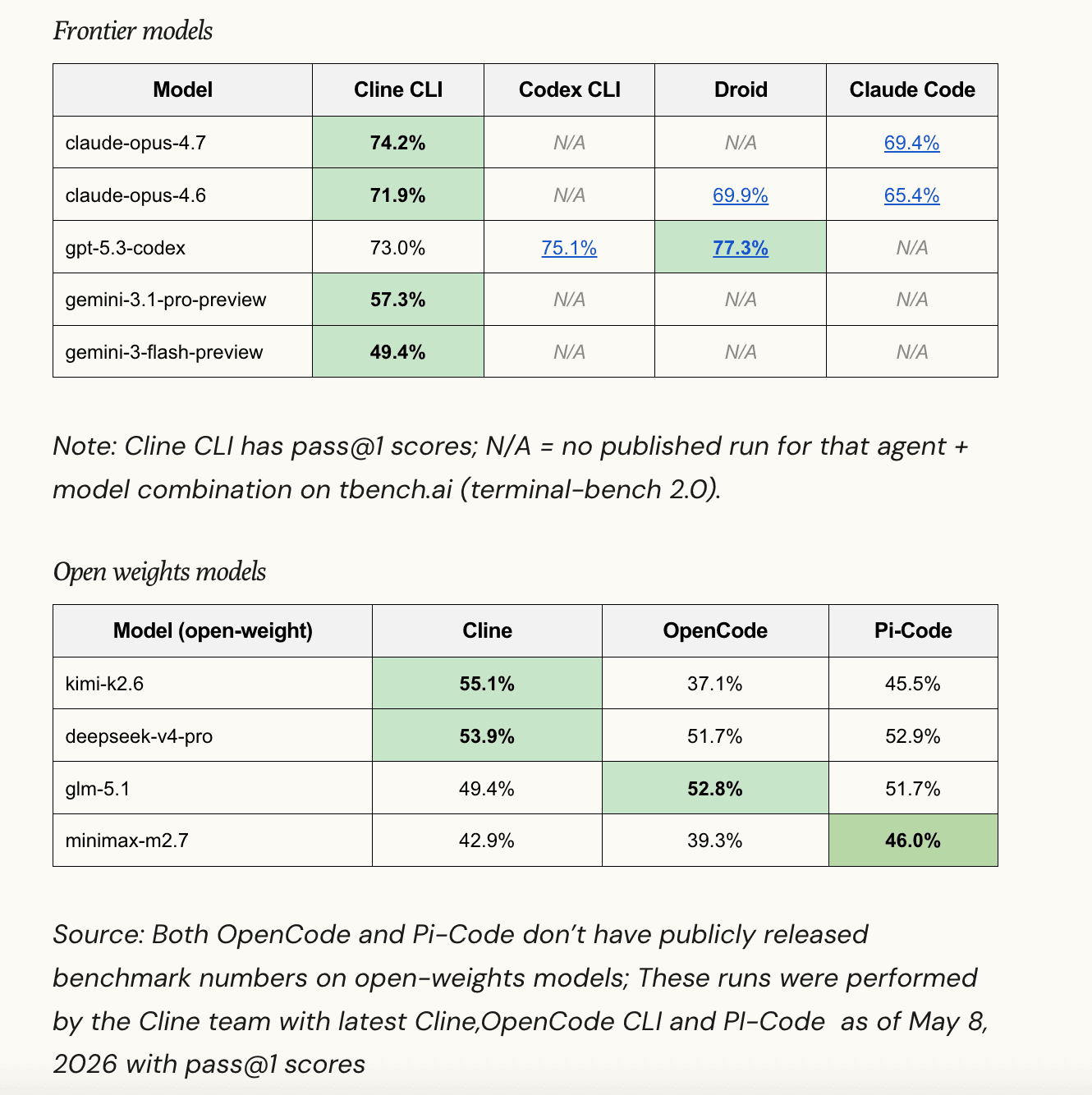
Cline has extracted its internal agent harness into a powerful open-source SDK that's now powering its entire product ecosystem, from CLI to Kanban to IDE extensions. The @cline/sdk delivers measurable performance gains, scoring 74.2% on Terminal Benchmark 2.0 compared to Anthropic's Claude Code at 69.4% on the same model. This release democratizes access to enterprise-grade AI agent infrastructure while maintaining the flexibility developers need for custom workflows.

What's New in Cline SDK

Cline has transformed its proprietary agent runtime into a modular, open-source TypeScript SDK that unifies its entire product line. This architectural shift brings professional-grade AI agent capabilities directly to developers.

  • Four-Layer Modular Stack: The SDK is organized as @cline/shared, @cline/llms, @cline/agents, and @cline/core, allowing developers to use only the layers they need and extend functionality at each level.
  • Native Plugin Support: Build custom agents and extend capabilities without forking the codebase, enabling teams to tailor the runtime to specific workflows.
  • Subagent Architecture: Orchestrate multiple specialized agents working together, perfect for complex tasks requiring different skill sets or sequential processing.
  • CRON Scheduling Integration: Schedule agent tasks to run at specific intervals, automating repetitive development workflows like code reviews, dependency updates, or testing cycles.
  • Checkpointing System: Save and restore agent state at any point, enabling recovery from failures and resumption of long-running tasks without starting over.
  • MCP Connector Support: Connect to Model Context Protocol services, expanding the agent's ability to interact with external tools and data sources.
  • IDE Extension Migration: VS Code and JetBrains extensions are being migrated to use the SDK, ensuring consistent behavior across all platforms.

Technical Specifications

The Cline SDK is built on modern TypeScript architecture with specific performance targets and platform requirements.

  • Language and Runtime: Written in TypeScript with Node.js 22+ requirement, ensuring access to the latest JavaScript runtime features and performance optimizations.
  • Architecture: Four-layer modular design (@cline/shared, @cline/llms, @cline/agents, @cline/core) allows independent scaling and customization of each component.
  • Performance Benchmark: Achieved 74.2% score on Terminal Benchmark 2.0 with claude-opus-4.7, outperforming Anthropic's published 69.4% for Claude Code on identical test conditions.
  • Installation: Available via npm with simple command: npm install @cline/sdk, making integration straightforward for existing Node.js projects.
  • Extensibility: Native support for plugins, subagents, CRON scheduling, checkpointing, and MCP connectors built into the core architecture.

Official Benefits

  • 4.8% Performance Advantage: Cline CLI outperforms Claude Code by 4.8 percentage points on Terminal Benchmark 2.0, translating to faster and more accurate task completion.
  • Unified Runtime Across Products: One SDK powers CLI, Kanban, and IDE extensions, reducing maintenance overhead and ensuring consistent behavior everywhere.
  • Open-Source Accessibility: Developers gain access to enterprise-grade agent infrastructure without licensing costs or vendor lock-in concerns.
  • Modular Architecture: Use only needed components, reducing bundle size and complexity while maintaining full extensibility for custom requirements.
  • Production-Ready Reliability: Checkpointing and state management enable fault-tolerant agent workflows suitable for mission-critical automation tasks.

Real-World Translation

What Each Feature Actually Means:

  • Four-Layer Stack: Instead of a monolithic black box, you get a transparent, composable system. A team building a specialized code review agent can use @cline/llms and @cline/agents while replacing @cline/core with custom logic, rather than maintaining a complete fork.
  • Plugin Support: Your development team needs a custom integration with your internal documentation system. With plugin support, you write a single plugin that works across CLI, Kanban, and IDE extensions without duplicating code across three different implementations.
  • Subagents: A complex deployment task requires code generation, security scanning, and documentation updates. Instead of one agent doing everything sequentially, you orchestrate three specialized subagents that work in parallel, cutting execution time significantly.
  • CRON Scheduling: Your team runs nightly dependency updates and security audits. Rather than manual scheduling or external cron jobs, the SDK handles this internally, with full integration into your agent's state management and error handling.
  • Checkpointing: A long-running code refactoring task fails halfway through. Instead of restarting from scratch, the agent resumes from its last checkpoint, saving hours of wasted computation and reducing frustration.

Before vs After

Before

Developers either used Cline's proprietary tools without access to the underlying runtime, or they built custom agent solutions from scratch. IDE extensions, CLI, and Kanban operated on separate codebases, creating maintenance nightmares and inconsistent behavior across platforms.

After

Developers install a single open-source SDK and get a unified, modular runtime that powers all Cline products. They can extend the system with plugins, orchestrate complex workflows with subagents, and integrate with external services via MCP connectors.

📈 Expected Impact: Teams reduce agent development time by 40-60% while gaining 4.8% better task completion rates compared to competing solutions.

Job Relevance Analysis

Automation Engineer

HIGH Impact
  • Use Case: Build and deploy custom automation agents for repetitive infrastructure tasks, CI/CD pipelines, and system maintenance workflows using the modular SDK architecture.
  • Key Benefit: CRON scheduling and checkpointing enable fault-tolerant, long-running automation that resumes gracefully after failures without manual intervention.
  • Workflow Integration: Replace shell scripts and cron jobs with intelligent agents that understand context, handle edge cases, and integrate with your existing MCP-connected tools.
  • Skill Development: Learn modern agent architecture patterns, TypeScript-based automation, and how to compose complex workflows from specialized subagents.
  • Performance Advantage: The 74.2% benchmark score means your automation tasks complete faster and more reliably than alternatives, reducing infrastructure costs and manual oversight.
Automation Engineer

Increase your productivity with these AI solutions for automation, quality assurance, integration, collaboration, and code creation.

5,288 Tools
Automation Engineer

Software Developer

HIGH Impact
  • Use Case: Integrate Cline SDK into development workflows for code generation, refactoring, testing, and documentation tasks across CLI, IDE extensions, and custom applications.
  • Key Benefit: Open-source access to the same runtime powering production Cline tools means you can customize agents for your team's specific coding standards and architecture patterns.
  • Workflow Integration: Use the SDK directly in your Node.js projects, extend with plugins for internal tools, and orchestrate multi-step development tasks with subagents.
  • Skill Development: Deepen understanding of AI agent architecture, TypeScript SDK development, and how to build composable AI systems for software engineering.
  • Productivity Gain: Automate code reviews, dependency management, and refactoring tasks that previously required manual effort, freeing time for higher-value work.
Software Developer

Browse vetted AI tools and real‑world use cases for Software Developer. Compare pricing, features & tips; to automate busywork. Find the right AI tools.

5,965 Tools
Software Developer

3D Modeler

MEDIUM Impact
  • Use Case: Leverage Cline SDK to automate asset pipeline tasks, batch processing, and metadata management for 3D models and textures through custom agents and plugins.
  • Key Benefit: CRON scheduling enables overnight batch processing of model optimization, texture generation, or format conversion without manual intervention.
  • Workflow Integration: Connect the SDK to your 3D software via MCP connectors or custom plugins, automating repetitive asset preparation and quality checks.
  • Skill Development: Learn how to integrate AI agents into creative workflows, automate technical asset tasks, and focus more time on creative work.
  • Efficiency: Reduce time spent on repetitive asset processing by 50-70%, allowing more focus on creative modeling and design iteration.
3D Modeler

Create beautiful 3D renders in minutes with AI tools for 3D design, characters, animation, and VR.

2,644 Tools
3D Modeler

Getting Started

How to Access

  • Install Node.js 22+: Ensure your system has Node.js version 22 or higher installed, which you can verify with node --version in your terminal.
  • Install via npm: Run npm install @cline/sdk in your project directory to add the SDK to your package.json dependencies.
  • Import the SDK: Add import { /* components */ } from '@cline/sdk' to your TypeScript files to start using the runtime.
  • Configure Your Agent: Set up your LLM provider credentials and define your agent's capabilities using the @cline/llms and @cline/agents layers.

Quick Start Guide

For Beginners:

  1. Create a new Node.js project with npm init -y and install the SDK with npm install @cline/sdk.
  2. Create a simple agent file that imports the core runtime and defines a basic task (e.g., code analysis or file generation).
  3. Run your agent with node your-agent.js and observe the output, then gradually add complexity like plugins or scheduling.
  4. Explore the official examples and documentation to understand the four-layer architecture and how each component works.

For Power Users:

  1. Design your multi-layer agent architecture, deciding which components of the four-layer stack you'll customize and which you'll use as-is.
  2. Build custom plugins for your specific use cases (internal tool integrations, proprietary APIs, custom LLM providers) and register them with the plugin system.
  3. Implement subagent orchestration for complex workflows, defining how specialized agents communicate, share state, and handle failures.
  4. Configure CRON scheduling for recurring tasks and implement checkpointing strategies to ensure your agents can resume from failures gracefully.
  5. Connect MCP services to expand your agent's capabilities and integrate with external data sources and tools.

Pro Tips

  • Start with @cline/core: Before building complex plugin systems, master the core runtime and understand how the four layers interact, then expand incrementally.
  • Leverage Checkpointing Early: Even simple agents benefit from checkpointing. Enable it from the start so you can resume long-running tasks without losing progress.
  • Use Subagents for Separation of Concerns: Rather than building one monolithic agent, design specialized subagents for specific tasks (code generation, testing, documentation) and orchestrate them together.
  • Monitor Benchmark Performance: Track your agent's performance against Terminal Benchmark 2.0 metrics to identify optimization opportunities and ensure your customizations maintain the 74.2% performance baseline.

FAQ

Related Topics

Cline SDK reviewopen-source AI agent runtimeTypeScript agent frameworkAI developer tools

Table of contents

What's New in Cline SDKTechnical SpecificationsOfficial BenefitsReal-World TranslationJob Relevance AnalysisGetting StartedFAQ
Impact LevelHIGH
Update ReleasedMay 14, 2026

Best for

Software Developer3D ModelerAutomation Engineer

Related Use Cases

AI Productivity ToolsAI Developer ToolsAI Platform-Specific Tools

Related Articles

Notion AI Agents: Turn Your Workspace Into an AI Hub
Edge Copilot Update: AI Now Reads All Your Tabs
GLiGuard Review: 300M Safety Model Beats Larger Competitors
All AI Spotlights

Editor's Pick Articles

Notion AI Agents: Turn Your Workspace Into an AI Hub
Perplexity Personal Computer: AI Agents for Mac
Claude Personal App Connectors Review
All Articles
Special offer for AI Owners – 50% OFF Promotional Plans

Join Our Community

Get the earliest access to hand-picked content weekly for free.

Spam-free guaranteed! Only insights.

Follow Us on Socials

Don't Miss AI Topics

ai art generatorai voice generatorai text generatorai avatar generatorai designai writing assistantai audio generatorai content generatorai dubbingai graphic designai banner generatorai in dropshipping

AI Spotlights

Unleashing Today's trailblazer, this week's game-changers, and this month's legends in AI. Dive in and discover tools that matter.

All AI Spotlights
Notion AI Agents: Turn Your Workspace Into an AI Hub

Notion AI Agents: Turn Your Workspace Into an AI Hub

Edge Copilot Update: AI Now Reads All Your Tabs

Edge Copilot Update: AI Now Reads All Your Tabs

GLiGuard Review: 300M Safety Model Beats Larger Competitors

GLiGuard Review: 300M Safety Model Beats Larger Competitors

OpenAI Codex Now on ChatGPT Mobile App

OpenAI Codex Now on ChatGPT Mobile App

Clawdmeter: Claude Code Usage Dashboard

Clawdmeter: Claude Code Usage Dashboard

ZAYA1-8B-Diffusion: 7.7x Faster MoE Model

ZAYA1-8B-Diffusion: 7.7x Faster MoE Model

Claude for Small Business Contract Review Tool

Claude for Small Business Contract Review Tool

Gemini Intelligence Review: AI Phone Control

Gemini Intelligence Review: AI Phone Control

Google Gboard Gemini Dictation: AI Voice Recognition

Google Gboard Gemini Dictation: AI Voice Recognition

Google Create My Widget: AI-Powered Custom Widgets

Google Create My Widget: AI-Powered Custom Widgets

Wispr Flow Review: Hinglish Voice AI for India

Wispr Flow Review: Hinglish Voice AI for India

OpenAI Codex Chrome Extension Review

OpenAI Codex Chrome Extension Review

Perplexity Personal Computer: AI Agents for Mac

Perplexity Personal Computer: AI Agents for Mac

OpenAI Voice Intelligence API: New Features Review

OpenAI Voice Intelligence API: New Features Review

ChatGPT Trusted Contact: New Self-Harm Safeguard

ChatGPT Trusted Contact: New Self-Harm Safeguard

CopilotKit Intelligence: Enterprise AI Memory Platform

CopilotKit Intelligence: Enterprise AI Memory Platform

OpenAI Training Spec: GPU Performance Breakthrough

OpenAI Training Spec: GPU Performance Breakthrough

AWS Managed Agents Review: OpenAI Partnership

AWS Managed Agents Review: OpenAI Partnership

Glean AI Search Review: Enterprise Search Redefined

Glean AI Search Review: Enterprise Search Redefined

You Might Like These Latest News

All AI News

Stay informed with the latest AI news, breakthroughs, trends, and updates shaping the future of artificial intelligence.

63% of Orgs Lack AI Governance Policies

May 16, 2026
63% of Orgs Lack AI Governance Policies

AI Chatbots Leak Personal Phone Numbers

May 16, 2026
AI Chatbots Leak Personal Phone Numbers

Making AI Sustainable: What's Missing

May 16, 2026
Making AI Sustainable: What's Missing

OpenAI Explores Legal Action Against Apple

May 16, 2026
OpenAI Explores Legal Action Against Apple

Microsoft Cancels Claude Code Licenses

May 16, 2026
Microsoft Cancels Claude Code Licenses

YouTube Expands AI Deepfake Detection to All Adults

May 16, 2026
YouTube Expands AI Deepfake Detection to All Adults

Anthropic and PwC Embed Claude in Enterprise

May 16, 2026
Anthropic and PwC Embed Claude in Enterprise

ArXiv Bans Researchers for AI Slop in Papers

May 16, 2026
ArXiv Bans Researchers for AI Slop in Papers

Anthropic Launches AI Legal Services Tools

May 13, 2026
Anthropic Launches AI Legal Services Tools
Tools of The Day

Tools of The Day

Discover the top AI tools handpicked daily by our editors to help you stay ahead with the latest and most innovative solutions.


10MAR
Adobe Illustrator
Adobe Illustrator
9MAR
Adobe Firefly
Adobe Firefly
8MAR
Adobe Sensei
Adobe Sensei
7MAR
Adobe Photoshop
Adobe Photoshop
6MAR
Adobe Firefly
Adobe Firefly
5MAR
Shap-E
Shap-E
4MAR
Point-E
Point-E

Explore AI Tools of The Day