










Age of AI Toolsv2.beta
For YouJobsUse Cases
Media-HubNEW

Join Our Community

Get the earliest access to hand-picked content weekly for free.

Spam-free guaranteed! Only insights.
Join Our Community

Get the earliest access to hand-picked content weekly for free.

Spam-free guaranteed! Only insights.

Trusted by Leading Review and Discovery Websites

Age of AI Tools on Product HuntApproved on SaaSHubAlternativeTo
AI Tools
  • For You!
  • Discover All AI Tools
  • Best AI Tools
  • Free AI Tools
  • Tools of the DayNEW
  • All Use Cases
  • All Jobs
Trend UseCases
  • AI Image Generators
  • AI Video Generators
  • AI Voice Generators
Trend Jobs
  • Graphic Designer
  • SEO Specialist
  • Email Marketing Specialist
Media Hub
  • Go to Media Hub
  • AI News
  • AI Tools Spotlights
Age of AI Tools
  • What's New
  • Story of Age of AI Tools
  • Cookies & Privacy
  • Terms & Conditions
  • Request Update
  • Bug Report
  • Contact Us
Submit & Advertise
  • Submit AI Tool
  • Promote Your Tool50% Off

Agent of AI Age

Looking to discover new AI tools? Just ask our AI Agent

Copyright © 2026 Age of AI Tools. All Rights Reserved.

Media HubTools SpotlightClawdmeter: Claude Code Usage Dashboard
16 May 20265 min read

Clawdmeter: Claude Code Usage Dashboard

Clawdmeter: Claude Code Usage Dashboard

🎯 Quick Impact Summary

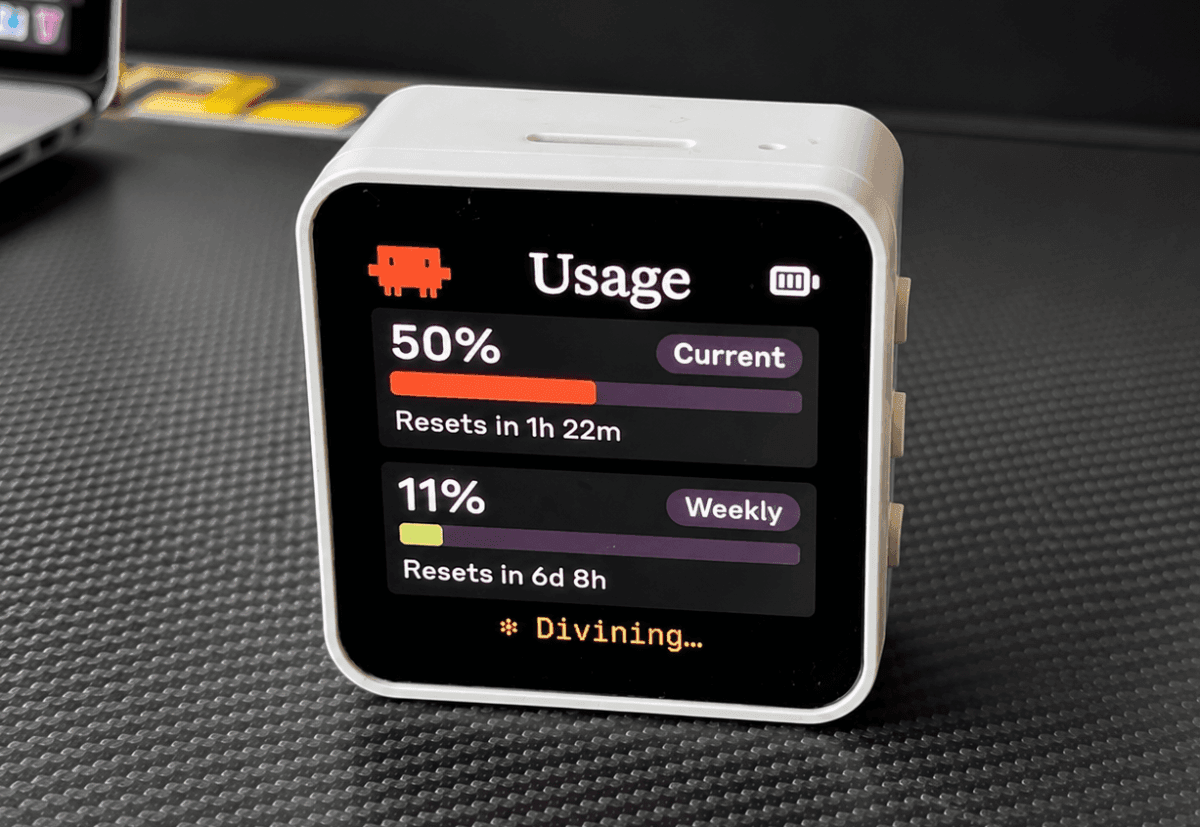
Clawdmeter brings transparency to Claude Code usage by converting raw API statistics into an intuitive desktop dashboard that AI coding power users can monitor at a glance. This open source gadget eliminates the friction of digging through logs or dashboards to understand your coding assistant consumption patterns. For developers integrating Claude into their workflows, real-time usage visibility becomes a game-changer for cost management and productivity optimization.

What's New in Clawdmeter

Clawdmeter introduces a streamlined approach to monitoring Claude Code usage with a purpose-built desktop interface that puts critical metrics front and center.

  • Desktop Dashboard Interface: Displays Claude Code usage statistics in a compact, always-accessible widget that sits on your desktop without consuming significant screen real estate
  • Real-Time Usage Tracking: Monitors API calls, token consumption, and coding session metrics as they happen, giving you immediate feedback on your usage patterns
  • Open Source Architecture: Built as an open source project, allowing developers to customize, extend, and contribute improvements to the tool
  • Usage Statistics Visualization: Transforms raw API data into readable charts and metrics that show consumption trends over time
  • Lightweight Performance: Designed as a minimal desktop gadget that runs efficiently without impacting system resources or development workflows
  • Integration with Claude Code: Directly connects to your Claude Code environment to pull live usage data without manual configuration

Technical Specifications

Clawdmeter is engineered as a lightweight desktop application with direct integration to Claude's API infrastructure.

  • Architecture: Open source desktop gadget built for cross-platform compatibility with minimal system overhead
  • Data Source: Pulls real-time usage statistics directly from Claude Code API endpoints and session logs
  • Performance Profile: Runs as a background process with negligible CPU and memory consumption, designed for continuous monitoring
  • Integration Method: Connects via Claude API authentication, requiring valid API credentials for data access
  • Display Format: Compact widget interface optimized for desktop environments, supporting both light and dark themes

Official Benefits

  • Instant Cost Visibility: See exactly how many tokens you're consuming across coding sessions, enabling better budget management
  • Usage Pattern Recognition: Identify peak usage times and coding patterns to optimize when and how you use Claude Code
  • Reduced Dashboard Friction: Eliminate the need to navigate to web dashboards or logs to check usage metrics
  • Developer Transparency: Get clear, real-time feedback on API consumption without waiting for billing cycles or monthly reports
  • Workflow Integration: Monitor usage without leaving your development environment, keeping focus on coding tasks

Real-World Translation

What Each Feature Actually Means:

  • Desktop Dashboard Interface: Instead of logging into a web portal or checking email reports, you glance at a small widget on your desktop and instantly see how many tokens you've burned today. A data scientist running multiple Claude Code sessions can see at 3 PM that they've already hit 80% of their daily budget and adjust their approach accordingly.
  • Real-Time Usage Tracking: Every time you ask Claude Code a question or run a coding task, the dashboard updates immediately. You're not guessing whether that complex refactoring task cost 5,000 or 50,000 tokens; you see the exact number appear on your dashboard seconds after completion.
  • Open Source Architecture: You're not locked into whatever the creators decide to build. If you need to export data to a spreadsheet, add Slack notifications when you hit usage thresholds, or customize the dashboard colors, you can fork the project and make those changes yourself.
  • Usage Statistics Visualization: Raw numbers like "42,847 tokens used" become a visual graph showing your usage climbing through the day. You can spot when you had a spike (that big refactoring session at 2 PM) and understand your consumption patterns at a glance.
  • Lightweight Performance: The dashboard runs in the background without slowing down your IDE, compilation, or other development tools. You can leave it running all day without noticing any performance impact on your machine.

Before vs After

Before

Developers had to navigate to web dashboards, check email billing reports, or dig through API logs to understand Claude Code consumption. This meant context-switching away from development work, waiting for page loads, and often discovering usage surprises only at billing time. There was no real-time visibility into whether your coding sessions were efficient or wasteful.

After

With Clawdmeter, usage metrics appear in a persistent desktop widget that updates in real time as you work. You see your token consumption immediately after each coding task, spot trends throughout the day, and make informed decisions about usage without leaving your development environment. Cost management becomes proactive rather than reactive.

📈 Expected Impact: Developers gain immediate, continuous visibility into Claude Code consumption, reducing billing surprises and enabling data-driven decisions about API usage patterns.

Job Relevance Analysis

Data Scientist

HIGH Impact
  • Use Case: Data scientists frequently use Claude Code to write data processing scripts, build ML pipelines, and debug complex analytical code. Clawdmeter lets them monitor API costs across multiple experiments and iterations without interrupting their workflow.
  • Key Benefit: Understand exactly how much each data exploration session costs, enabling better budget allocation across multiple projects and experiments
  • Workflow Integration: Sits alongside Jupyter notebooks and IDEs, providing cost visibility without requiring context-switching to external dashboards
  • Skill Development: Builds awareness of API economics and encourages efficient coding practices by making costs immediately visible
  • Cost Management: Prevents runaway API bills from extended debugging sessions or inefficient prompting patterns by providing real-time feedback
Data Scientist

Understand business insights via AI for analyzing, predicting, data mining, data visualization, and data warehousing.

4,480 Tools
Data Scientist

Automation Engineer

HIGH Impact
  • Use Case: Automation engineers build and maintain Claude Code-powered scripts that run repeatedly across systems. Clawdmeter helps them track cumulative costs of automated workflows and identify optimization opportunities.
  • Key Benefit: Monitor total API consumption across all deployed automation scripts, catching inefficient patterns before they compound into significant costs
  • Workflow Integration: Integrates with CI/CD pipelines and development environments, providing visibility into automation costs without manual tracking
  • Skill Development: Encourages optimization thinking by making the cost of each automated task transparent and measurable
  • Performance Optimization: Identify which automation scripts consume the most tokens, enabling targeted optimization efforts
Automation Engineer

Increase your productivity with these AI solutions for automation, quality assurance, integration, collaboration, and code creation.

5,288 Tools
Automation Engineer

AI Researcher

MEDIUM Impact
  • Use Case: AI researchers experiment with Claude Code for prompt engineering, model behavior testing, and research validation. Clawdmeter provides cost tracking across numerous experimental iterations.
  • Key Benefit: Track research costs accurately for grant reporting and budget planning, understanding which experiments are most resource-intensive
  • Workflow Integration: Complements research notebooks and experimental frameworks by providing transparent cost accounting
  • Skill Development: Builds understanding of API economics and encourages efficient experimental design
  • Research Documentation: Provides data for research papers and reports that discuss computational costs and resource efficiency
AI Researcher

Advance innovation with AI tools for academic research, data analysis, knowledge representation, decision-making, and AI-powered chatbots.

6,692 Tools
AI Researcher

Getting Started

How to Access

  1. Visit the Clawdmeter GitHub repository to access the open source project
  2. Clone or download the repository to your local machine
  3. Install required dependencies following the project's README documentation
  4. Configure your Claude API credentials in the application settings

Quick Start Guide

For Beginners:

  1. Download Clawdmeter from the official repository and extract the files to your preferred location
  2. Open the configuration file and add your Claude API key (found in your Anthropic dashboard)
  3. Launch the Clawdmeter application, which will appear as a desktop widget
  4. Start using Claude Code normally; the dashboard will automatically begin tracking your usage

For Power Users:

  1. Clone the repository and customize the widget appearance by modifying the theme configuration files
  2. Set up API rate limiting thresholds and configure alerts when usage approaches your budget limits
  3. Export usage data to CSV or JSON format for integration with your own analytics or billing systems
  4. Extend the dashboard with custom metrics by modifying the data collection scripts
  5. Deploy Clawdmeter across your team by creating a shared configuration that connects to a central usage tracking system

Pro Tips

  • Set Daily Budgets: Configure usage alerts to notify you when you're approaching your daily or weekly token limit, preventing surprise bills
  • Review Peak Hours: Check the dashboard's time-based analytics to identify when you use Claude Code most heavily, then optimize your workflow accordingly
  • Export Weekly Reports: Use Clawdmeter's export function to generate weekly usage reports for team billing or project cost allocation
  • Customize Refresh Rate: Adjust the dashboard update frequency based on your needs; faster updates provide real-time feedback but use slightly more resources

FAQ

Related Topics

ClawdmeterClaude CodeAPI monitoringdeveloper toolsusage dashboardAI productivity tools

Table of contents

What's New in ClawdmeterTechnical SpecificationsOfficial BenefitsReal-World TranslationJob Relevance AnalysisGetting StartedFAQ
Impact LevelMEDIUM
Update ReleasedMay 14, 2026

Best for

Data ScientistAI ResearcherAutomation Engineer

Related Use Cases

AI Productivity ToolsAI Developer ToolsAI Lifestyle Tools

Related Articles

Notion AI Agents: Turn Your Workspace Into an AI Hub
Edge Copilot Update: AI Now Reads All Your Tabs
GLiGuard Review: 300M Safety Model Beats Larger Competitors
All AI Spotlights

Editor's Pick Articles

Notion AI Agents: Turn Your Workspace Into an AI Hub
Perplexity Personal Computer: AI Agents for Mac
Claude Personal App Connectors Review
All Articles
Special offer for AI Owners – 50% OFF Promotional Plans

Join Our Community

Get the earliest access to hand-picked content weekly for free.

Spam-free guaranteed! Only insights.

Follow Us on Socials

Don't Miss AI Topics

ai art generatorai voice generatorai text generatorai avatar generatorai designai writing assistantai audio generatorai content generatorai dubbingai graphic designai banner generatorai in dropshipping

AI Spotlights

Unleashing Today's trailblazer, this week's game-changers, and this month's legends in AI. Dive in and discover tools that matter.

All AI Spotlights
Notion AI Agents: Turn Your Workspace Into an AI Hub

Notion AI Agents: Turn Your Workspace Into an AI Hub

Edge Copilot Update: AI Now Reads All Your Tabs

Edge Copilot Update: AI Now Reads All Your Tabs

GLiGuard Review: 300M Safety Model Beats Larger Competitors

GLiGuard Review: 300M Safety Model Beats Larger Competitors

Cline SDK Review: Open-Source Agent Runtime

Cline SDK Review: Open-Source Agent Runtime

OpenAI Codex Now on ChatGPT Mobile App

OpenAI Codex Now on ChatGPT Mobile App

ZAYA1-8B-Diffusion: 7.7x Faster MoE Model

ZAYA1-8B-Diffusion: 7.7x Faster MoE Model

Claude for Small Business Contract Review Tool

Claude for Small Business Contract Review Tool

Gemini Intelligence Review: AI Phone Control

Gemini Intelligence Review: AI Phone Control

Google Gboard Gemini Dictation: AI Voice Recognition

Google Gboard Gemini Dictation: AI Voice Recognition

Google Create My Widget: AI-Powered Custom Widgets

Google Create My Widget: AI-Powered Custom Widgets

Wispr Flow Review: Hinglish Voice AI for India

Wispr Flow Review: Hinglish Voice AI for India

OpenAI Codex Chrome Extension Review

OpenAI Codex Chrome Extension Review

Perplexity Personal Computer: AI Agents for Mac

Perplexity Personal Computer: AI Agents for Mac

OpenAI Voice Intelligence API: New Features Review

OpenAI Voice Intelligence API: New Features Review

ChatGPT Trusted Contact: New Self-Harm Safeguard

ChatGPT Trusted Contact: New Self-Harm Safeguard

CopilotKit Intelligence: Enterprise AI Memory Platform

CopilotKit Intelligence: Enterprise AI Memory Platform

OpenAI Training Spec: GPU Performance Breakthrough

OpenAI Training Spec: GPU Performance Breakthrough

AWS Managed Agents Review: OpenAI Partnership

AWS Managed Agents Review: OpenAI Partnership

Glean AI Search Review: Enterprise Search Redefined

Glean AI Search Review: Enterprise Search Redefined

You Might Like These Latest News

All AI News

Stay informed with the latest AI news, breakthroughs, trends, and updates shaping the future of artificial intelligence.

63% of Orgs Lack AI Governance Policies

May 16, 2026
63% of Orgs Lack AI Governance Policies

AI Chatbots Leak Personal Phone Numbers

May 16, 2026
AI Chatbots Leak Personal Phone Numbers

Making AI Sustainable: What's Missing

May 16, 2026
Making AI Sustainable: What's Missing

OpenAI Explores Legal Action Against Apple

May 16, 2026
OpenAI Explores Legal Action Against Apple

Microsoft Cancels Claude Code Licenses

May 16, 2026
Microsoft Cancels Claude Code Licenses

YouTube Expands AI Deepfake Detection to All Adults

May 16, 2026
YouTube Expands AI Deepfake Detection to All Adults

Anthropic and PwC Embed Claude in Enterprise

May 16, 2026
Anthropic and PwC Embed Claude in Enterprise

ArXiv Bans Researchers for AI Slop in Papers

May 16, 2026
ArXiv Bans Researchers for AI Slop in Papers

Anthropic Launches AI Legal Services Tools

May 13, 2026
Anthropic Launches AI Legal Services Tools
Tools of The Day

Tools of The Day

Discover the top AI tools handpicked daily by our editors to help you stay ahead with the latest and most innovative solutions.


10MAR
Adobe Illustrator
Adobe Illustrator
9MAR
Adobe Firefly
Adobe Firefly
8MAR
Adobe Sensei
Adobe Sensei
7MAR
Adobe Photoshop
Adobe Photoshop
6MAR
Adobe Firefly
Adobe Firefly
5MAR
Shap-E
Shap-E
4MAR
Point-E
Point-E

Explore AI Tools of The Day











































