










Age of AI Toolsv2.beta
For YouJobsUse Cases
Media-HubNEW

Join Our Community

Get the earliest access to hand-picked content weekly for free.

Spam-free guaranteed! Only insights.
Join Our Community

Get the earliest access to hand-picked content weekly for free.

Spam-free guaranteed! Only insights.

Trusted by Leading Review and Discovery Websites

Age of AI Tools on Product HuntApproved on SaaSHubAlternativeTo
AI Tools
  • For You!
  • Discover All AI Tools
  • Best AI Tools
  • Free AI Tools
  • Tools of the DayNEW
  • All Use Cases
  • All Jobs
Trend UseCases
  • AI Image Generators
  • AI Video Generators
  • AI Voice Generators
Trend Jobs
  • Graphic Designer
  • SEO Specialist
  • Email Marketing Specialist
Media Hub
  • Go to Media Hub
  • AI News
  • AI Tools Spotlights
Age of AI Tools
  • What's New
  • Story of Age of AI Tools
  • Cookies & Privacy
  • Terms & Conditions
  • Request Update
  • Bug Report
  • Contact Us
Submit & Advertise
  • Submit AI Tool
  • Promote Your Tool50% Off

Agent of AI Age

Looking to discover new AI tools? Just ask our AI Agent

Copyright © 2026 Age of AI Tools. All Rights Reserved.

Media HubTools SpotlightChatGPT Security Update: Advanced Protection Features
6 May 20265 min read

ChatGPT Security Update: Advanced Protection Features

ChatGPT Security Update: Advanced Protection Features

🎯 Quick Impact Summary

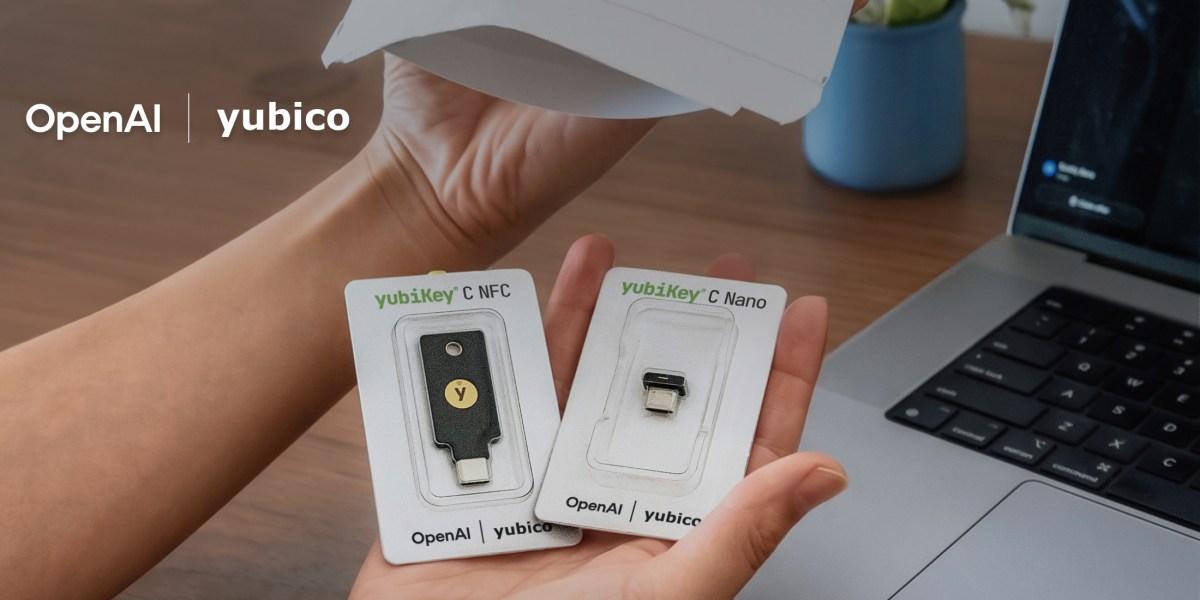
OpenAI is rolling out advanced security features for ChatGPT accounts, marking a significant step toward enterprise-grade account protection. The new initiative includes a strategic partnership with Yubico, a leading security key provider, enabling users to add hardware-based authentication to their accounts. This update reflects growing demand for stronger account security as AI tools become increasingly central to business and personal workflows.

What's New in ChatGPT Security

OpenAI has introduced a suite of opt-in security enhancements designed to give users greater control over their account protection. These features address emerging security concerns while maintaining ease of use for standard users.

  • Security Key Support via Yubico Partnership: Users can now enable hardware security keys as a second authentication factor, providing phishing-resistant protection that goes beyond traditional two-factor authentication methods.
  • Opt-In Security Framework: All new protections are optional, allowing users to choose their security level based on their specific needs and risk profile.
  • Enterprise-Grade Authentication: The partnership brings industry-standard security practices to consumer ChatGPT accounts, aligning with FIDO2 standards for hardware-based verification.
  • Account Access Controls: Enhanced options for managing who can access accounts and from where, giving users visibility into active sessions and login attempts.
  • Phishing Resistance: Hardware security keys eliminate vulnerability to phishing attacks that can compromise traditional password and SMS-based authentication methods.

Technical Specifications

The security implementation leverages established standards and proven authentication protocols to protect ChatGPT accounts.

  • Authentication Standard: FIDO2 compliant hardware security keys, supporting industry-standard protocols for passwordless authentication.
  • Yubico Integration: Direct integration with YubiKey hardware devices, enabling seamless security key enrollment and verification workflows.
  • Multi-Factor Architecture: Layered security approach combining something you have (security key) with something you know (password), eliminating single points of failure.
  • Session Management: Real-time session tracking and device management capabilities allowing users to monitor and revoke access from specific locations or devices.
  • Cross-Platform Support: Security features work across web, mobile, and API access points, ensuring consistent protection regardless of access method.

Official Benefits

  • Eliminates phishing vulnerability by replacing SMS-based codes with hardware-based verification that cannot be intercepted or spoofed.
  • Provides users with complete visibility into account access patterns, showing login attempts, successful authentications, and active sessions in real time.
  • Reduces account compromise risk by up to 99.9% compared to password-only authentication, according to industry security research on hardware key effectiveness.
  • Enables organizations to enforce stronger security policies for team members using ChatGPT for sensitive work, supporting compliance requirements.

Real-World Translation

What Each Feature Actually Means:

  • Security Key Support: Instead of receiving a text code that could be intercepted, you insert a physical YubiKey device to verify your identity. A researcher accessing sensitive AI models can now use this key to prevent unauthorized access even if their password is compromised.
  • Opt-In Framework: You maintain complete control over which security features to enable. A casual user might skip hardware keys, while a cybersecurity professional managing sensitive projects can activate all protections.
  • Session Management: You can see exactly when and where your account was accessed. If you notice a login from an unfamiliar location, you can immediately revoke that session and investigate potential unauthorized access.
  • Phishing Resistance: Attackers cannot trick you into revealing a security key through fake login pages. Even if you accidentally visit a phishing site, the key won't authenticate because it verifies the legitimate OpenAI domain.

Before vs After

Before

ChatGPT accounts relied primarily on passwords and optional SMS-based two-factor authentication. Users had limited visibility into account access patterns, and phishing attacks could compromise accounts if users entered credentials on fake websites. Organizations had few options for enforcing stronger security policies across team members.

After

Users can now enable hardware security keys for phishing-resistant authentication and monitor all account access in real time. Organizations gain the ability to enforce stronger security requirements, and account compromise becomes significantly more difficult for attackers. The partnership with Yubico brings enterprise-grade security practices to consumer accounts.

📈 Expected Impact: Account security vulnerability decreases by up to 99.9% for users who enable hardware security keys, while all users gain improved visibility into account access patterns.

Job Relevance Analysis

Cybersecurity & Detection

HIGH Impact
  • Use Case: Cybersecurity professionals use this to audit and enforce security standards across AI tool usage within their organizations, ensuring ChatGPT accounts meet compliance requirements and security baselines.
  • Key Benefit: Hardware security keys provide a tangible, verifiable authentication method that can be included in security policies and incident response procedures, eliminating reliance on potentially compromised passwords.
  • Workflow Integration: Security teams can now monitor ChatGPT account access logs to detect anomalous login patterns, unauthorized access attempts, and potential account compromise as part of their broader threat detection workflows.
  • Skill Development: Professionals deepen expertise in FIDO2 standards, hardware-based authentication implementation, and zero-trust security principles applied to AI tool access.
  • Compliance Support: The opt-in security framework helps organizations meet regulatory requirements for multi-factor authentication and account access controls in sensitive environments.

AI Researcher

MEDIUM Impact
  • Use Case: AI researchers working with sensitive models, proprietary datasets, or confidential research use enhanced security to protect accounts that may contain valuable intellectual property or unreleased model information.
  • Key Benefit: Session management and access visibility help researchers detect if their accounts are being used for unauthorized model access or data extraction, protecting research integrity.
  • Workflow Integration: Researchers can enable security keys when accessing ChatGPT from different locations or devices, ensuring consistent protection across their research environments without disrupting productivity.
  • Skill Development: Researchers gain practical experience with enterprise security practices and understand how authentication mechanisms work, valuable knowledge for deploying secure AI systems.
  • Data Protection: Hardware-based authentication significantly reduces risk of account compromise that could expose research data, model insights, or collaborative work with other researchers.
AI Researcher

Advance innovation with AI tools for academic research, data analysis, knowledge representation, decision-making, and AI-powered chatbots.

6,692 Tools
AI Researcher

Automation Engineer

MEDIUM Impact
  • Use Case: Automation engineers managing ChatGPT API access and integration workflows use enhanced security to protect service accounts and API keys that power production automation systems.
  • Key Benefit: Session management helps engineers monitor API access patterns and quickly identify if automation workflows are being accessed from unexpected sources or by unauthorized systems.
  • Workflow Integration: Engineers can implement security key authentication for administrative access to ChatGPT accounts while maintaining API-based automation through secure token management.
  • Skill Development: Engineers develop expertise in securing AI tool integrations, implementing authentication best practices in automation pipelines, and monitoring system access patterns.
  • System Reliability: Protecting ChatGPT accounts from compromise ensures automation workflows remain reliable and trustworthy, preventing attackers from injecting malicious prompts or data into automated processes.
Automation Engineer

Increase your productivity with these AI solutions for automation, quality assurance, integration, collaboration, and code creation.

5,288 Tools
Automation Engineer

Getting Started

How to Access

  • Visit your ChatGPT account settings and navigate to the Security section.
  • Look for the new "Security Keys" or "Advanced Security" option in your account preferences.
  • Select "Add Security Key" and follow the enrollment process with your Yubico device.
  • Complete the verification step to activate hardware-based authentication on your account.

Quick Start Guide

For Beginners:

  1. Log into your ChatGPT account and go to Settings > Security.
  2. Click "Enable Security Key" and select your Yubico device when prompted.
  3. Insert your security key and follow the on-screen verification steps.
  4. Save your changes and test login with your security key on your next session.

For Power Users:

  1. Access your account settings and enable all available security features including session management and access logs.
  2. Configure security key requirements for your account and set up device-specific access policies if available.
  3. Export or monitor your access logs regularly to establish baseline access patterns and detect anomalies.
  4. Integrate security key authentication into your team's onboarding process if managing multiple ChatGPT accounts.
  5. Set up alerts or notifications for unusual login attempts or access from new locations.

Pro Tips

  • Backup Keys: Keep a second Yubico key as a backup in case your primary key is lost or damaged, ensuring you maintain account access.
  • Regular Audits: Review your session logs monthly to identify any unauthorized access attempts or unexpected login patterns early.
  • Team Enforcement: If managing team access, require security keys for accounts handling sensitive projects or proprietary information.
  • Device Management: Regularly revoke sessions from devices you no longer use to minimize the number of active access points to your account.

Getting Started

How to Access

  • Visit your ChatGPT account settings and navigate to the Security section.
  • Look for the new "Security Keys" or "Advanced Security" option in your account preferences.
  • Select "Add Security Key" and follow the enrollment process with your Yubico device.
  • Complete the verification step to activate hardware-based authentication on your account.

Quick Start Guide

For Beginners:

  1. Log into your ChatGPT account and go to Settings > Security.
  2. Click "Enable Security Key" and select your Yubico device when prompted.
  3. Insert your security key and follow the on-screen verification steps.
  4. Save your changes and test login with your security key on your next session.

For Power Users:

  1. Access your account settings and enable all available security features including session management and access logs.
  2. Configure security key requirements for your account and set up device-specific access policies if available.
  3. Export or monitor your access logs regularly to establish baseline access patterns and detect anomalies.
  4. Integrate security key authentication into your team's onboarding process if managing multiple ChatGPT accounts.
  5. Set up alerts or notifications for unusual login attempts or access from new locations.

Pro Tips

  • Backup Keys: Keep a second Yubico key as a backup in case your primary key is lost or damaged, ensuring you maintain account access.
  • Regular Audits: Review your session logs monthly to identify any unauthorized access attempts or unexpected login patterns early.
  • Team Enforcement: If managing team access, require security keys for accounts handling sensitive projects or proprietary information.
  • Device Management: Regularly revoke sessions from devices you no longer use to minimize the number of active access points to your account.

FAQ

Related Topics

ChatGPT security updatehardware security keysYubico partnershipaccount protectiontwo-factor authentication

Table of contents

What's New in ChatGPT SecurityTechnical SpecificationsOfficial BenefitsReal-World TranslationJob Relevance AnalysisGetting StartedGetting StartedFAQ
Impact LevelMEDIUM
Update ReleasedApril 30, 2026

Best for

AI ResearcherAutomation EngineerCybersecurity & Detection

Related Use Cases

AI Chatbot ToolsAI Cybersecurity ToolsAI Social Media Chatbots

Related Articles

AWS Managed Agents Review: OpenAI Partnership
Glean AI Search Review: Enterprise Search Redefined
Mistral's Cloud Code Platform Review
All AI Spotlights

Editor's Pick Articles

Claude Personal App Connectors Review
ChatGPT Images 2.0 Review: Better Text & Details
Google Gemini Mac App Review: AI Assistant
All Articles
Special offer for AI Owners – 50% OFF Promotional Plans

Join Our Community

Get the earliest access to hand-picked content weekly for free.

Spam-free guaranteed! Only insights.

Follow Us on Socials

Don't Miss AI Topics

ai art generatorai voice generatorai text generatorai avatar generatorai designai writing assistantai audio generatorai content generatorai dubbingai graphic designai banner generatorai in dropshipping

AI Spotlights

Unleashing Today's trailblazer, this week's game-changers, and this month's legends in AI. Dive in and discover tools that matter.

All AI Spotlights
AWS Managed Agents Review: OpenAI Partnership

AWS Managed Agents Review: OpenAI Partnership

Glean AI Search Review: Enterprise Search Redefined

Glean AI Search Review: Enterprise Search Redefined

Mistral's Cloud Code Platform Review

Mistral's Cloud Code Platform Review

Meta Autodata: AI Framework for Autonomous Data Scientists

Meta Autodata: AI Framework for Autonomous Data Scientists

Gemini API Webhooks: Real-Time AI Automation

Gemini API Webhooks: Real-Time AI Automation

Zyphra TSP: 2.6x Faster AI Training Review

Zyphra TSP: 2.6x Faster AI Training Review

SoundHound OASYS: Self-Learning AI Agent Platform

SoundHound OASYS: Self-Learning AI Agent Platform

Google Home Gemini 3.1: Smarter AI Assistant

Google Home Gemini 3.1: Smarter AI Assistant

Grok Voice Think Fast 1.0 Review: AI Voice

Grok Voice Think Fast 1.0 Review: AI Voice

Vision Banana Review: Google's Instruction-Tuned Image Generator

Vision Banana Review: Google's Instruction-Tuned Image Generator

GitNexus Review: Open-Source Code Knowledge Graph

GitNexus Review: Open-Source Code Knowledge Graph

Qwen3.6-27B Review: Dense Model Outperforms 397B MoE

Qwen3.6-27B Review: Dense Model Outperforms 397B MoE

ChatGPT Workspace Agents: Custom AI Bots for Teams

ChatGPT Workspace Agents: Custom AI Bots for Teams

Google Gemini Enterprise Agent Platform Review

Google Gemini Enterprise Agent Platform Review

Google Workspace Intelligence: AI Office Automation

Google Workspace Intelligence: AI Office Automation

Google Chrome AI Co-Worker: Gemini Auto Browse

Google Chrome AI Co-Worker: Gemini Auto Browse

GPT-5.5 Review: OpenAI's Smarter Coding & Automation Model

GPT-5.5 Review: OpenAI's Smarter Coding & Automation Model

OpenAI Codex with GPT-5.5: AI Coding Revolution

OpenAI Codex with GPT-5.5: AI Coding Revolution

Claude Personal App Connectors Review

Claude Personal App Connectors Review

You Might Like These Latest News

All AI News

Stay informed with the latest AI news, breakthroughs, trends, and updates shaping the future of artificial intelligence.

Microsoft Copilot Hits 20M Paid Users

May 6, 2026
Microsoft Copilot Hits 20M Paid Users

Runway Eyes World Models Beyond AI Video

May 6, 2026
Runway Eyes World Models Beyond AI Video

Microsoft to Exploit New OpenAI Deal

May 6, 2026
Microsoft to Exploit New OpenAI Deal

Legal AI Startup Legora Hits $5.6B Valuation

May 6, 2026
Legal AI Startup Legora Hits $5.6B Valuation

Anthropic Eyes $900B+ Valuation in Major Fundraise

May 6, 2026
Anthropic Eyes $900B+ Valuation in Major Fundraise

Musk Admits xAI Used OpenAI Models to Train Grok

May 6, 2026
Musk Admits xAI Used OpenAI Models to Train Grok

Replit CEO on Cursor deal, Apple fight, and staying independent

May 6, 2026
Replit CEO on Cursor deal, Apple fight, and staying independent

Meta Acquires Robotics Startup for AI Humanoid Push

May 6, 2026
Meta Acquires Robotics Startup for AI Humanoid Push

Oscars Bans AI-Generated Actors and Scripts

May 6, 2026
Oscars Bans AI-Generated Actors and Scripts
Tools of The Day

Tools of The Day

Discover the top AI tools handpicked daily by our editors to help you stay ahead with the latest and most innovative solutions.


10MAR
Adobe Illustrator
Adobe Illustrator
9MAR
Adobe Firefly
Adobe Firefly
8MAR
Adobe Sensei
Adobe Sensei
7MAR
Adobe Photoshop
Adobe Photoshop
6MAR
Adobe Firefly
Adobe Firefly
5MAR
Shap-E
Shap-E
4MAR
Point-E
Point-E

Explore AI Tools of The Day










































