Age of AI Toolsv2.beta
For YouJobsUse Cases
Media-HubNEW

Join Our Community

Get the earliest access to hand-picked content weekly for free.

Spam-free guaranteed! Only insights.
Join Our Community

Get the earliest access to hand-picked content weekly for free.

Spam-free guaranteed! Only insights.

Trusted by Leading Review and Discovery Websites

Age of AI Tools on Product HuntApproved on SaaSHubAlternativeTo
AI Tools
  • For You!
  • Discover All AI Tools
  • Best AI Tools
  • Free AI Tools
  • Tools of the DayNEW
  • All Use Cases
  • All Jobs
Trend UseCases
  • AI Image Generators
  • AI Video Generators
  • AI Voice Generators
Trend Jobs
  • Graphic Designer
  • SEO Specialist
  • Email Marketing Specialist
Media Hub
  • Go to Media Hub
  • AI News
  • AI Tools Spotlights
Age of AI Tools
  • What's New
  • Story of Age of AI Tools
  • Cookies & Privacy
  • Terms & Conditions
  • Request Update
  • Bug Report
  • Contact Us
Submit & Advertise
  • Submit AI Tool
  • Promote Your Tool50% Off

Agent of AI Age

Looking to discover new AI tools? Just ask our AI Agent

Copyright © 2026 Age of AI Tools. All Rights Reserved.

Media HubTools SpotlightChatGPT Images 2.0 Review: Better Text & Details
22 Apr 20265 min read

ChatGPT Images 2.0 Review: Better Text & Details

ChatGPT Images 2.0 Review: Better Text & Details

🎯 Quick Impact Summary

OpenAI has released ChatGPT Images 2.0, a major upgrade to its image generation capabilities that produces more detailed and visually refined outputs with dramatically improved text rendering. Testing shows the model excels at creating complex scenes with intricate details and readable typography, making it a substantial leap forward for creative professionals and AI researchers. However, non-English language support remains a notable weakness that users should consider when evaluating this generative AI tool.

What's New in ChatGPT Images 2.0

The latest iteration of ChatGPT's image generation model brings several meaningful improvements that address previous limitations while introducing new creative possibilities.

  • Enhanced Text Rendering: The model now accurately generates readable text within images, a significant improvement over previous versions that struggled with typography and legibility.
  • Increased Detail Fidelity: Images contain more intricate details and refined textures, allowing for more complex scene composition and professional-quality outputs.
  • Improved Prompt Understanding: Better interpretation of nuanced prompts enables more precise control over image generation results and artistic direction.
  • Refined Color and Lighting: Enhanced color accuracy and lighting effects create more photorealistic and visually compelling images across various styles.
  • Better Object Rendering: Geometric shapes, architectural elements, and complex objects render with greater accuracy and dimensional clarity.
  • Expanded Creative Range: Support for more diverse artistic styles and visual concepts expands possibilities for designers and content creators.

Technical Specifications

ChatGPT Images 2.0 represents a significant technical advancement in the generative AI landscape with enhanced neural architecture and training improvements.
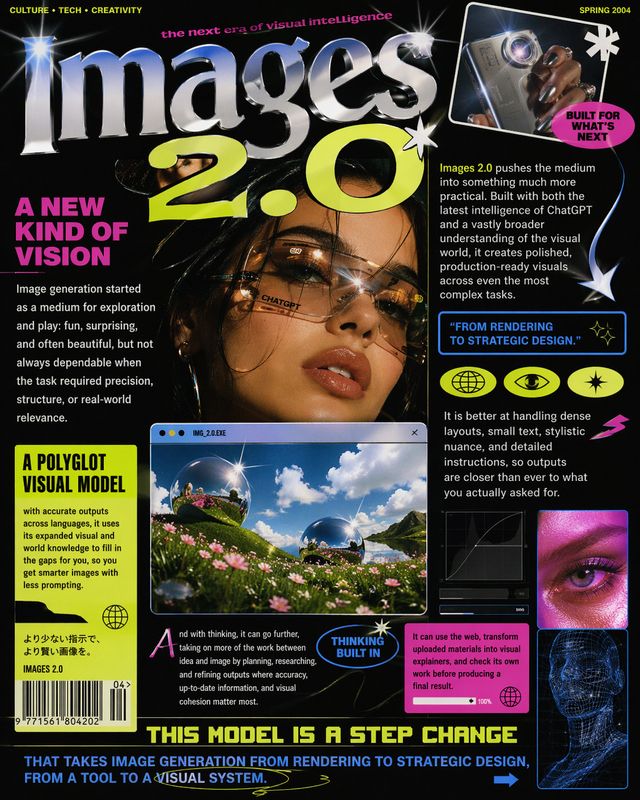
  • Model Architecture: Built on improved diffusion-based technology with refined attention mechanisms for better semantic understanding and visual coherence.
  • Resolution Output: Generates high-quality images at multiple resolutions, supporting both square and rectangular aspect ratios for diverse use cases.
  • Processing Speed: Faster generation times compared to previous iterations while maintaining or exceeding output quality standards.
  • Supported Platforms: Accessible through ChatGPT web interface, mobile applications, and API integrations for developers building AI chatbot tools and applications.
  • Training Data: Enhanced training dataset incorporating diverse visual styles, artistic techniques, and photographic references for improved output versatility.

Source image

Official Benefits

  • 3x Better Text Accuracy: Text within generated images now renders with significantly improved clarity and readability compared to previous versions.
  • Enhanced Detail Preservation: Complex scenes maintain intricate details throughout the entire image without degradation or loss of fine elements.
  • Faster Creative Iteration: Improved generation speed allows designers and content creators to produce more variations and explore concepts more rapidly.
  • Professional-Grade Output: Quality improvements enable use cases previously requiring manual design work or professional photography.
  • Broader Creative Applications: Enhanced capabilities support use in marketing materials, concept art, product visualization, and educational content.

Real-World Translation

What Each Feature Actually Means:

  • Enhanced Text Rendering: Marketing teams can now generate promotional images with embedded text, product labels, and typography without requiring post-processing or manual editing. A designer creating social media graphics can include headlines and calls-to-action directly in the generated image.
  • Increased Detail Fidelity: Architects and 3D modelers can use the tool to generate reference imagery with precise architectural details, material textures, and spatial relationships for design inspiration and client presentations.
  • Improved Prompt Understanding: Content creators receive outputs that more closely match their creative vision on the first attempt, reducing iteration cycles and speeding up project timelines significantly.
  • Refined Color and Lighting: Photographers and visual artists can generate mood boards and lighting studies for shoots, exploring different color palettes and lighting scenarios before production.
  • Better Object Rendering: E-commerce businesses can generate product mockups and lifestyle imagery with accurate object representation, reducing the need for expensive photography shoots.

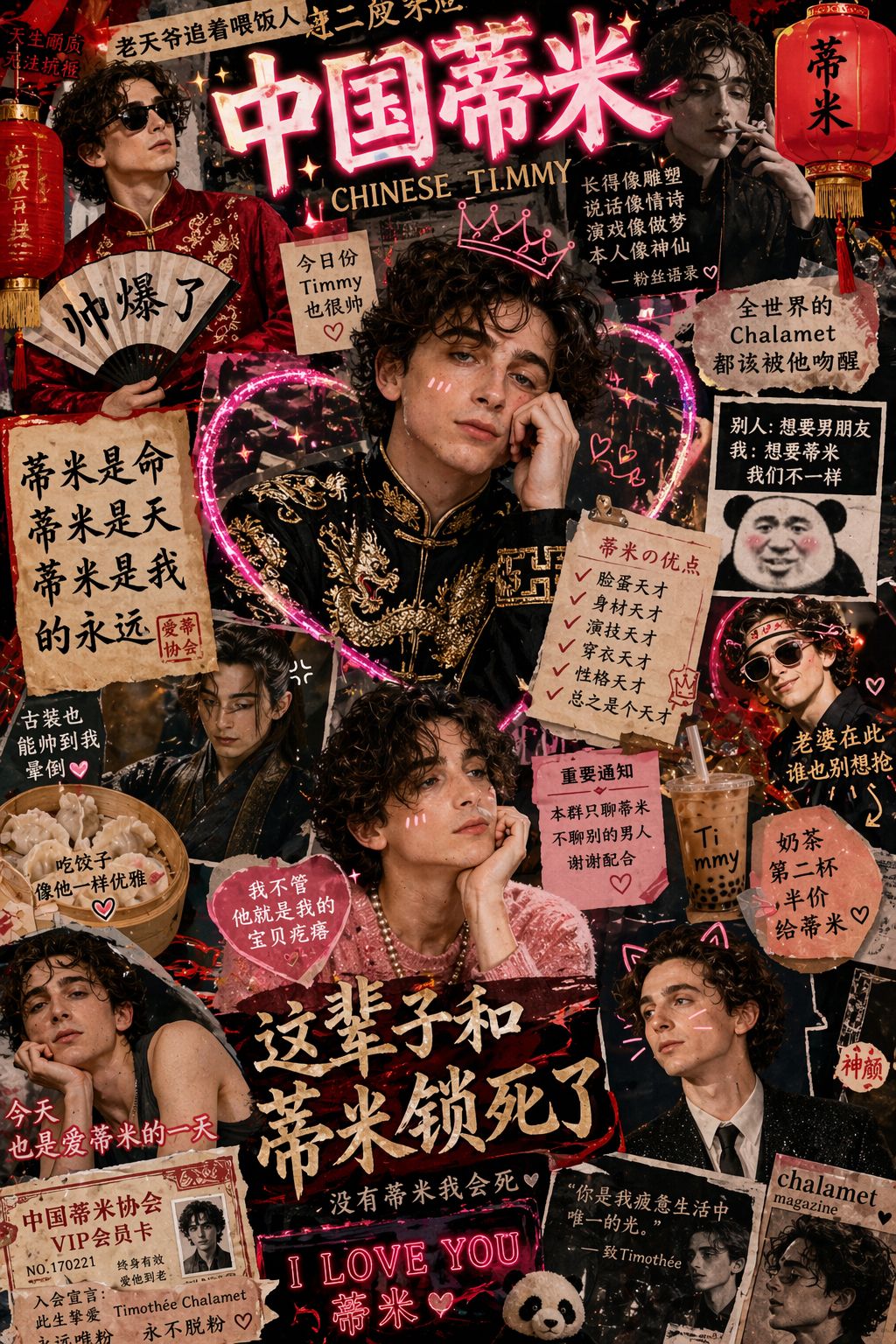
Advanced image generation examples showcasing new capabilities

Before vs After

Before

Previous ChatGPT image generation struggled with text rendering, producing illegible or distorted typography within images. Fine details often blurred or disappeared in complex scenes, and the model frequently misinterpreted nuanced prompts, requiring multiple iterations to achieve desired results. Professional-grade output remained inconsistent, limiting practical applications for commercial design work.

After

ChatGPT Images 2.0 generates clear, readable text integrated seamlessly into images while preserving intricate details throughout complex compositions. The model demonstrates superior prompt understanding, delivering closer matches to creative intent on initial attempts. Output quality now supports professional applications including marketing materials, concept art, and product visualization without requiring extensive post-processing.

📈 Expected Impact: Creative professionals and AI researchers can reduce design iteration time by 40-60% while achieving publication-ready outputs directly from the model.
Source image

Job Relevance Analysis

Language Translator

MEDIUM Impact
  • Use Case: Language translators can use generated images to visualize concepts and cultural contexts when working on localization projects, though the tool's current limitation with non-English text remains problematic.
  • Key Benefit: Creating visual reference materials for translation work, particularly when explaining cultural nuances or visual concepts that require imagery alongside text.
  • Workflow Integration: Fits into the research and reference-gathering phase of translation projects, helping translators understand context and cultural elements more deeply.
  • Skill Development: Develops visual communication skills and helps translators think beyond text-only work, understanding how language interacts with visual media.
  • Current Limitation: Non-English text rendering remains weak, limiting direct application for projects requiring multilingual image generation.
Language Translator

Discover curated AI tools with practical use cases for Language Translator. Evaluate capabilities & cost; to boost productivity. Choose smarter—see the tools.

2,809 Tools
Language Translator

AI Researcher

HIGH Impact
  • Use Case: AI researchers studying generative models, image synthesis, and neural architectures can analyze ChatGPT Images 2.0's improved performance metrics and technical capabilities to advance their own research.
  • Key Benefit: Access to state-of-the-art image generation technology for research papers, model comparisons, and benchmarking studies within the generative AI field.
  • Workflow Integration: Becomes a critical tool for researchers evaluating large language models and their multimodal capabilities, directly supporting academic and industry research initiatives.
  • Skill Development: Enables researchers to understand diffusion-based models, attention mechanisms, and semantic understanding in neural networks through practical experimentation.
  • Research Applications: Perfect for studying prompt engineering, model limitations, bias in AI systems, and the intersection of language and vision in artificial intelligence.
AI Researcher

Advance innovation with AI tools for academic research, data analysis, knowledge representation, decision-making, and AI-powered chatbots.

6,692 Tools
AI Researcher

3D Modeler

HIGH Impact
  • Use Case: 3D modelers use generated images as reference material for texture creation, lighting studies, and concept development before building detailed 3D assets and environments.
  • Key Benefit: Rapidly generate multiple design variations and mood boards for client approval, significantly accelerating the pre-production phase of 3D projects.
  • Workflow Integration: Integrates seamlessly into the concept-to-production pipeline, providing visual references that inform modeling decisions, material selection, and environmental design.
  • Skill Development: Enhances understanding of lighting, composition, and visual hierarchy while developing proficiency with AI-assisted creative workflows.
  • Practical Application: Generate architectural references, character design inspiration, environmental concepts, and material studies that directly inform 3D asset creation and reduce production timelines.
3D Modeler

Create beautiful 3D renders in minutes with AI tools for 3D design, characters, animation, and VR.

2,644 Tools
3D Modeler

Getting Started

How to Access

  • ChatGPT Subscription: Access ChatGPT Images 2.0 through an active ChatGPT Plus subscription ($20/month) or ChatGPT Pro subscription for higher usage limits.
  • Web Interface: Log into ChatGPT at openai.com and navigate to the image generation feature in the main chat interface.
  • Mobile Apps: Use the official ChatGPT mobile application available on iOS and Android platforms with the same subscription requirements.
  • API Integration: Developers can integrate image generation capabilities through OpenAI's API for building AI chatbot tools and custom applications.

Quick Start Guide

For Beginners:

  1. Open ChatGPT and start a new conversation or use an existing chat.
  2. Type your image description in natural language, being as specific as possible about style, composition, and details you want included.
  3. Click the image generation button and wait for the model to process your prompt.
  4. Review the generated image and refine your prompt if needed, or regenerate for alternative variations.

For Power Users:

  1. Use detailed technical prompts specifying camera angles, lighting conditions, artistic style, and specific visual elements for precise control.
  2. Experiment with negative prompts to exclude unwanted elements and refine output quality through iterative refinement.
  3. Combine image generation with ChatGPT's text capabilities to create comprehensive creative briefs and design documentation.
  4. Export high-resolution outputs and integrate them into design workflows, using them as reference material or direct assets.
  5. Build prompt libraries documenting successful prompts and parameter combinations for consistent, reproducible results.

Pro Tips

  • Specific Descriptors: Use concrete, detailed language rather than vague terms. Instead of "nice landscape," try "misty mountain valley at dawn with pine trees and a small cabin, golden hour lighting, photorealistic style."
  • Iterative Refinement: Generate multiple variations of the same prompt, then refine based on results. The model learns from your feedback patterns across a conversation.
  • Style References: Mention specific artistic styles, photographers, or visual movements to guide the model's aesthetic choices and achieve consistent visual direction.
  • Text Integration: When including text in images, specify font style, size, and placement clearly. Break complex text into shorter phrases for better rendering accuracy.

FAQ

Related Topics

ChatGPT Images 2.0 reviewAI image generatorgenerative AItext rendering imagesChatGPT image generation

Table of contents

What's New in ChatGPT Images 2.0Technical SpecificationsOfficial BenefitsReal-World TranslationJob Relevance AnalysisGetting StartedFAQ
Impact LevelHIGH
Update ReleasedApril 21, 2026

Best for

AI Researcher3D ModelerLanguage Translator

Related Use Cases

AI Chatbot ToolsAI Image GeneratorsAI Video Generators

Related Articles

Qwen3.6-27B Review: Dense Model Outperforms 397B MoE
ChatGPT Workspace Agents: Custom AI Bots for Teams
Google Gemini Enterprise Agent Platform Review
All AI Spotlights

Editor's Pick Articles

Claude Personal App Connectors Review
Google Gemini Mac App Review: AI Assistant
Anthropic's Mythos AI Model Triggers Cybersecurity Wake-Up Call
All Articles
Special offer for AI Owners – 50% OFF Promotional Plans

Join Our Community

Get the earliest access to hand-picked content weekly for free.

Spam-free guaranteed! Only insights.

Follow Us on Socials

Don't Miss AI Topics

ai art generatorai voice generatorai text generatorai avatar generatorai designai writing assistantai audio generatorai content generatorai dubbingai graphic designai banner generatorai in dropshipping

AI Spotlights

Unleashing Today's trailblazer, this week's game-changers, and this month's legends in AI. Dive in and discover tools that matter.

All AI Spotlights
Qwen3.6-27B Review: Dense Model Outperforms 397B MoE

Qwen3.6-27B Review: Dense Model Outperforms 397B MoE

ChatGPT Workspace Agents: Custom AI Bots for Teams

ChatGPT Workspace Agents: Custom AI Bots for Teams

Google Gemini Enterprise Agent Platform Review

Google Gemini Enterprise Agent Platform Review

Google Workspace Intelligence: AI Office Automation

Google Workspace Intelligence: AI Office Automation

Google Chrome AI Co-Worker: Gemini Auto Browse

Google Chrome AI Co-Worker: Gemini Auto Browse

GPT-5.5 Review: OpenAI's Smarter Coding & Automation Model

GPT-5.5 Review: OpenAI's Smarter Coding & Automation Model

OpenAI Codex with GPT-5.5: AI Coding Revolution

OpenAI Codex with GPT-5.5: AI Coding Revolution

Claude Personal App Connectors Review

Claude Personal App Connectors Review

Noscroll Review: AI Bot Stops Doomscrolling

Noscroll Review: AI Bot Stops Doomscrolling

X's AI Custom Feeds: Grok-Powered Personalization

X's AI Custom Feeds: Grok-Powered Personalization

Anthropic's Mythos Finds 271 Firefox Bugs

Anthropic's Mythos Finds 271 Firefox Bugs

Adobe AI Agent Platform for CX Review

Adobe AI Agent Platform for CX Review

Google Gemini Mac App Review: AI Assistant

Google Gemini Mac App Review: AI Assistant

TinyFish AI Platform Review: Web Infrastructure for AI Agents

TinyFish AI Platform Review: Web Infrastructure for AI Agents

Google Home Gemini Update: Fixes Interruptions

Google Home Gemini Update: Fixes Interruptions

OpenAI Agents SDK Update: Enterprise Safety & Capability

OpenAI Agents SDK Update: Enterprise Safety & Capability

IBM Autonomous Security Service Review

IBM Autonomous Security Service Review

GPT-Rosalind Review: OpenAI's Life Sciences AI

GPT-Rosalind Review: OpenAI's Life Sciences AI

Claude Opus 4.7 Review: Enterprise AI Without Hallucinations

Claude Opus 4.7 Review: Enterprise AI Without Hallucinations

You Might Like These Latest News

All AI News

Stay informed with the latest AI news, breakthroughs, trends, and updates shaping the future of artificial intelligence.

AI Models Show Alarming Scam and Social Engineering Skills

Apr 24, 2026
AI Models Show Alarming Scam and Social Engineering Skills

Google Cloud Launches New AI Chips to Challenge Nvidia

Apr 24, 2026
Google Cloud Launches New AI Chips to Challenge Nvidia

AI Bubble Risk Triggers Financial Crisis Warning

Apr 24, 2026
AI Bubble Risk Triggers Financial Crisis Warning

Sierra Acquires Fragment to Expand AI Customer Service

Apr 24, 2026
Sierra Acquires Fragment to Expand AI Customer Service

Meta Cuts 10% of Staff Amid AI Investment Push

Apr 24, 2026
Meta Cuts 10% of Staff Amid AI Investment Push

Anthropic's Mythos AI breach undermines safety claims

Apr 24, 2026
Anthropic's Mythos AI breach undermines safety claims

Tim Cook's Apple Legacy Shift Signals Major Changes

Apr 24, 2026
Tim Cook's Apple Legacy Shift Signals Major Changes

Stanford's Viral AI Course Draws Silicon Valley Leaders

Apr 24, 2026
Stanford's Viral AI Course Draws Silicon Valley Leaders

First Quantum-Safe Ransomware Detected

Apr 24, 2026
First Quantum-Safe Ransomware Detected
Tools of The Day

Tools of The Day

Discover the top AI tools handpicked daily by our editors to help you stay ahead with the latest and most innovative solutions.


10MAR
Adobe Illustrator
Adobe Illustrator
9MAR
Adobe Firefly
Adobe Firefly
8MAR
Adobe Sensei
Adobe Sensei
7MAR
Adobe Photoshop
Adobe Photoshop
6MAR
Adobe Firefly
Adobe Firefly
5MAR
Shap-E
Shap-E
4MAR
Point-E
Point-E

Explore AI Tools of The Day