Age of AI Toolsv2.beta
For YouJobsUse Cases
Media-HubNEW

Join Our Community

Get the earliest access to hand-picked content weekly for free.

Spam-free guaranteed! Only insights.
Join Our Community

Get the earliest access to hand-picked content weekly for free.

Spam-free guaranteed! Only insights.

Trusted by Leading Review and Discovery Websites

Age of AI Tools on Product HuntApproved on SaaSHubAlternativeTo
AI Tools
  • For You!
  • Discover All AI Tools
  • Best AI Tools
  • Free AI Tools
  • Tools of the DayNEW
  • All Use Cases
  • All Jobs
Trend UseCases
  • AI Image Generators
  • AI Video Generators
  • AI Voice Generators
Trend Jobs
  • Graphic Designer
  • SEO Specialist
  • Email Marketing Specialist
Media Hub
  • Go to Media Hub
  • AI News
  • AI Tools Spotlights
Age of AI Tools
  • What's New
  • Story of Age of AI Tools
  • Cookies & Privacy
  • Terms & Conditions
  • Request Update
  • Bug Report
  • Contact Us
Submit & Advertise
  • Submit AI Tool
  • Promote Your Tool50% Off

Agent of AI Age

Looking to discover new AI tools? Just ask our AI Agent

Copyright © 2026 Age of AI Tools. All Rights Reserved.

Media HubTools SpotlightChatGPT Apps SDK: Build AI Apps Inside ChatGPT
7 Mar 20265 min read

ChatGPT Apps SDK: Build AI Apps Inside ChatGPT

ChatGPT Apps SDK: Build AI Apps Inside ChatGPT

🎯 Quick Impact Summary

OpenAI has introduced a new generation of apps built directly into ChatGPT, powered by a fresh Apps SDK now available in preview. This shift moves beyond traditional app stores and browser extensions, embedding AI applications into the world's most-used AI interface. Developers can now build, deploy, and monetize apps where millions of users already spend their time.

What's New in ChatGPT Apps SDK

The Apps SDK represents a fundamental shift in how AI applications are built and distributed. Instead of forcing users to leave ChatGPT to access specialized tools, developers can now create integrated experiences that live inside the platform.
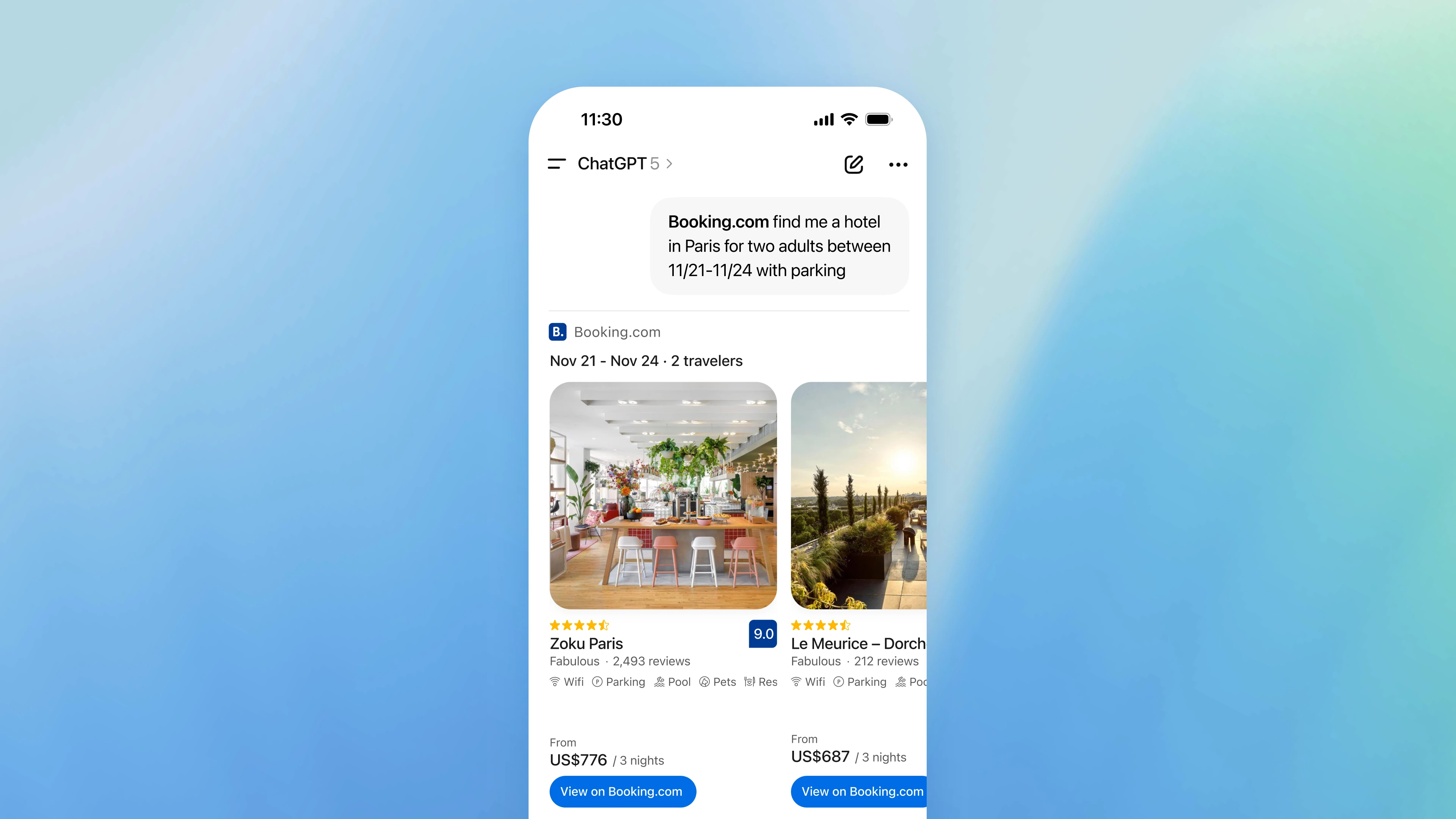
  • Native In-Chat Integration: Apps run directly within ChatGPT conversations, eliminating context-switching and creating seamless user experiences without external redirects.
  • Preview SDK Access: Developers gain early access to build and test applications before the full public launch, allowing for rapid iteration and feedback loops.
  • Simplified App Discovery: Users discover apps organically through ChatGPT's interface rather than hunting through app stores or extension marketplaces.
  • Direct Monetization Paths: Developers can build sustainable business models with apps embedded in a platform with millions of active users.
  • Conversation Context Awareness: Apps can access conversation history and context, enabling smarter, more personalized interactions within existing chats.
  • Unified Developer Experience: Single SDK handles authentication, data handling, and deployment across the ChatGPT ecosystem.

ChatGPT Apps SDK interface showing integrated app experience

Technical Specifications

The Apps SDK is built on modern web standards and integrates deeply with ChatGPT's infrastructure. Here's what developers need to know technically:

  • API-First Architecture: Built on REST and WebSocket protocols for real-time communication between apps and ChatGPT's core systems.
  • Authentication Framework: OAuth 2.0 integration with ChatGPT's identity system, supporting both user and app-level permissions.
  • Deployment Infrastructure: Apps deploy to OpenAI's managed servers with automatic scaling, eliminating infrastructure management overhead.
  • SDK Language Support: Initial preview supports JavaScript/TypeScript with Python support coming in subsequent releases.
  • Rate Limiting and Quotas: Tiered rate limits based on app usage patterns, with transparent quota management dashboards.

Developer dashboard for ChatGPT Apps SDK

Official Benefits

OpenAI highlights several concrete advantages for developers and users adopting the Apps SDK:

  • Reduced Friction: Users access specialized tools without leaving ChatGPT, increasing adoption rates and engagement compared to external app links.
  • Faster Development Cycles: Pre-built authentication, hosting, and deployment infrastructure cuts development time from weeks to days.
  • Built-in User Base: Launch directly to millions of ChatGPT users rather than starting from zero with marketing and distribution challenges.
  • Improved Monetization: Integrated billing and subscription management through ChatGPT's payment infrastructure simplifies revenue collection.
  • Enhanced Capabilities: Apps can leverage ChatGPT's language models, memory systems, and conversation context for smarter functionality.

Real-World Translation

What Each Feature Actually Means:

  • Native In-Chat Integration: Instead of telling users "click this link to use our tool," your app appears as a button or option within the conversation. A user researching market trends can access a financial analysis app without opening a new tab, getting instant results in context.
  • Conversation Context Awareness: Your app automatically understands what the user was discussing. If someone asks ChatGPT about video editing and then launches your video editor app, it already knows the project context and can make relevant suggestions.
  • Direct Monetization: You can charge users directly through ChatGPT's billing system. A productivity app developer can offer premium features that unlock automatically for paying users without managing separate payment processing.
  • Unified Developer Experience: You write code once and it works everywhere ChatGPT runs. No separate iOS, Android, or web versions to maintain—the SDK handles platform differences automatically.
  • Simplified Discovery: Users find your app through ChatGPT's app marketplace or recommendations, not through Google searches or app store optimization. This levels the playing field for new developers competing against established names.

Before vs After

Before

Developers had to choose between building browser extensions (limited reach, fragmented user experience), standalone web apps (requires external links and user friction), or negotiating with app stores (high barriers to entry, revenue splits). Users constantly switched between ChatGPT and external tools, losing conversation context and creating workflow interruptions.

After

Developers build once with the Apps SDK and deploy directly to millions of ChatGPT users with built-in monetization, authentication, and hosting. Users access specialized functionality without leaving their conversation, maintaining context and workflow continuity.

📈 Expected Impact: Development time reduced by 60-70%, user adoption rates increase by 3-5x compared to external apps, and developers gain direct access to a verified user base of millions.

Job Relevance Analysis

Game Developer

HIGH Impact
  • Use Case: Game developers can build interactive games, puzzle experiences, and narrative adventures that run directly in ChatGPT conversations, creating new distribution channels beyond traditional app stores.
  • Key Benefit: Access to millions of ChatGPT users without competing in crowded app marketplaces, plus built-in monetization through ChatGPT's billing system.
  • Workflow Integration: Developers use the Apps SDK to create turn-based games, text adventures, and AI-powered game mechanics that leverage ChatGPT's language models for dynamic storytelling.
  • Skill Development: Game developers learn to build conversational interfaces, manage real-time state in chat contexts, and optimize for text-based gameplay rather than graphics-heavy experiences.
  • Revenue Opportunity: Direct access to premium subscription revenue through ChatGPT's payment infrastructure, eliminating app store commission cuts.
Game Developer

Use AI to simplify your game development from 3D rendering to character building, story development, debugging, and even AR!

4,918 Tools
Game Developer

Software Developer

HIGH Impact
  • Use Case: Software developers build productivity tools, code assistants, data analysis apps, and workflow automation tools that integrate seamlessly into ChatGPT conversations for daily use.
  • Key Benefit: Dramatically reduced time-to-market with pre-built infrastructure for authentication, hosting, and deployment, allowing developers to focus on core functionality.
  • Workflow Integration: Developers use the SDK to create apps that enhance ChatGPT's capabilities—code generators, API testing tools, database query builders, and documentation assistants that work within conversations.
  • Skill Development: Developers master ChatGPT's API ecosystem, learn to build context-aware applications, and develop expertise in conversational UI patterns.
  • Monetization Path: Build sustainable businesses by offering premium features, specialized tools, or enterprise versions directly to ChatGPT's user base.
Software Developer

Browse vetted AI tools and real‑world use cases for Software Developer. Compare pricing, features & tips; to automate busywork. Find the right AI tools.

5,965 Tools
Software Developer

Video Editor

MEDIUM Impact
  • Use Case: Video editors can build AI-powered editing assistants, script generators, and video analysis tools that help users plan, script, and optimize video projects within ChatGPT conversations.
  • Key Benefit: Reach creators and video professionals who are already using ChatGPT for content planning, without requiring them to download separate software.
  • Workflow Integration: Video editors create apps that generate video scripts, suggest editing techniques, analyze video performance data, or help with thumbnail optimization—all conversational and context-aware.
  • Skill Development: Video editors learn to build AI-assisted workflows, understand conversational interfaces, and develop complementary tools that enhance rather than replace their core editing software.
  • Audience Access: Target the growing community of content creators using ChatGPT for planning and ideation, capturing users at the beginning of their creative process.
Video Editor

Explore handpicked AI solutions & examples for Video Editor. Check key features at a glance; to save time and cut costs. Find the right AI tools now.

3,775 Tools
Video Editor

Getting Started

How to Access

  1. Visit the OpenAI developer portal and sign in with your developer account (create one if needed).
  2. Navigate to the Apps SDK section and request preview access—early adopters get priority onboarding.
  3. Download the SDK documentation and starter templates for your preferred language (JavaScript/TypeScript initially).
  4. Set up your development environment with Node.js and the required dependencies listed in the SDK guide.

Quick Start Guide

For Beginners:

  1. Start with the "Hello World" template included in the SDK—it demonstrates basic app structure and ChatGPT integration in under 50 lines of code.
  2. Deploy your first app to the preview environment using the built-in CLI tool with a single command.
  3. Test your app directly in ChatGPT by selecting it from the apps menu and running through basic interactions.
  4. Review the interaction logs in your developer dashboard to understand how users engage with your app.

For Power Users:

  1. Implement advanced authentication by integrating OAuth 2.0 with your existing user database and permission systems.
  2. Build context-aware features by accessing conversation history through the SDK's context API and storing app-specific data in the persistent state layer.
  3. Set up custom monetization by configuring subscription tiers, usage-based pricing, or premium feature gates through ChatGPT's billing integration.
  4. Optimize performance by implementing caching strategies, lazy-loading components, and monitoring API response times through the analytics dashboard.
  5. Deploy to production using the SDK's staging environment for final testing before full public release.

Pro Tips

  • Start with Conversation Context: Design your app to understand what the user was discussing before launching it—this creates a 3-5x better user experience than apps that ignore context.
  • Optimize for Chat: Remember users are in a conversation interface, not a full application. Keep interactions brief, use clear buttons and options, and avoid overwhelming users with too many features at once.
  • Monitor Analytics Early: Enable detailed analytics from day one to understand how users interact with your app. This data is invaluable for prioritizing features and fixing friction points.
  • Leverage ChatGPT's Models: Use the conversation context to call ChatGPT's language models for enhanced functionality—don't just build a static tool, make it intelligent and adaptive.

ChatGPT by OpenAI logo
ChatGPT by OpenAI
4.5
Read Full Review

FAQ

Related Topics

ChatGPT Apps SDKAI app builderChatGPT developmentAI chatbot development

Table of contents

What's New in ChatGPT Apps SDKTechnical SpecificationsOfficial BenefitsReal-World TranslationJob Relevance AnalysisGetting StartedFAQ
ChatGPT by OpenAI

ChatGPT by OpenAI

4.5
Impact LevelHIGH
Update ReleasedOctober 6, 2025

Best for

Software DeveloperGame DeveloperVideo Editor

Related Use Cases

AI Chatbot ToolsAI Developer ToolsAI Social Media Chatbots

Related Articles

Google's Offline AI Dictation App Review
MaxToki Review: AI Predicts Cellular Aging
Apple Music AI Playlist Curation Review
All AI Spotlights

Editor's Pick Articles

Google's Offline AI Dictation App Review
Microsoft Copilot 'For Entertainment Only,' Terms Reveal
Apple Music AI Playlist Curation Review
All Articles
Special offer for AI Owners – 50% OFF Promotional Plans

Join Our Community

Get the earliest access to hand-picked content weekly for free.

Spam-free guaranteed! Only insights.

Follow Us on Socials

Don't Miss AI Topics

ai art generatorai voice generatorai text generatorai avatar generatorai designai writing assistantai audio generatorai content generatorai dubbingai graphic designai banner generatorai in dropshipping

AI Spotlights

Unleashing Today's trailblazer, this week's game-changers, and this month's legends in AI. Dive in and discover tools that matter.

All AI Spotlights
Google's Offline AI Dictation App Review

Google's Offline AI Dictation App Review

MaxToki Review: AI Predicts Cellular Aging

MaxToki Review: AI Predicts Cellular Aging

Apple Music AI Playlist Curation Review

Apple Music AI Playlist Curation Review

Microsoft's New Voice & Image AI Models

Microsoft's New Voice & Image AI Models

Trinity Large Thinking: Open-Source Reasoning Model

Trinity Large Thinking: Open-Source Reasoning Model

Gemini API Inference Tiers: Cost vs Reliability

Gemini API Inference Tiers: Cost vs Reliability

Slack AI Makeover: 30 New Features Transform Productivity

Slack AI Makeover: 30 New Features Transform Productivity

ChatGPT on Apple CarPlay: Voice AI Now in Your Car

ChatGPT on Apple CarPlay: Voice AI Now in Your Car

GLM-5V-Turbo Review: Vision Coding Model

GLM-5V-Turbo Review: Vision Coding Model

Harrier-OSS-v1: Microsoft's SOTA Multilingual Embedding Models

Harrier-OSS-v1: Microsoft's SOTA Multilingual Embedding Models

Copilot Researcher: Microsoft's AI Accuracy Upgrade

Copilot Researcher: Microsoft's AI Accuracy Upgrade

Google TurboQuant Review: Real-Time AI Quantization

Google TurboQuant Review: Real-Time AI Quantization

A-Evolve: Automated AI Agent Development Framework

A-Evolve: Automated AI Agent Development Framework

Gemini Switching Tools: Import Chats from Other AI Chatbots

Gemini Switching Tools: Import Chats from Other AI Chatbots

Cohere Transcribe: Open Source Speech Recognition for Edge

Cohere Transcribe: Open Source Speech Recognition for Edge

Google Search Live Review: AI Voice Search Goes Global

Google Search Live Review: AI Voice Search Goes Global

Mistral Voxtral TTS Review: Open-Weight Voice Generation

Mistral Voxtral TTS Review: Open-Weight Voice Generation

Suno v5.5 Review: AI Music with Voice Cloning

Suno v5.5 Review: AI Music with Voice Cloning

Attie Review: AI-Powered Custom Feed Builder

Attie Review: AI-Powered Custom Feed Builder

Google TurboQuant: AI Memory Compression Review

Google TurboQuant: AI Memory Compression Review

You Might Like These Latest News

All AI News

Stay informed with the latest AI news, breakthroughs, trends, and updates shaping the future of artificial intelligence.

OpenAI Proposes AI Economy Plan With Robot Taxes

Apr 7, 2026
OpenAI Proposes AI Economy Plan With Robot Taxes

Microsoft Copilot 'For Entertainment Only,' Terms Reveal

Apr 6, 2026
Microsoft Copilot 'For Entertainment Only,' Terms Reveal

Anthropic Charges Extra for OpenClaw on Claude

Apr 4, 2026
Anthropic Charges Extra for OpenClaw on Claude

Anthropic Acquires Biotech AI Startup for $400M

Apr 4, 2026
Anthropic Acquires Biotech AI Startup for $400M

AI Giants Bet on Natural Gas Plants

Apr 4, 2026
AI Giants Bet on Natural Gas Plants

Meta Pauses Mercor Work After AI Data Breach

Apr 4, 2026
Meta Pauses Mercor Work After AI Data Breach

Anthropic Launches Political PAC to Shape AI Policy

Apr 4, 2026
Anthropic Launches Political PAC to Shape AI Policy

OpenClaw AI Security Flaw Exposes Admin Access Risk

Apr 4, 2026
OpenClaw AI Security Flaw Exposes Admin Access Risk

OpenAI Executive Takes Medical Leave Amid Leadership Restructuring

Apr 4, 2026
OpenAI Executive Takes Medical Leave Amid Leadership Restructuring
Tools of The Day

Tools of The Day

Discover the top AI tools handpicked daily by our editors to help you stay ahead with the latest and most innovative solutions.


10MAR
Adobe Illustrator
Adobe Illustrator
9MAR
Adobe Firefly
Adobe Firefly
8MAR
Adobe Sensei
Adobe Sensei
7MAR
Adobe Photoshop
Adobe Photoshop
6MAR
Adobe Firefly
Adobe Firefly
5MAR
Shap-E
Shap-E
4MAR
Point-E
Point-E

Explore AI Tools of The Day