
Join Our Community










Get the earliest access to hand-picked content weekly for free.
Spam-free guaranteed! Only insights.
Join Our Community
Get the earliest access to hand-picked content weekly for free.
Spam-free guaranteed! Only insights.
🎯 Quick Impact Summary
In a significant shift to its productivity software strategy, Microsoft has announced that it's making its Office web applications completely free for personal use. This move eliminates the previous requirement for a Microsoft account to access these tools and introduces AI capabilities, including Copilot Chat, to all users. The change marks Microsoft's most aggressive push yet to compete with Google's suite of free productivity tools.
Microsoft's decision to make Office web apps freely accessible represents a major departure from its traditional subscription-based model. Starting soon, anyone can use Word, Excel, PowerPoint, and Outlook online without needing to sign in with a Microsoft account. This removes a significant barrier that previously gave Google's free productivity tools an edge in the market.
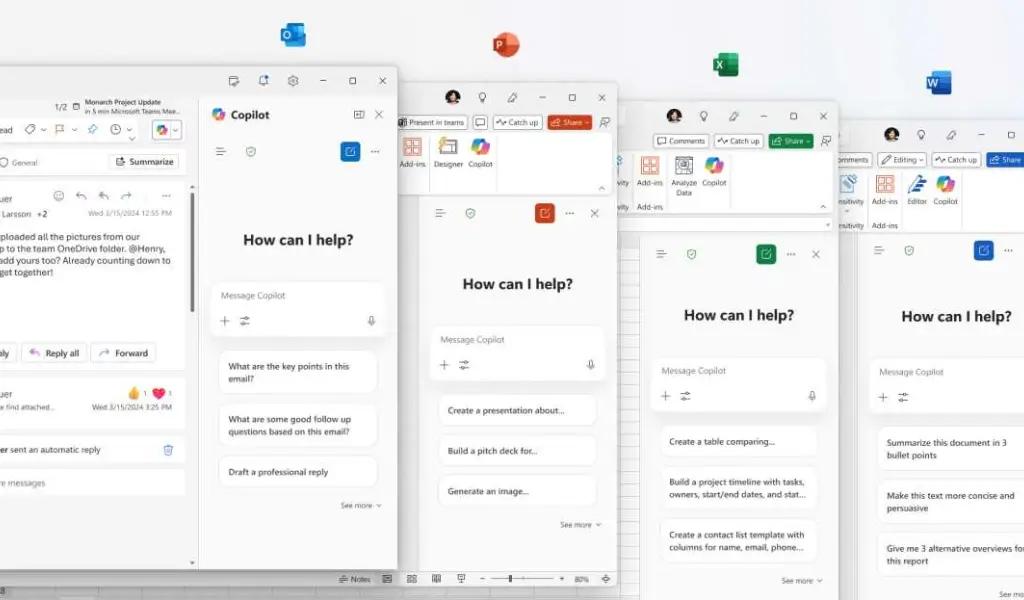
The company is also bringing its AI assistant, Copilot, to these free web applications. Free users will receive 50 Copilot prompts per month, allowing them to leverage AI capabilities for content creation, data analysis, and other productivity tasks. This allocation provides enough AI assistance for casual users while still offering incentives for power users to upgrade to paid tiers.
Tom Warren, senior editor at The Verge, notes that this move "opens up Microsoft's productivity apps to many more people who might have been using Google's alternatives because they're free and don't require an account."
The integration of Copilot into free Office applications brings powerful AI capabilities to everyone. In Word, users can now generate text, summarize documents, and receive writing suggestions. Excel users can analyze data patterns and generate formulas with natural language prompts. PowerPoint gains presentation creation and design assistance, while Outlook users can draft emails and summarize conversations.
Microsoft's Copilot Chat provides contextual assistance across all applications, allowing users to ask questions about their documents and receive immediate help. For instance, users working on a budget in Excel could ask Copilot to explain formulas or suggest ways to optimize their spreadsheet.
These AI features are part of Microsoft's broader strategy to differentiate its productivity tools in an increasingly competitive market. By offering 50 free Copilot prompts monthly, Microsoft provides enough AI assistance to demonstrate value while encouraging users who need more extensive AI capabilities to upgrade to Microsoft 365 Personal or Family subscriptions.
Alongside making Office free, Microsoft is rebranding Office.com to Microsoft.com. This change reflects the company's evolution beyond traditional office applications to a broader ecosystem of productivity and AI tools. The Microsoft.com hub will serve as a central access point for all the company's free web applications.
This strategic shift directly challenges Google's dominance in free productivity software. For years, Google has attracted users with its no-cost Docs, Sheets, and Slides applications, building a substantial user base, particularly among students and small businesses. Microsoft's move to eliminate account requirements and add AI features aims to recapture market share in these segments.
Industry analysts see this as part of Microsoft's larger AI-first strategy. By introducing millions of new users to its AI tools through free Office applications, the company can showcase Copilot's capabilities and potentially convert free users to paid Microsoft 365 subscribers who receive unlimited Copilot access.
The timing of this announcement also coincides with increased competition in the AI productivity space, as Google continues to enhance its Workspace applications with Gemini AI features and other competitors like Notion and Coda gain traction with their AI-powered productivity tools.
FAQ
AI Spotlights
Unleashing Today's trailblazer, this week's game-changers, and this month's legends in AI. Dive in and discover tools that matter.

Claude Fable 5 Review: Mythos Power with Safety

Gemma 4 12B Review: Multimodal AI on Your Laptop

Google Dreambeans Review: AI Cartoon Stories

NVIDIA Nemotron 3 Ultra: 550B MoE LLM Review

Meta AI Agent for Enterprises: Global Launch

Gemini Omni and 3.5: Google's Latest AI Models

Step 3.7 Flash Review: 198B MoE Vision-Language Model

Gemini Spark Review: Google's AI Agent Goes Personal

Microsoft Agent Governance Toolkit Review

Gemini Spark AI Agent Review: Always-On Automation

MAI-Thinking-1 Review: Microsoft's Advanced Reasoning AI

Microsoft Scout Review: OpenClaw-Powered AI Assistant

Microsoft MDASH Review: 100+ AI Agents for Threat Hunting

Google Phone App Fake Call Detection Review

Stable Audio 3 Review: Fast AI Audio Generation

Claude Opus 4.8: Dynamic Workflows & Faster AI

Microsoft 365 Copilot Redesign: 2x Speed Boost

Perplexity Bumblebee: AI Supply Chain Security Scanner

AWS OpenSearch Serverless Review: Enterprise Search Reimagined

OSCAR: 2-Bit KV Cache Quantization for LLMs
You Might Like These Latest News
All AI NewsStay informed with the latest AI news, breakthroughs, trends, and updates shaping the future of artificial intelligence.
Microsoft Patches Zero-Day After Researcher Disclosure
Jun 10, 2026
NVIDIA GPUs Power Apple's Private Cloud Compute Expansion
Jun 10, 2026
GM Launches Vehicle-to-Grid Tech to Power AI Data Centers
Jun 10, 2026
Alphabet's $85B AI Investment Signals Major Shift
Jun 5, 2026
AI Cognitive Fatigue: Work Smarter, Not Harder
Jun 5, 2026
Nvidia Unveils Physical AI Research with Cosmos 3
Jun 5, 2026
Airbnb CEO Launches AI Lab to Build Custom LLMs
Jun 5, 2026
Anthropic's IPO Filing Balances Growth With Responsible AI
Jun 3, 2026
Meta's AI Chatbot Exploited to Hijack Instagram Accounts
Jun 3, 2026

Discover the top AI tools handpicked daily by our editors to help you stay ahead with the latest and most innovative solutions.



















