Join Our Community










Get the earliest access to hand-picked content weekly for free.
Spam-free guaranteed! Only insights.
Join Our Community
Get the earliest access to hand-picked content weekly for free.
Spam-free guaranteed! Only insights.
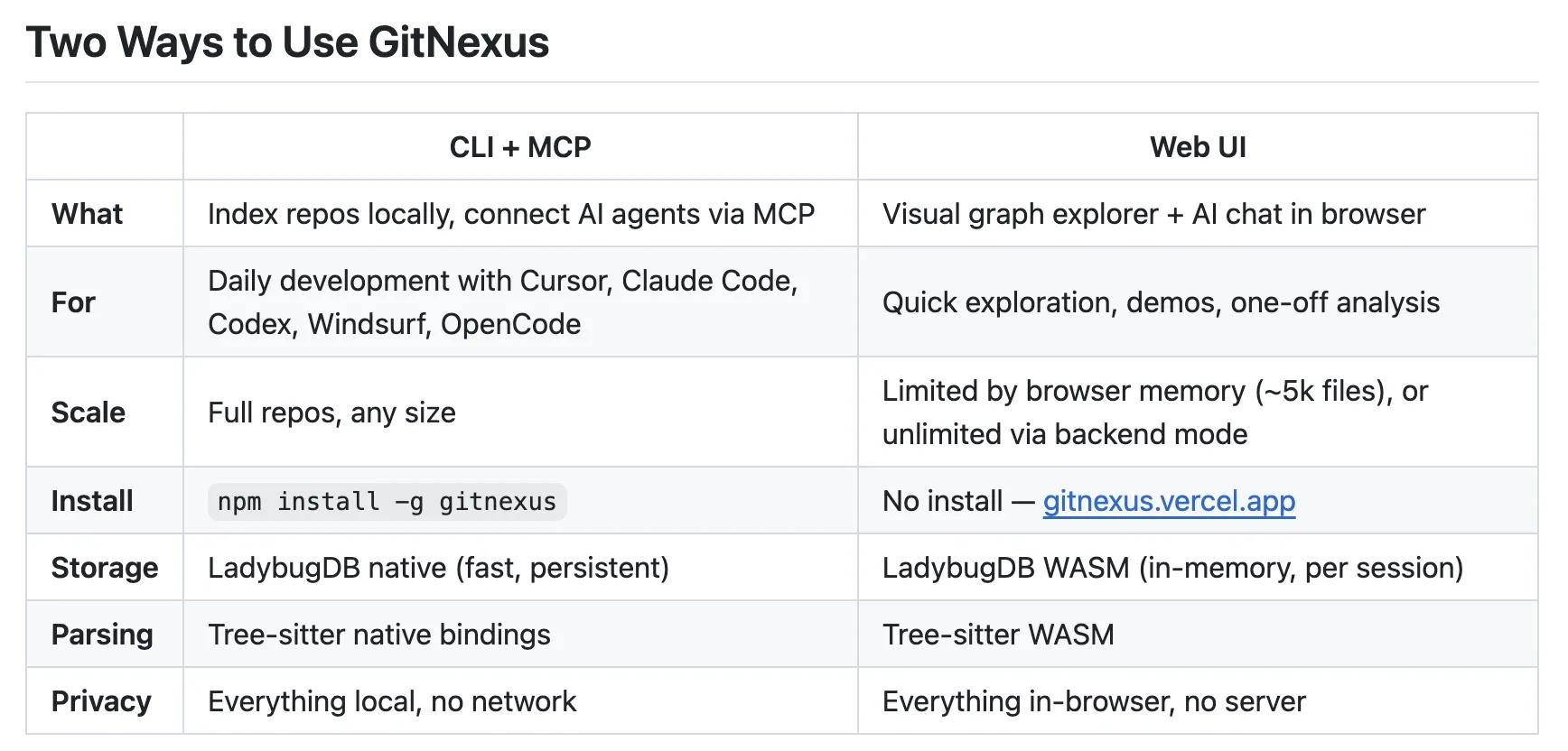
🎯 Quick Impact Summary
GitNexus is an open-source MCP-native knowledge graph engine that fundamentally changes how AI coding assistants like Claude and Cursor interact with your codebase. By giving these agents true structural awareness of your code, GitNexus solves the persistent problem of AI agents making edits without actually understanding the code they're modifying. With nearly 19,000 GitHub stars, it's become the go-to solution for developers who want their AI tools to code smarter, not just faster.
GitNexus introduces a revolutionary approach to AI-assisted development by building a knowledge graph that maps your entire codebase's structure. This isn't just another code indexing tool—it's a semantic understanding layer that transforms how AI agents navigate and modify your code.
MCP-Native Architecture: Built from the ground up as a Model Context Protocol native tool, GitNexus integrates seamlessly with Claude, Cursor, and other MCP-compatible AI assistants without requiring custom integrations or workarounds.
Knowledge Graph Engine: Creates a dynamic, queryable graph of your codebase that captures relationships between functions, classes, modules, and dependencies, enabling AI agents to understand code context at a structural level.
Full Codebase Structural Awareness: AI agents gain complete visibility into how your code is organized, what depends on what, and how changes in one area ripple through the system before making edits.
Open-Source Foundation: Available on GitHub with an active community, GitNexus allows teams to self-host, customize, and extend the tool without vendor lock-in or licensing restrictions.
Real-Time Code Understanding: Continuously analyzes your codebase as it changes, maintaining an up-to-date knowledge graph that reflects your current project structure and dependencies.
Multi-Language Support: Works across different programming languages and frameworks, making it valuable for polyglot teams and diverse tech stacks.
GitNexus is engineered for performance and compatibility with modern AI development workflows. Here's what powers the engine under the hood.
Protocol: Model Context Protocol (MCP) native implementation, enabling direct integration with Claude, Cursor, and other MCP-compatible AI platforms without middleware.
Graph Database: Uses a knowledge graph structure to represent code relationships, enabling efficient querying of dependencies, call chains, and structural relationships across large codebases.
Language Coverage: Supports multiple programming languages including Python, JavaScript, TypeScript, Java, Go, Rust, and C++, with extensible parser architecture for additional language support.
Performance Metrics: Handles codebases with thousands of files and millions of lines of code, with graph queries returning results in milliseconds for real-time AI agent decision-making.
Self-Hosted Deployment: Runs on standard infrastructure (Docker, Kubernetes, or bare metal), giving teams complete control over data privacy and system performance.
AI agents make fewer mistakes by understanding code structure before editing, reducing the need for manual code review and correction cycles.
Development teams spend less time debugging AI-generated code changes because the agent understands dependencies and architectural constraints upfront.
Onboarding new developers accelerates as AI assistants can explain codebase structure and relationships automatically, reducing knowledge transfer time.
Code refactoring becomes safer and faster when AI agents understand the full impact of changes across your entire codebase before execution.
Teams maintain complete data privacy by self-hosting GitNexus, eliminating concerns about sending proprietary code to external services.
What Each Feature Actually Means:
Knowledge Graph Engine: Instead of an AI agent treating your code like a flat text document, it now understands that Function A calls Function B, which depends on Module C, which imports Library D. When you ask the agent to refactor Function A, it knows exactly what else might break and can plan accordingly.
MCP-Native Architecture: You don't need to set up complex API bridges or custom plugins. GitNexus works directly with Claude and Cursor through the standard MCP protocol, meaning it's ready to use immediately after installation without configuration headaches.
Structural Awareness: When you ask Claude to add a new feature, it doesn't just generate code in isolation. It understands your existing architecture, naming conventions, dependency patterns, and design decisions, so the generated code fits naturally into your project.
Real-Time Updates: As your team commits code changes, GitNexus automatically updates its understanding of your codebase. This means AI agents always have current information about what exists and how it's organized, preventing suggestions based on outdated code structure.
Multi-Language Support: A team using Python for backend, JavaScript for frontend, and Go for services can use a single GitNexus instance to give AI agents structural awareness across their entire tech stack, rather than maintaining separate tools for each language.
Before
AI coding assistants like Claude and Cursor would analyze code by treating it as raw text, without understanding the broader architecture or how changes ripple through dependencies. Developers would ask an AI to refactor code or add features, only to discover the agent made changes that broke other parts of the system or violated architectural patterns. Code review and manual correction became necessary steps after every AI-assisted change.
After
With GitNexus, AI agents have a complete map of your codebase's structure, dependencies, and relationships. When Claude or Cursor makes changes, it understands the full impact across your system and can avoid breaking changes. Developers get higher-quality code suggestions that respect existing architecture and patterns, requiring far less manual review and correction.
📈 Expected Impact: Development teams report 40-60% reduction in AI-generated code requiring manual fixes, and significantly faster code review cycles because AI changes are architecturally sound from the start.
Use Case: Daily interaction with AI coding assistants becomes dramatically more productive when the AI understands your codebase structure. You use GitNexus to give Claude or Cursor context about your project architecture, then ask for refactoring, bug fixes, or new features with confidence that the AI understands the implications.
Key Benefit: Reduces time spent debugging AI-generated code and manually fixing architectural mistakes. Instead of spending 30 minutes reviewing and correcting AI suggestions, you spend 5 minutes reviewing code that already respects your system design.
Workflow Integration: GitNexus sits between your code editor and AI assistant, automatically providing codebase context. You continue working in your normal IDE with Cursor or Claude, but now those tools have structural awareness built in.
Skill Development: Working with GitNexus-enhanced AI assistants helps you develop better architectural thinking, as you see how the AI reasons about dependencies and design patterns in your code.
Code Quality: Your team maintains higher code quality standards because AI suggestions are pre-filtered through architectural understanding, reducing the number of problematic changes that make it into code review.
Use Case: Game developers working with complex codebases (game engines, physics systems, rendering pipelines) can use GitNexus to help AI assistants understand the intricate relationships between game systems. When you ask Claude to add a new feature to your game engine, it understands how your rendering system connects to physics, audio, and input handling.
Key Benefit: Accelerates prototyping and feature development by having AI assistants that understand your game architecture. Instead of manually explaining how your game loop connects to your entity system, GitNexus provides that context automatically.
Workflow Integration: Integrates with Cursor or Claude in your game development IDE, providing structural awareness of your game engine code, asset management systems, and gameplay logic.
Skill Development: Helps game developers learn better architectural patterns by seeing how GitNexus represents complex system relationships in game code.
Refactoring Safety: Game engine refactoring is risky because changes can cascade through multiple systems. GitNexus helps AI assistants understand these cascading effects, making large refactors safer and faster.
Use Case: Automation engineers building complex workflows, CI/CD pipelines, and infrastructure-as-code projects benefit from AI assistants that understand their automation architecture. GitNexus helps Claude or Cursor understand how your workflow steps connect, what dependencies exist, and how changes propagate through your automation systems.
Key Benefit: Reduces errors in automation code by ensuring AI suggestions understand the full workflow chain. When you ask an AI to modify a CI/CD pipeline step, it understands what upstream and downstream steps depend on it.
Workflow Integration: Works with your existing automation tools and IDEs, providing structural awareness of your infrastructure code, pipeline definitions, and automation scripts.
Skill Development: Helps automation engineers design more robust systems by seeing how GitNexus represents complex dependency chains in automation code.
Debugging Efficiency: When automation fails, AI assistants with GitNexus context can better understand the root cause by tracing through the full system architecture rather than analyzing code in isolation.
GitHub Repository: Visit the official GitNexus GitHub repository to access the open-source code, documentation, and community resources.
Installation: Clone the repository and follow the setup instructions for your environment (Docker, Kubernetes, or local installation).
Configuration: Configure GitNexus to point to your codebase and select which programming languages you want to analyze.
Integration: Connect GitNexus to your Claude or Cursor instance through the MCP protocol by adding the connection details to your AI assistant configuration.
For Beginners:
Clone the GitNexus repository to your local machine using git clone.
Run the Docker container or follow the local installation guide for your operating system.
Point GitNexus to your project directory and let it analyze your codebase structure.
Connect your Claude or Cursor instance to GitNexus by updating your MCP configuration with the local endpoint.
For Power Users:
Deploy GitNexus to your infrastructure using Kubernetes manifests or Docker Compose for production environments.
Configure custom language parsers and analysis rules to match your specific architectural patterns and coding standards.
Set up automated codebase re-indexing on git push events to keep your knowledge graph synchronized with your repository.
Integrate GitNexus with your CI/CD pipeline to provide AI agents with current codebase context during automated code generation or refactoring tasks.
Configure role-based access controls if running GitNexus in a team environment to manage who can query and update the knowledge graph.
Start with a Single Project: Begin by connecting GitNexus to one project to understand how it works before scaling to your entire codebase portfolio.
Regular Re-indexing: Set up automated re-indexing after major commits or merges to keep your knowledge graph current and accurate for AI agents.
Combine with Code Review: Use GitNexus-enhanced AI suggestions as a first-pass review layer, then have human developers do final architectural review for critical changes.
Monitor Query Performance: Track how quickly GitNexus responds to AI agent queries. If performance degrades, consider splitting large codebases into separate GitNexus instances.
FAQ
AI Spotlights
Unleashing Today's trailblazer, this week's game-changers, and this month's legends in AI. Dive in and discover tools that matter.

Claude Fable 5 Review: Mythos Power with Safety

Gemma 4 12B Review: Multimodal AI on Your Laptop

Google Dreambeans Review: AI Cartoon Stories

NVIDIA Nemotron 3 Ultra: 550B MoE LLM Review

Meta AI Agent for Enterprises: Global Launch

Gemini Omni and 3.5: Google's Latest AI Models

Step 3.7 Flash Review: 198B MoE Vision-Language Model

Gemini Spark Review: Google's AI Agent Goes Personal

Microsoft Agent Governance Toolkit Review

Gemini Spark AI Agent Review: Always-On Automation

MAI-Thinking-1 Review: Microsoft's Advanced Reasoning AI

Microsoft Scout Review: OpenClaw-Powered AI Assistant

Microsoft MDASH Review: 100+ AI Agents for Threat Hunting

Google Phone App Fake Call Detection Review

Stable Audio 3 Review: Fast AI Audio Generation

Claude Opus 4.8: Dynamic Workflows & Faster AI

Microsoft 365 Copilot Redesign: 2x Speed Boost

Perplexity Bumblebee: AI Supply Chain Security Scanner

AWS OpenSearch Serverless Review: Enterprise Search Reimagined

OSCAR: 2-Bit KV Cache Quantization for LLMs
You Might Like These Latest News
All AI NewsStay informed with the latest AI news, breakthroughs, trends, and updates shaping the future of artificial intelligence.
Microsoft Patches Zero-Day After Researcher Disclosure
Jun 10, 2026
NVIDIA GPUs Power Apple's Private Cloud Compute Expansion
Jun 10, 2026
GM Launches Vehicle-to-Grid Tech to Power AI Data Centers
Jun 10, 2026
Alphabet's $85B AI Investment Signals Major Shift
Jun 5, 2026
AI Cognitive Fatigue: Work Smarter, Not Harder
Jun 5, 2026
Nvidia Unveils Physical AI Research with Cosmos 3
Jun 5, 2026
Airbnb CEO Launches AI Lab to Build Custom LLMs
Jun 5, 2026
Anthropic's IPO Filing Balances Growth With Responsible AI
Jun 3, 2026
Meta's AI Chatbot Exploited to Hijack Instagram Accounts
Jun 3, 2026

Discover the top AI tools handpicked daily by our editors to help you stay ahead with the latest and most innovative solutions.